.svg)
I ranked and reviewed the top 20 webinar software based on video quality, marketing features, integrations, pricing, support, and more.

Here is my list of top webinar software choices:
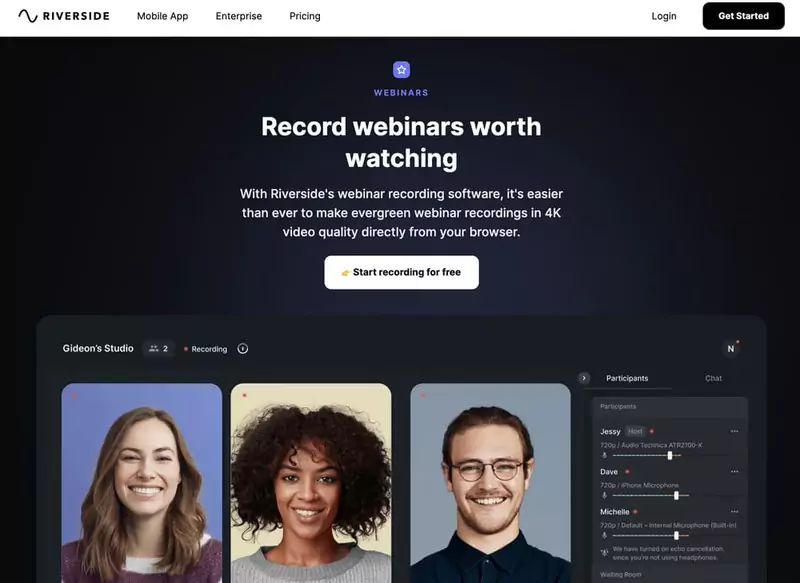
Riverside is a cutting-edge software for large businesses looking to organize top-quality webinars.
Its ability to record webinars with clear, uncompressed audio, recorded locally at 48 kHz WAV, sets it apart sharply.
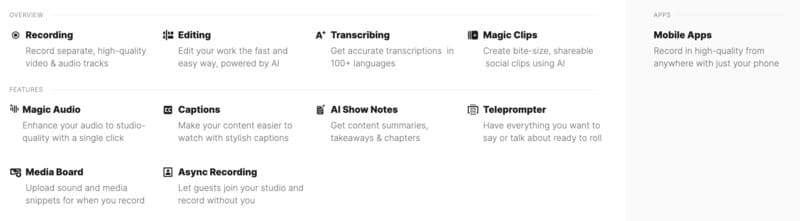
Its Magic Editor allows efficient and structured editing of material, optimizing the presentation of webinars.
Easy to use, Riverside offers the flexibility to record events anywhere and anytime, with convenient transcripts to improve engagement and ease of access to content.
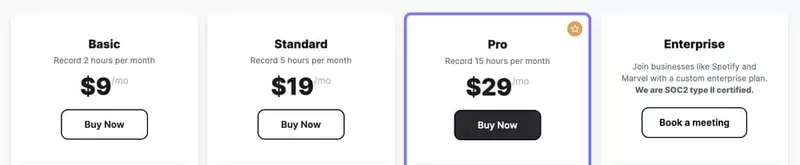
Riverside is the ideal solution for demanding businesses that want to produce high quality webinars. Its superior audio recording, simplified editor, and streaming options make it an ally of choice, despite a higher-than-average price. If quality is your priority, Riverside is for you.
👍 Unique benefits : Superior audio quality with local 48kHz WAV recording. Magic Editor for easy editing. Simultaneous streaming on multiple channels.
👎 Disadvantages : More expensive than some competitors. No free version, trial limited to 1 hour. Some features only available on higher plans.
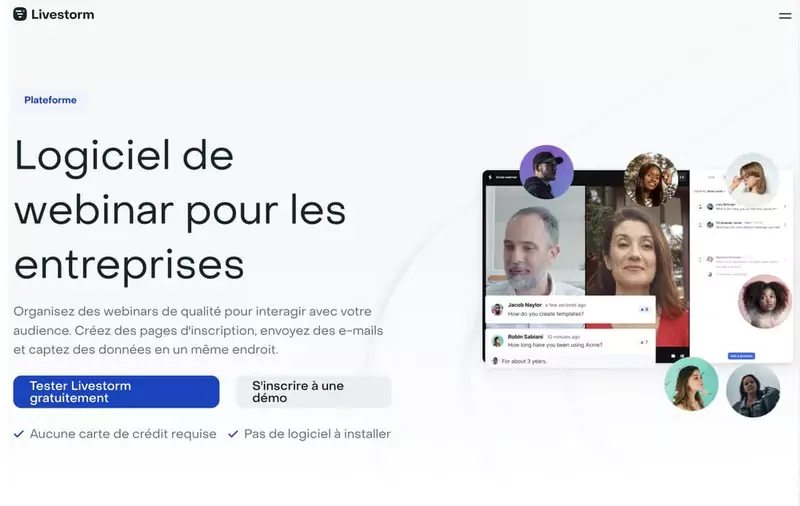
Livestorm stands out as a versatile webinar software, suitable for both product demonstrations and sales sessions.
What makes it unique is its universal compatibility, running on all browsers with no webinar size restrictions and accessible from a variety of devices like PCs, laptops, tablets, and mobile phones.
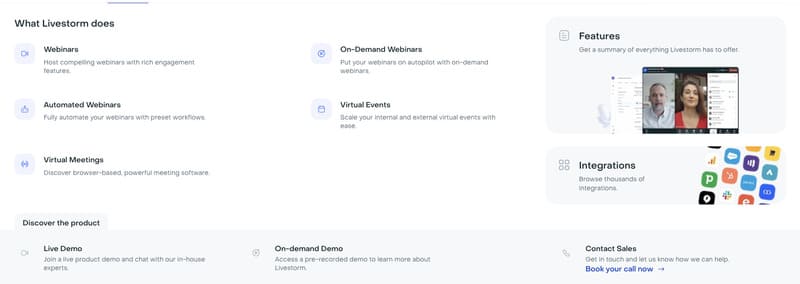
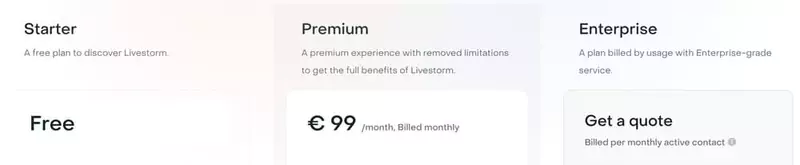
Livestorm is a versatile webinar software that combines ease of use with powerful features. Despite some limitations in the lower plans, it provides a smooth experience for participants across devices. Ideal for most businesses looking for a complete and accessible solution.
👍 Unique benefits : Compatible with all browsers with no size restrictions. Accessible on multiple devices. Automation of webinar sequences.
👎 Disadvantages : Advanced features only for higher plans. No live webinars in the free version. Limited to 4 hours per webinar in the Premium plan.
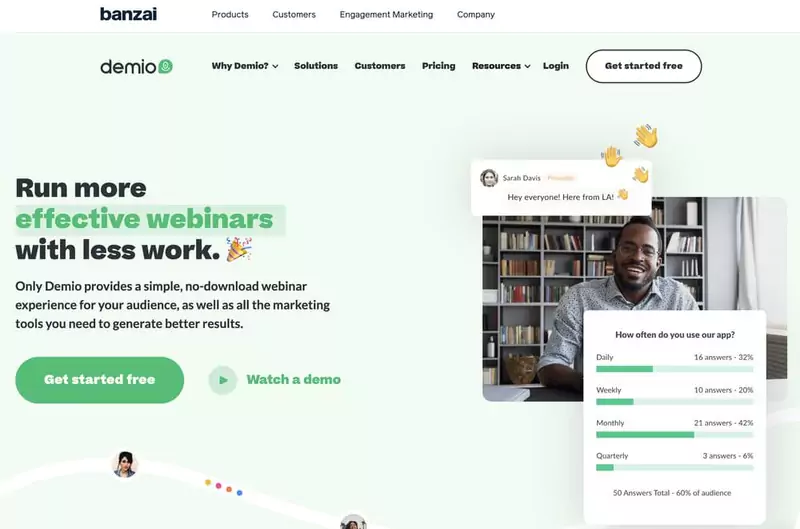
Demio is positioned as a solution of choice for those looking for an elegant and effective webinar platform, combining ease of use without downloading for participants and integrated marketing tools to generate more leads.
One of Demio's strengths is its visual aesthetics, offering a real-time HD video stream on a high quality platform.
Personalization is at the heart of its offering, allowing users to adapt the webinar experience to their brand.
Demio stands out for its comprehensive video conferencing features, including live and automated webinars, replays, and personalized registration landing pages.
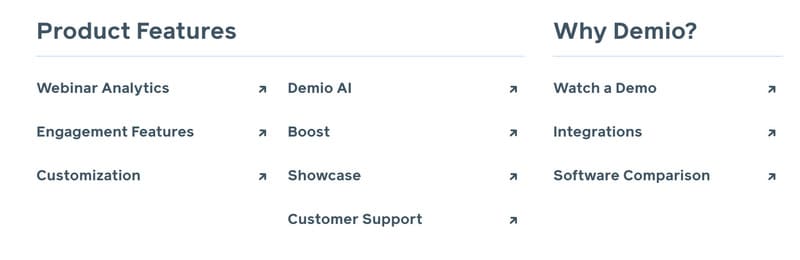

Demio is the ideal platform for creating engaging webinars and generating qualified leads. Its frictionless experience seduces participants, while its integrated marketing tools boost conversions. A profitable investment for businesses that are serious about their webinar strategy.
👍 Unique benefits : A no-download experience for participants. Integrated marketing tools to generate leads. Automated and on-demand webinars.
👎 Disadvantages : Prices may seem high for some budgets. No completely free version unlike some competitors. Learning curve to master all features.

Zoho Meeting is one of my favorite webinar tools!
It's perfect for anyone who wants a single platform that can be used for marketing webinars, internal team webinars, group web conferences, and even one-on-one meetings.
It's so easy to use and trusted by tens of thousands of customers around the world.
Zoho offers world-class products for every aspect of your business. From marketing and customer relationship management tools to customer service and financial tools, Zoho has it all.
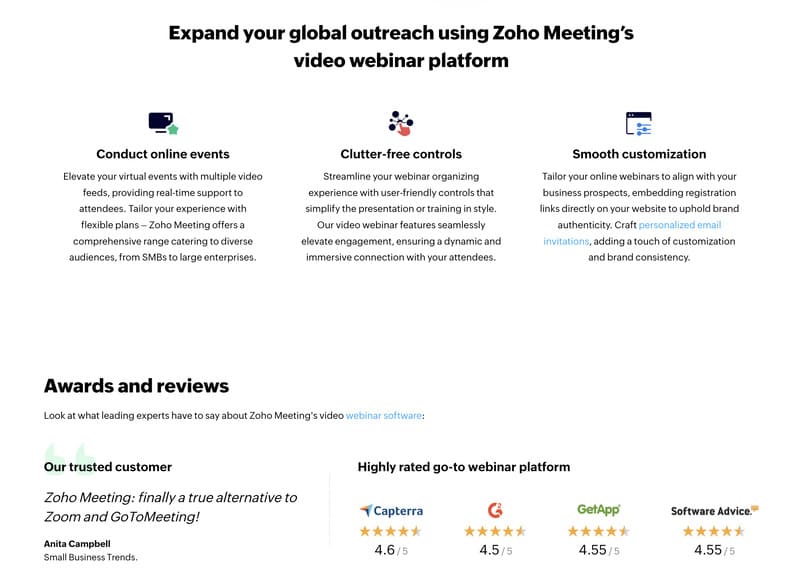

Zoho Meeting is a great choice for businesses looking for a webinar solution that's simple, affordable, and well-integrated. Despite some limitations in the free version, it offers all the essential features with an intuitive interface. The perfect addition to the Zoho ecosystem.
👍 Unique benefits : A single platform for all types of meetings. Integration with the Zoho ecosystem. Affordable rates with free trial.
👎 Disadvantages : Limited features in the free version. Customer support not available 24/7 in all plans. Participant limits may be restrictive.

ClickMeeting stands out as one of the most popular webinar software platforms, thanks to its intuitive and user-friendly interface.
It is particularly suited to facilitate the connection with customers in areas such as training, sales, and product marketing.
This platform is proving to be a wise choice for small and medium-sized businesses, offering clear instructions for an easy set up of the event without technical worries.
ClickMeeting also provides valuable analytical insights into past webinars and the audience for future webinars.

ClickMeeting is a comprehensive and accessible webinar solution that is perfect for small and medium businesses. Its user-friendly interface, delivery options, and affordable rates make it a good choice for starting webinars without breaking the bank.
👍 Unique benefits : Intuitive interface for easy handling. Live broadcast on Facebook and YouTube to expand the audience. Reasonable rates with various plans.
👎 Disadvantages : Limited number of participants in lower plans. No free version to test the platform. Advanced features for higher plans only.
LEARN MORE >> Try for free ClickMeeting

The next webinar software on my list is GoTo (Webinar).
With GoTo, you don't have to worry about the clutter and confusion that comes with organizing your webinar and you can focus on reaching more people and growing your business.
All you need to do is choose when you want to organize your webinar and the system takes care of everything else.
It also exposes you to a variety of features to improve your webinar experience, from flexible scheduling to the entire event management process.
You also have access to several integrated webinar templates that provide an ideal professional environment.

GoTo Webinar is a premium solution for demanding businesses. Its advanced features, powerful analytics, and 24/7 support justify its high price. Ideal for organizations looking for a high-end platform without compromising on quality.
👍 Unique benefits : Pre-recorded and automated webinars. Robust performance analytics. 24/7 customer support.
👎 Disadvantages : High rates compared to some competitors. No free version to test the platform. Interface considered less intuitive by some users.
LEARN MORE >> Try GoTo right now

WebinarJam is ranked fourth in my selection of the best webinar software. Its ease of use makes it an ideal option for those who have little or no technical knowledge when it comes to setting up webinars.
WebinarJam is distinguished by its ability to broadcast directly to a YouTube page and to organize password-secure online meetings. One of its major advantages is the possibility of offering pop-up windows during the webinar, allowing participants to buy products or services in real time.
Its advanced two-way communication, through live chat and participant video, enriches the communication experience.

WebinarJam is a major ally in boosting sales through webinars. Its pop-up shopping windows turn participants into customers. Despite the substantial price, the “satisfied or refunded” guarantee and the $1 trial allow you to test this conversion-driven tool with confidence.
👍 Unique benefits : Pop-up purchase windows during webinars. 30-day money back guarantee. 14-day trial for $1.
👎 Disadvantages : Prices may seem high for some budgets. No completely free version unlike some competitors. Some limitations in lower plans
LEARN MORE >> Try JAM Webinar
Billed as the “most powerful automated webinar platform,” EverWebinar is one of the most popular tools on this list. It's built with direct integration with WebinarJam, although the parent company sells them separately or in a bundle.
Its features include fully automated email connections based on customer activity, the ability to keep users informed, and a complete setup in under three minutes for WebinarJam users.
Plus, it automatically records webinars so the user can replay them for potential leads.

EverWebinar is the ultimate reference for creating highly converting automated webinars. Integrating it with WebinarJam offers the best of both worlds. A significant investment but profitable in the long term for companies that organize regular webinars.
👍 Unique benefits : Full automation of webinars. “Just in time” webinars upon registration. Free hosting on reliable cloud servers.
👎 Disadvantages : No free version unlike some competitors. Single rate that may seem high for some budgets. Learning curve to exploit the full potential.
LEARN MORE >> Try EverWebinar now
EasyWebinar is the only online software platform that has successfully and seamlessly integrated webinar technology into marketing strategy.
It offers an all-in-one solution for live and automated webinars.
The webinar software offers tons of other features, including a multi-presenter option, integration with popular email marketing software, shopping carts, and lead generation tools.

EasyWebinar is the ideal platform for combining webinars and marketing actions. Its integrations, its flexibility and its generous capacity make it a premium choice for companies concerned about performance. A substantial investment but quickly paid for itself.
👍 Unique benefits : An all-in-one solution for live and automated webinars. Powerful marketing integrations. High capacity in all plans.
👎 Disadvantages : Prices may seem high for some budgets. No free version to test the platform. Learning curve to master all features.
LEARN MORE >> Try EasyWebinar now

zoom is the most popular webinar software on the market today. It makes it possible to connect friends and colleagues around the world, despite the different time zones.
Some of the reasons to use Zoom include the fact that it's intuitive, completely cloud-based, and has a user-friendly interface that makes it easy for its users.
It carries out a wide range of activities that make it an asset for any business. Zoom offers HD video and audio, screen sharing, desktop, and application options.
Plus, it allows you to host scheduled and unscheduled meetings, and keeps a backup of each session in the cloud for immediate and future access.
Their web conferencing software also allows for private and public discussions so that the audience does not necessarily have to interrupt the speaker while speaking.
It also integrates with Google Calendar and Microsoft Outlook, allowing its users to schedule meetings and send emails, seamlessly.
Zoom is a one-stop shop for everything related to organizing a webinar.
It is one of the best webinar platforms that offer a freemium formula.
Zoom is the ultimate consumer webinar solution. Its ease of use and its free version make it an accessible and effective choice for most needs. Despite some limitations in terms of advanced features, Zoom remains a safe bet for starting webinars without the hassle.
👍 Unique benefits : Ease of use and intuitive interface. Generous free version. Pricing plans for different budgets and needs.
👎 Disadvantages : Limited functionality compared to specialized webinar solutions. Limit of participants and duration in the free version. Some security and privacy issues in the past.
LEARN MORE >> Try Zoom now

Cisco product, Webex lives up to the expectations of such a reputable parent company.
It offers impressive features, such as a lobby room with HD audio and video services that can be accessed across multiple devices.
It allows its users a high degree of customization, so that the host environment can be adapted to the needs of the business.
Thanks to webinars Webex, you can organize meetings across your organization, offer online and offline training sessions, and provide remote support. The main benefits of Webex are mobility, usability, and compatibility with all devices and browsers.
It is a platform based on cloud computing, which guarantees not only higher speed, but also data security.

Webex is the high-end webinar solution from Cisco. Its advanced functionalities, its impeccable quality and its security make it the choice of the most demanding companies. A significant but justified investment for organizations with specific needs and an adequate budget.
👍 Unique benefits : Advanced and customizable features. Excellent audio/video quality Secure and reliable platform. Large reception capacity.
👎 Disadvantages : Rates generally higher than the competition. Interface considered less intuitive by some users. Fewer basic features than other solutions.
FIND OUT MORE >> Start a Webex trial
DaCast is another great webinar software platform on this list that helps you set up your online video conferencing environment in minutes. It offers impressive streaming features to help you manage, monetize, and analyze your online videos.
Besides hosting the videos securely, you get 24/7 customer support, which is very helpful if you get stuck along the way.
Some of the most popular features include integrating live video with APIs and streaming video to social media platforms like Facebook.
With these features, you can shoot live webinars and then offer your webinars on demand at a later date.
In other words, it is a fast and easy to use platform that can be used even by novice marketers.
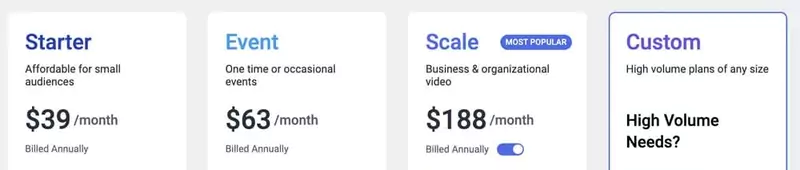
DaCast is the right solution for businesses looking for advanced broadcast features. Its streaming focus, omnipotent customer support, and flexible pricing make it a one-of-a-kind choice. Ideal for creating immersive experiences, at the cost of a relative lack of notoriety.
👍 Unique benefits : Advanced live streaming and VOD features. 24/7 customer support. Flexible rates with no limit of participants.
👎 Disadvantages : Broadcast-oriented, fewer core features. No free version unlike some competitors. Less well known than giants like Zoom.
FIND OUT MORE >> Start a DaCast trial
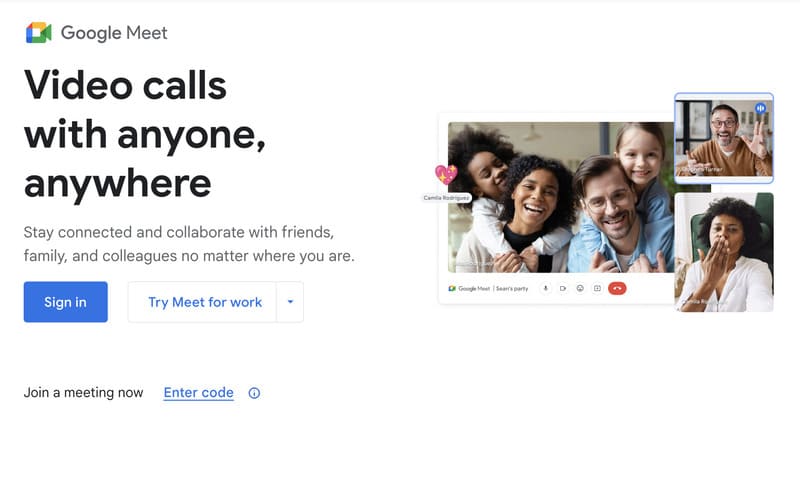
Google Meet, integrated with Google Workspace, offers a simple and effective solution for webinars and video conferences. It integrates seamlessly with other Google tools, facilitating collaboration and communication.
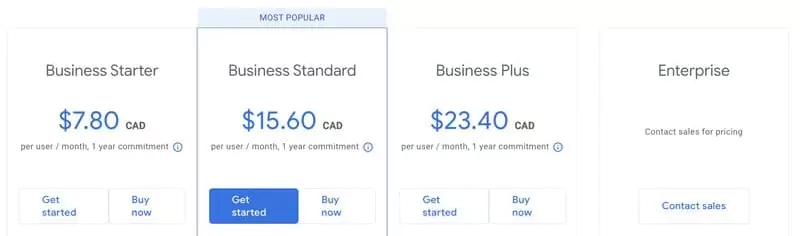
Google Meet is the ideal webinar solution for businesses that already use Google Workspace. Its simplicity, smooth integration and free version make it a relevant choice for daily collaboration. Despite some shortcomings in terms of advanced features, Google Meet is still a solid and affordable option.
👍 Unique benefits : Ease of use and intuitive interface. Seamless integration with Google Workspace. Generous free version.
👎 Disadvantages : Limited advanced features compared to specialized solutions. Limit of participants in the free version. No native recording.
FIND OUT MORE >> Start a Google Meet trial
A webinar is a form of online conference Which is essentially a mixture of the words web and seminary. Webinar software manages this online video conference meeting. It is best defined as a conference, live presentation, meeting, or event that takes place entirely online and is attended by an exclusive audience.
The software used to run and conduct a webinar is webinar software. These webinar tools help you make your webinars more interactive, engaging, and flexible.
The best webinar software makes it easy to register, share, and follow up on your leads without any hassles or downtime.
In my opinion, the best webinar tools are Riverside, Livestorm, and Zoho Meeting.
Overall, a webinar tool for small businesses should help you stream high-quality live video and sync with your email lists. It should also allow you to automate your sales process and engage with your potential customers with live training and product demonstrations.
Additionally, most online video conferencing tools come with features such as built-in surveys and polls, email marketing software, live chat functions, automated webinar sequences, streaming capabilities, and more.
These automated webinar sequences are great for hosting ongoing content like online courses, podcasted interviews, or employee onboarding videos.
When choosing webinar software, it is essential to consider several features to ensure an optimal experience for speakers and participants.
Here are the top features to look for in the best webinar software:
Video and audio quality is critical to ensuring a pleasant and professional webinar experience. Successful webinar software should offer HD video and audio quality to allow clear and smooth communication between speakers and participants.
The capacity of the software is also an important factor to consider. Depending on your needs, you will need to ensure that the software can accommodate a sufficient number of participants, ranging from a few dozen to several thousand.
Screen sharing is an essential feature for conducting live demonstrations and facilitating exchanges.
Host control allows the webinar organizer to manage software features, such as turning audio and video on and off for attendees, and managing questions and answers.
Surveys and votes can be used to gather participants' opinions, which can be useful in making decisions or in assessing participant satisfaction.
Managing question and answer sessions is a key feature to promote interaction between speakers and participants. It allows participants to ask questions and speakers to respond, which can be very beneficial in delving deeper into the topics discussed and in clarifying areas of confusion.
File sharing allows participants to give free access to documents such as PDFs, PowerPoint supports or even mind maps, before or during a videoconference. In some cases, participants can also offer downloadable files.
Surveys and feedback can be used to assess participant satisfaction and to gather constructive feedback on the webinar. This can help you improve future webinars and provide a better experience for attendees.
Managing meetings and registrations is an important feature for organizing and scheduling your webinars. It allows you to manage participant registrations, schedule video conference meetings, and track emails sent.
Presentation streaming and event scheduling are useful features for broadcasting your webinars live or delayed, and for planning events in advance.
Video conferences are essential for the best webinar software because they allow speakers and participants to see and communicate with each other in real time. They can be used for live presentations, group discussions, or one-on-one interviews. By taking these features into account, you can choose the webinar software that best fits your needs and those of your participants.
Choosing the best webinar software depends on several factors, such as the number of expected attendees, required features, and integration with other tools. It is important to assess these factors in order to make the right choice.
Most webinar software is designed to be easy for participants to use, with intuitive interfaces and features like screen sharing and question and answer management. However, it is important to check the technical requirements for participants before choosing software.
Thanks to their impressive and user-friendly features, they are among the best webinar tools available today.
But the question is which webinar software platform is best for your company's inbound marketing strategy and revenue.
To identify it, you need to take several things into account.
To start, see what your budget is and then compare the features accordingly, also see if you should get choosing a web host or if the platform offers it to you.
Next, you need to identify the size of your audience and what features you might need to engage them. Also, think about things like which dashboard features you need during the event.
What is your end goal? Do you want to increase your conversion rates or do you need to conduct a survey/survey? It's critical to choose the tool that offers the specific features you need.
The best part is that most of these tools come with a free trial or a money-back guarantee, so you can test the product before upgrading to a paid plan. When you find what you are looking for, you can then make the final purchase.
If you're looking for my best pick, I recommend starting with Riverside, which offers comprehensive features.
If you have Microsoft tools in your organization, solutions like Microsoft Teams have the benefit of not losing users with different interfaces.