Graphic Design Softwares

Jasper Art: How AI is transforming modern art

Learn how AI is revolutionizing modern art making and explore its implications for artists today. Read the article now.

START YOUR FREE TRIAL
Generate unlimited custom visuals in seconds—no photographer or designer needed
4.8

/5 | 99 reviews ⭐️

hero img blog

🟢 Free Version

🟢 Free Trial

❌ Free Version

💵 Start from  

49

💲

/mo

🗺 HQ :United States

📆 Last Update :

12/2025

📊 Key Takeaways

Jasper Art, integrated into the Jasper AI platform, is an AI-powered image generator that transforms your text descriptions into unique visuals in seconds. Ideal for content creators, marketers, entrepreneurs, and amateur graphic designers, this tool simplifies image creation without technical skills.

jasper.ai reviews

What is Jasper Art and how does it work?

Jasper Art uses an optimized version of DALL-E and proprietary machine learning models to generate royalty-free images from text prompts. For example, type "a cyberpunk dragon in a glowing metropolis" and get multiple visuals in 5-10 seconds. In 2026, Jasper Art has been enhanced with new features like 8K generation and multilingual support for prompts in multiple languages.

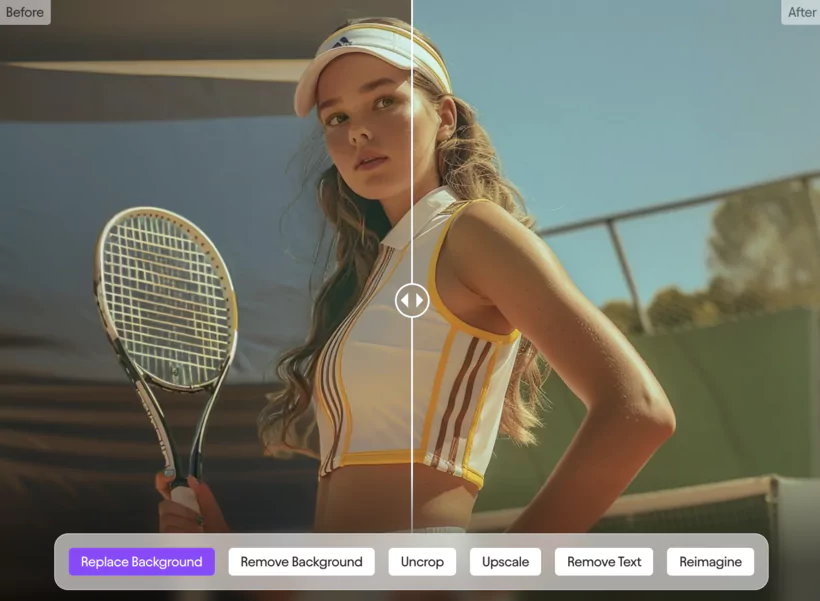
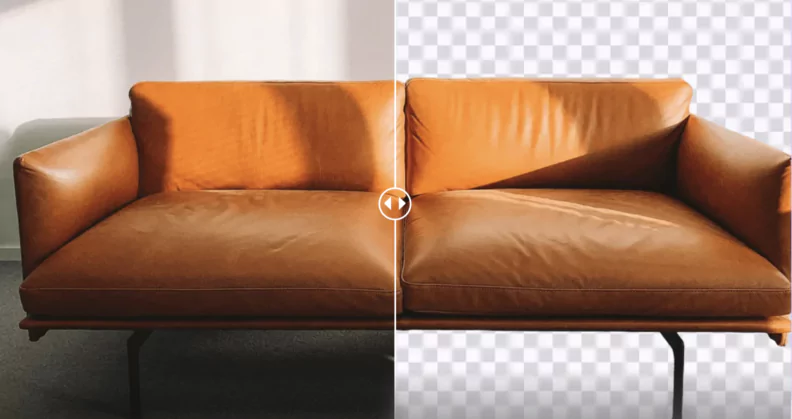
jasper remove background

Main advantages and features of Jasper Art

🎨 Jasper Art – Key strengths & essential features
Advantage / Feature Description
⚡ Speed Generates original images in seconds from a simple text prompt — ideal for reactive digital marketing.
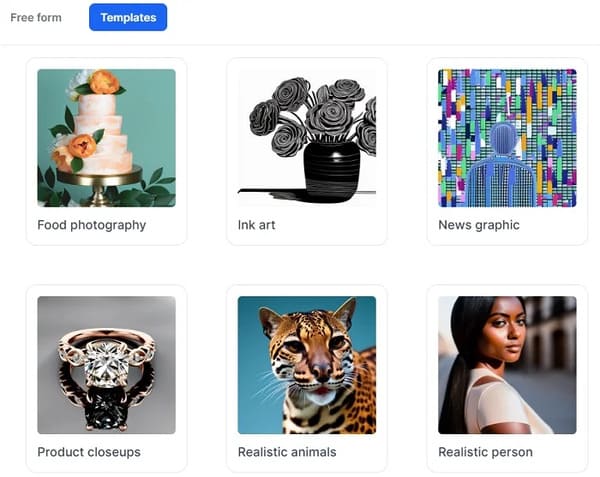
🎨 Varied styles Offers a rich palette of over 13 styles (pixel art, 3D, retro, watercolor, vector…), plus Freeform vs Templates modes to suit all creative levels. :contentReference[oaicite:0]{index=0}
📸 Visual quality High-resolution, customizable outputs without watermark, perfect for social media visuals or web campaigns. :contentReference[oaicite:1]{index=1}
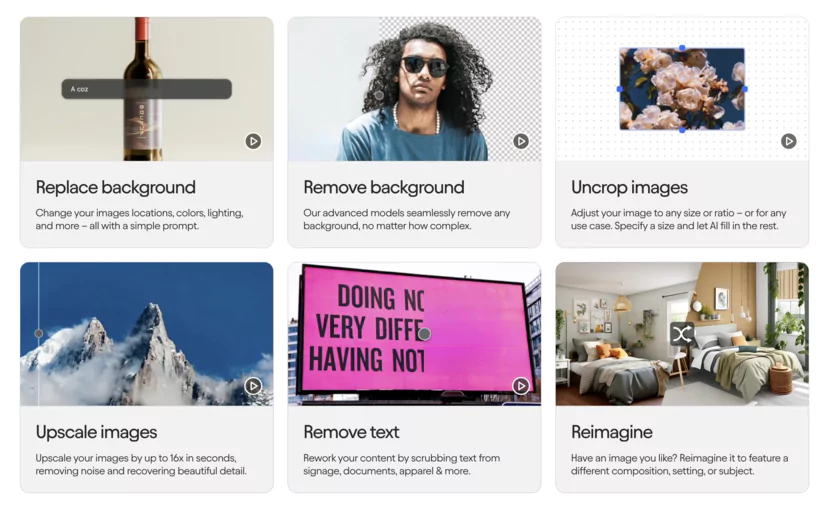
🔄 Bulk editing "Image Suite" feature — batch modifications (background, placement, retouching), very useful for large-scale product visuals. :contentReference[oaicite:2]{index=2}
⚙️ Integrations Easily connect Jasper Art to Canva, HubSpot and thousands of other apps via Zapier — seamless marketing workflows. :contentReference[oaicite:3]{index=3}
👩‍🎨 Accessibility Intuitive interface, accessible to non-designers to create attractive visuals effortlessly without technical skills.

Who is Jasper Art for?

jasper art features
  • Content creators: Banners for blogs or Instagram posts.
  • Marketers: Ads, quick branding.
  • Entrepreneurs: Visual prototypes for pitches or websites.
  • Amateur graphic designers: Illustrations without complex software.

How to use Jasper Art?

  1. Sign up at jasper.ai/art (7-day free trial).
  2. Enter a detailed prompt (e.g., "minimalist logo for an eco-friendly brand").
  3. Select a style, mood or artist inspiration (e.g., Van Gogh style).
  4. Generate 4-6 images, adjust (e.g., background removal) and download.Tip: Specific prompts with details (colors, angles) improve accuracy.

User reviews

copyright of jasper generated images

Jasper Art scores 4.7/5 on G2 (2026) for its simplicity and high-quality outputs. "I created posters for my e-commerce in just a few clicks, without a designer!" shares Emma, entrepreneur. Weaknesses: sometimes imperfect faces, high cost for intensive use (src: Trustpilot, 2026).

Beginner-friendly

Jasper template mode

The user-friendly interface and pre-built templates make Jasper Art accessible to beginners. Built-in tutorials and the Jasper community on X help master the tool quickly, even without design experience.

Comparison with other AI generators

Here's a table comparing Jasper Art to its competitors in 2026, based on current data (src: Cybernews, G2, TechRadar):

🤖 2026 Comparison – AI Image Generation
🛠️ Tool 💸 Pricing ✨ Major strengths ⚠️ Limitations 👥 Target audience
DALL·E 3 • ~$0.02–0.04 / image via API (depending on quality)
• Included in ChatGPT Plus (~$20/month) with unlimited generation (text + image)
• 🎯 Precise creations from detailed prompts
• 🎨 Inpainting to modify specific areas
• 📐 High resolution, suitable for professional use (up to 1024x1024+)
• 🧩 Results highly dependent on prompt quality
• 🔒 Only accessible via API or subscription
👨‍💻 Developers, AI researchers, demanding marketing agencies
Midjourney • Basic: $10/month (~200 min GPU) or $96/year (~$8/month)
• Standard: $30/month ($288/year)
• Pro: $60/month ($576/year)
• Mega: $120/month ($1152/year)
• 🎨 Unique artistic style, very high-quality rendering
• 🌍 Active and collaborative community (Discord + Web)
• ⚡ Fast and flexible generation according to GPU levels
• 🌀 Discord interface not intuitive for beginners
• 📉 Less suitable for marketing or institutional content
🎭 Artists, illustrators, visual creatives seeking inspiration and originality
Canva Pro • Free version (<5 GB storage)
• Pro: ~$12.99/month or $120/year
• Teams: ~$10/user/month (min. 3 users)
• 🖌️ Ultra-accessible interface without design skills
• 📚 Huge library of templates + elements
• 🤖 Integrated AI tools (Magic Studio, background remover, text-to-image generator)
• 👥 Simplified team collaboration
• 🎯 AI less powerful/precise than DALL·E or Midjourney
• 📈 Teams version became more expensive in 2026 (+300%)
🏢 Small businesses, marketers, content creators, teams looking for a simple all-in-one solution

Tips to maximize Jasper Art

  • Use detailed creative prompts (e.g., "illustration of a Parisian café, watercolor style, soft lighting").
  • Experiment with freestyle mode for more freedom or templates for quick results.
  • Integrate with tools like Canva for retouching or HubSpot for seamless campaigns.
  • Test new features, like automatic image quality enhancement.
Interface showing both creation modes side by side

Final advice

Jasper Art is a powerful tool for creating social media visuals, logos or AI-generated illustrations in 2026. Start with the free trial at jasper.ai/art, explore the templates and let your creativity speak.

No-code and AI make design accessible to everyone!

START YOUR FREE TRIAL
arrow CTA right

Jasper Art Customer Support

Customer support is a key element of the Jasper Art experience. Let's examine in detail the different facets of the support offered.

Responsiveness and accessibility

Jasper support responsiveness and accessibility

The Jasper Art support team impresses with its intervention speed, with an average response time between 20 minutes and 1 hour. Contact is primarily established via hey@jasper.ai or directly from the user interface via a floating help button.

Learning resources

This tool deploys a complete arsenal of educational resources:

Available supports include:

  • Comprehensive and documented help center
  • Jasper 101 training sessions
  • Live Q&A with experts
  • Detailed practical guides
  • Regular webinars

This multilayered approach allows each user to find the learning format that suits them best.

Dynamic community
jasper facebook community

The Jasper community represents a major asset with over 75,000 active members on Facebook. This mutual aid hub offers:

  • Sharing of concrete experiences
  • Discovery of innovative use cases
  • News and updates
  • Networking among creatives

Access to this community is automatically offered to each new user, creating a particularly enriching collaborative learning ecosystem.

The combination of responsive support, structured educational resources and a vibrant community makes Jasper Art support a model of comprehensive user support. This holistic approach greatly facilitates onboarding and optimal use of the tool.

Jasper Art User Guide: From Beginner to Expert

I offer you a practical guide to master Jasper Art and create unique visuals.

First connection and navigation

Access to Jasper Art is directly from your Jasper dashboard. The "Jasper Art" button in the sidebar directs you to the creation interface.

Choosing your creation mode

Jasper Art offers two distinct approaches depending on your experience:

Simple Mode offers a guided structure with:

  • Intuitive dropdown menus
  • Predefined styles
  • Preformatted mood options
  • Artist suggestions

Free Form Mode allows total creative expression within the 400-character limit, ideal for experienced users seeking precise control.

Mastering the prompt
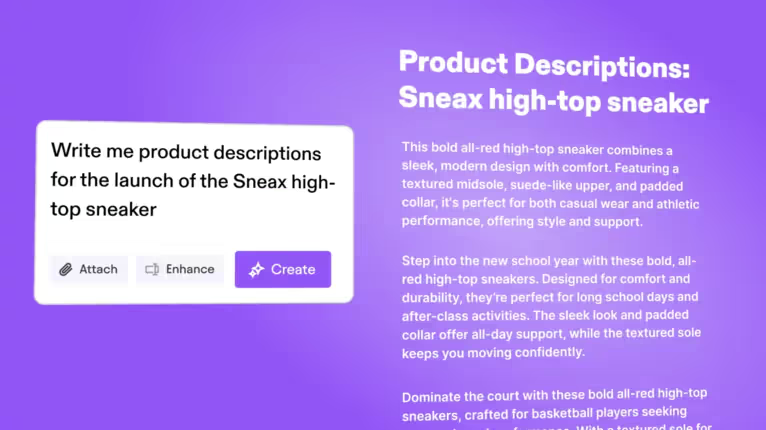
prompt on jasper

The quality of your description, or text, directly determines that of the generated image. A few golden rules for optimal results:

  • Precise and structured descriptions for artificial intelligence (inputs in prompt form)
  • The importance of texts in artificial intelligence-assisted content generation cannot be underestimated.
  • Separation of elements by commas
  • Specific and detailed vocabulary
  • Consistency in requests

Advanced customization
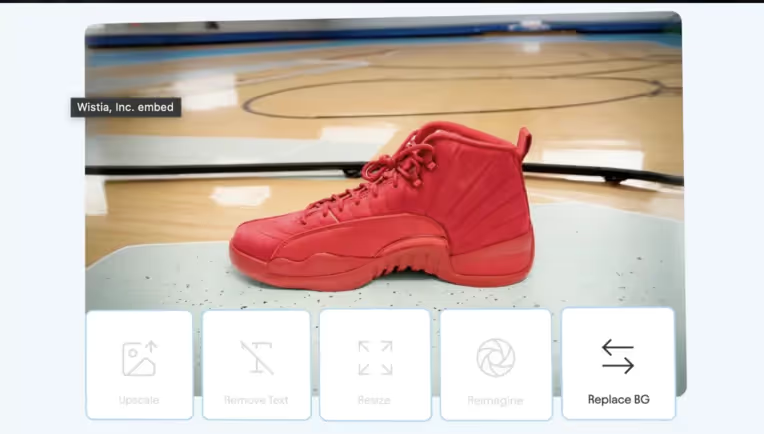
jasper ai image customization

Modifiers significantly refine your creations:

  • Explicit artistic references
  • Specific techniques and mediums
  • Resolution parameters
  • Detailed light ambiances
  • Composition elements

Generation and selection process

generation and selection on jasper art

Once your description is validated, Jasper Art generates four unique variations. The interface allows efficient comparative viewing and quick download or copy options.

Results optimization

Continuous improvement of your creations goes through an iterative approach. Don't hesitate to progressively refine your descriptions based on the results obtained. This learning method allows you to obtain increasingly precise visuals aligned with your vision.

This structured methodology transforms Jasper Art into a powerful creative tool, capable of meeting both artistic and marketing needs.

Conclusion

Jasper Art is an artificial intelligence-powered image generation tool, offered as a complementary module to the Jasper AI platform.

The Jasper team was founded by Dave Rogenmoser, John Phillip Morgan and Chris Hull in 2020 in the United States

User feedback on platforms like G2 and Capterra is generally positive, with an average rating of 4.8 out of 5.

Frequently mentioned strengths include ease of use in content creation, its user experience and the quality of generated images.
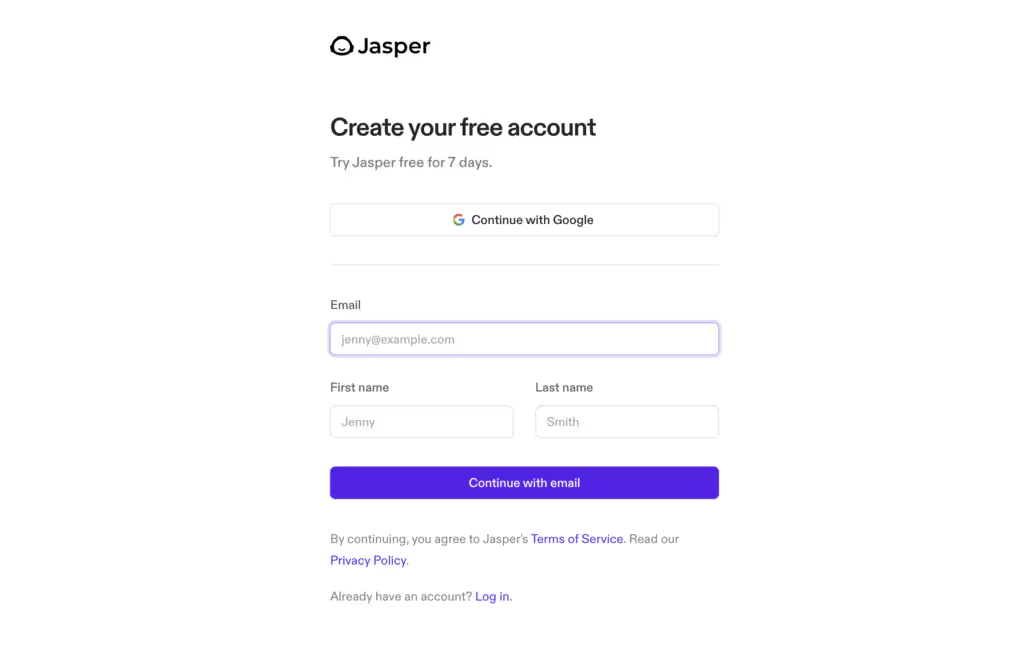
Jasper AI registration

FAQ

How to use Jasper Art to create images?

Jasper Art enables image production by entering a text description (e.g., "tropical landscape, watercolor style painting"). Choose a style or mood, and the tool generates artwork in seconds, perfect for unique photos or visuals. Jasper Art generates four images at a time in response to a single request.

What applications can be created with Jasper Art?

You can generate visuals for various applications: banners for articles, newsletter illustrations, logos for presentations, or works for social media and websites.

What can I write my prompts about?

Your subjects can include various ideas: landscapes, characters, abstract objects, or artist-inspired styles. AI image generation tools can produce entirely original and royalty-free creations. The quality of generated images depends on the precision and richness of the description provided by the user. The more precise your Jasper Art keywords (e.g., "cyberpunk, neon"), the better the quality.

Does Jasper Art offer an advanced editor?

Yes, the integrated editor allows retouching like background removal or color adjustment. For advanced features, combine with tools like Canva.

Can videos be created with Jasper Art?

Jasper Art focuses on images, but you can use the generated visuals in videos (e.g., YouTube intros) by integrating them into editing software like Adobe Premiere

What is the power of Jasper Art?

Its power lies in its speed (images in 5-10s), its resolution up to 8K, and its 20+ style categories (photorealistic, drawing, 3D), suitable for all needs

Can I use Jasper Art for email marketing?

Yes, create visuals for emails or newsletters (e.g., promotional banners). Images are optimized for digital marketing and integrable via HubSpot or Mailchimp. Images generated by Jasper Art can be used for blog articles, social media and ads.

What are Jasper Art's pricing plans?

Pricing starts at $39/month (Pro plan) with a 7-day free trial. The range includes pricing options for more visuals or advanced integrations. Images generated by Jasper Art can be used for blog articles, social media and ads.

Where to find resources or links for Jasper Art?

Visit jasper.ai/art for tutorials, links to the Jasper community on X, or articles on the official blog for usage ideas.

Is Jasper Art suitable for all users worldwide?

Yes, with multilingual support, users worldwide can enter prompts in their language. The generated artworks are suitable for all creative sectors.

You might also like...

TRANSPARENCY ON PARTNERSHIPS
We carefully choose the software, platforms, and services we recommend based on their quality and reliability. Our team tests and approves them, regardless of any business agreements.If you make a purchase or sign up through our partner links, we may earn a commission. This doesn’t cost you extra and helps keep our content free.

Vous Aimerez Aussi...

Check out more reviews to learn something new. Explore a variety of tools and resources that could be helpful and give you fresh ideas.