SiteBulb: Complete SEO Audit to Identify and Correct Technical Errors
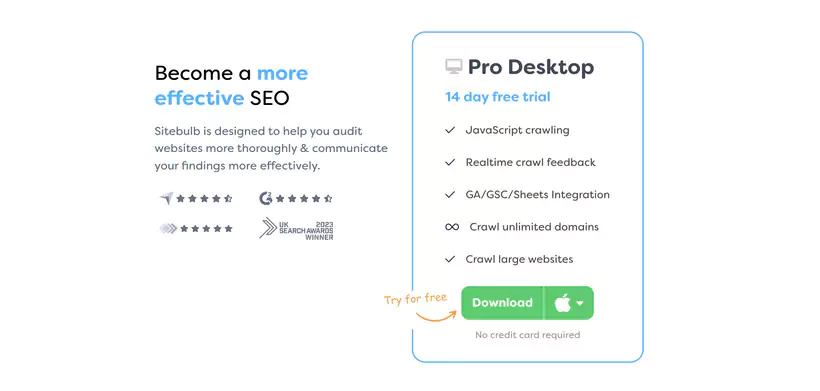
Sitebulb is made to help you audit websites more thoroughly and communicate your results more effectively. Explore your own website to improve your SEO.
SiteBulb is a leading SEO audit tool trusted by over 10,000 professionals worldwide, boasting a 4.8/5 rating on Capterra.
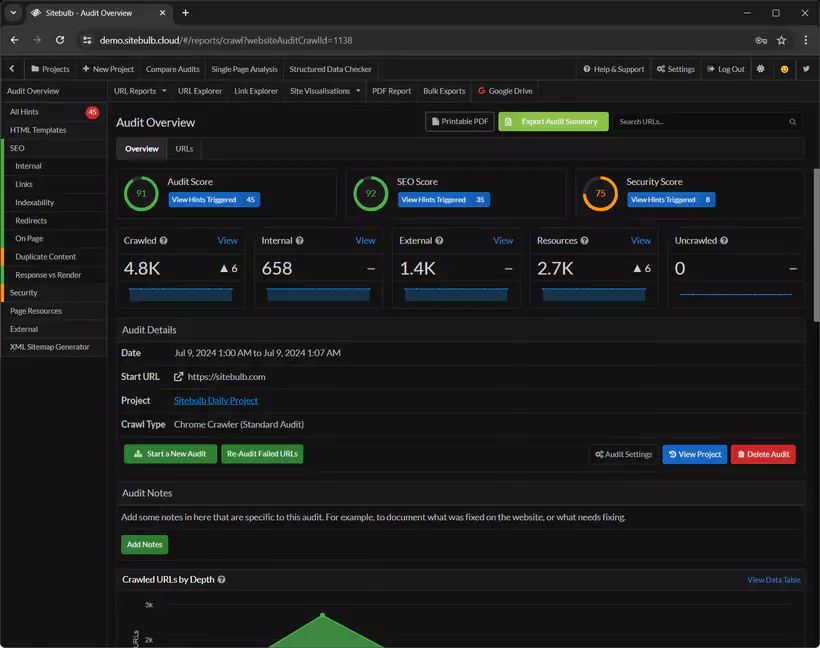
Upon completion of the analysis, SiteBulb provides a comprehensive overview of audit results, enabling quick visualization of key insights before diving into the details.
Designed to simplify technical audits while delivering deep insights, it combines an intuitive visual interface, powerful web crawling, and actionable SEO recommendations.
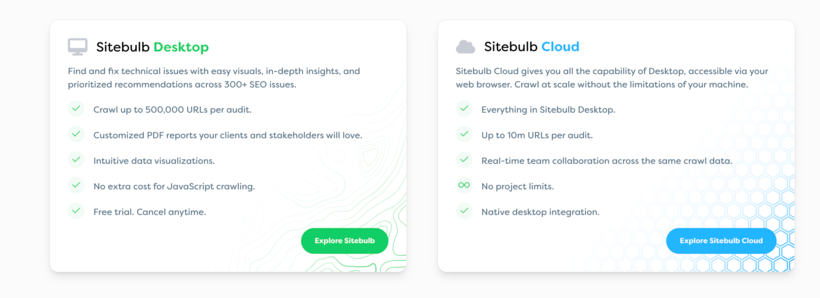
In 2026, SiteBulb stands out with its Desktop and Cloud versions, mobile compatibility, and integration with tools like Google Analytics. The Desktop version is software installed on your computer, while the Cloud version offers online access.
Through its Google Analytics integration, SiteBulb consolidates data from various sources to provide a comprehensive and cohesive view of your website.
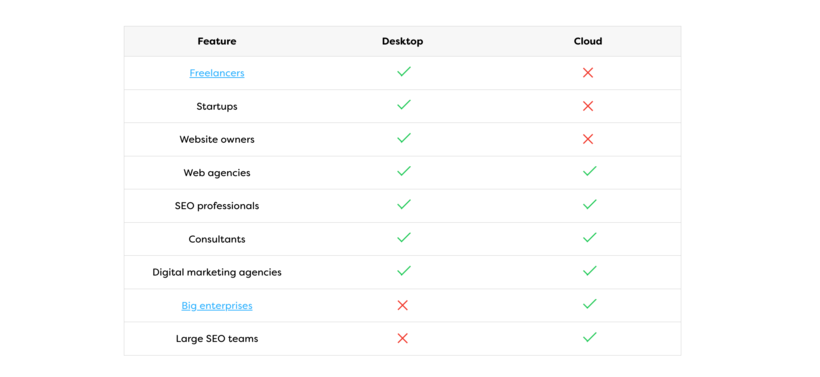
This guide explores its features, benefits, pricing, user reviews, and compares it to competitors like Screaming Frog. SiteBulb adapts to different SEO professional profiles, from freelancers to large agencies.
What is SiteBulb?
SiteBulb is an SEO crawler that analyzes websites to identify technical issues, optimization opportunities, and SEO errors. SiteBulb adopts a methodical approach to SEO audits, structuring the analysis according to technical priorities.
Launched in 2017, this application uses the Evergreen Chromium rendering engine for precise crawling, including JavaScript-heavy sites.
SiteBulb acts as a crawler to simulate search engine behavior.
Available in Desktop (Windows/Mac) and Cloud versions, SiteBulb adapts to the needs of freelancers, agencies, and large enterprises.
Its interactive visualizations and customizable PDF reports facilitate communication with clients and developers.
The software is available for direct download on the official website, with a free trial version.
What is SiteBulb used for and who is it for?
SiteBulb is used to conduct technical SEO audits to improve page performance, indexation, and search engine rankings.
It also enables precise identification of technical and strategic needs during an SEO audit.
It analyzes aspects such as Core Web Vitals, internal/external links, duplicate content, and site architecture.
SiteBulb thoroughly explores site content to optimize its structure and relevance. Its features make it accessible to non-developers while being powerful for experts:
SEO Consultants: For quick audits and client recommendations.
Digital Agencies: Managing multiple sites with scheduled audits.
Digital Marketing Managers: Tracking SEO performance without technical expertise.
Webmasters: Diagnosing indexation or loading time issues.
Site Publishers: Optimizing e-commerce or editorial sites.
SiteBulb thus meets the expectations of different profiles, from independent consultants to international agencies.
Key Features of SiteBulb
SiteBulb stands out for the richness of its features, offering a range of advanced tools for comprehensive audits:
Unlimited Crawling: Up to 500,000 URLs (Desktop) or 10 million (Cloud) per audit, with no additional fees for JavaScript.
SEO Hints: Over 300 automated checks by their bots (broken links, missing meta-tags, duplicate content) with explanations and prioritization.
Interactive Visualizations: Crawl maps, crawl depth charts, and diagrams to understand site architecture.
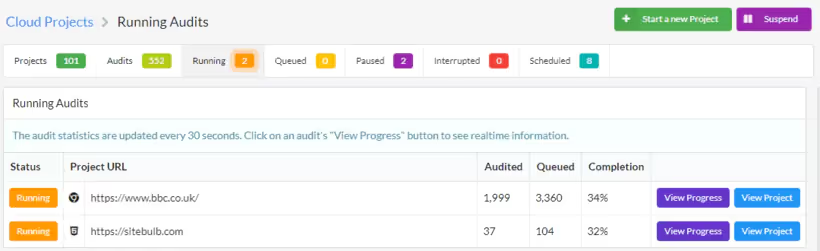
Scheduled Audits: Plan recurring crawls to track progress.
Integrations: Google Analytics, Google Search Console, Google Sheets, and Looker Studio for enriched reporting.
Customizable PDF Reports: Export professional reports with clear recommendations.
Core Web Vitals: Analysis of UX metrics (LCP, CLS, INP).
URL Explorer: Filter and sort URL-level data for specific analyses.
Cloud Version: Real-time collaboration, large-scale crawls, and browser-based access.
XML Sitemap Analysis: SiteBulb analyzes the XML sitemap to detect indexation errors and optimize communication with search engines.
Text Examination: The tool examines the text present on each page to assess the quality of indexable content.
Text Optimization: SiteBulb enables text optimization by analyzing readability and semantic relevance.
There's also a place in the interface where users can customize the display according to their preferences, such as day or night mode.
Advantages of SiteBulb for Website SEO Audits
Exploration with Intelligent Prioritization: "Hints" classify issues by impact (high, medium, low), accelerating corrections.
Accessible Interface: Clear visualizations for non-technical users, with detailed explanations for experts.
Scalability: Adapts audits to sites from 100 to 10 million pages. SiteBulb also offers precise measurement tools to evaluate technical performance and link quality.
Convincing Reports: Visual exports and PDFs facilitate communication with clients/developers. Reports include concrete measures to implement for improving SEO.
Frequent Updates: Each update brings new features monthly, based on user feedback.
Competitive Pricing: Affordable plans compared to tools like Botify or Lumar.
After the audit, it's essential to take time to reflect and analyze the results, transforming these analyses into strategic actions.
Differences Between SiteBulb and Other SEO Crawlers
SiteBulb stands out for its simplicity and actionable insights. Its ability to detect technical errors is a determining factor for SEO success. Here's a comparison table with Screaming Frog, SEMRush, and Lumar:
Tool
Price (base/month)
Crawl Limit
Strengths
Weaknesses
Website
SiteBulb
$18 (Lite)
500,000 (Desktop) and 10,000,000 (Cloud)
Priority Hints
Detailed Visualizations
PDF Exports
No free plan
Frequent updates
sitebulb.com
Screaming Frog
$24 (annual)
500,000 (with license)
Fast crawling
Advanced customization
Less intuitive interface
Few visual reports
screamingfrog.co.uk
SEMRush
$129.95
100,000 URLs/month (Pro)
Complete SEO suite
Multiple integrations
High cost
Limited basic audit
semrush.com
Lumar
On request (~$200)
Unlimited (Cloud)
JavaScript audits
High-performance benchmarking
High price
Learning curve
lumar.io
Analysis:
SiteBulb software excels for agencies and consultants thanks to its visual reports and affordable price.
Screaming Frog is more technical, ideal for developers but less accessible to non-experts.
SEMRush is a complete suite, but its web page SEO audit is less specialized than SiteBulb, though its user experience is better.
Lumar suits large companies, but its cost is prohibitive for SMEs.
SiteBulb users thus obtain concrete and measurable results after each SEO audit.
Installing SiteBulb
Before starting, note that downloading the software is necessary to use the Desktop version of SiteBulb.
SiteBulb requires local installation for the Desktop version (Windows/Mac) and functions as standalone desktop software, with performance dependent on your PC's power (processor, RAM).
Here are the updated steps for 2026:
Go to www.sitebulb.com.
Download the free trial version (14 days, no credit card required).
Once the download is complete, follow the instructions to install the software and create a user account.
For the Cloud version, log in directly through your browser after registration.
2026 Requirement: Minimum 8 GB RAM and an i5 processor for crawls >100,000 URLs. The Cloud version avoids these hardware constraints.
Launching and Configuring an Audit
Launching an audit with SiteBulb is intuitive and organized by projects, allowing you to compare audits over time. Here are the steps:
Open SiteBulb and click on "Start a new audit".
Create a project:
Enter a project name (e.g., "E-commerce Audit 2026").
Enter the site's URL (e.g., https://example.com).
Authentication: If the site (WordPress, Shopify, etc.) requires a login, check "Forms authentication required" and enter credentials. Otherwise, skip.
Click on "Save and Continue".
Configure the audit:
Check: Page Speed, Mobile Friendly, Front-End, Google Analytics, Google Search Console, Crawl Website, XML Sitemaps.
For multilingual sites, check hreflang. For AMP, check AMP.
Ignore non-relevant options (e.g., Google Analytics if not installed).
Once configuration is complete, click on "Start Audit".
SiteBulb presents audit results in a clear and structured manner, facilitating data exploitation.
Complete Audit: Analyzes page speed, mobile compatibility, JavaScript errors, cookies, TTFB, DOM loading time, and more.
2026 Innovation: Integration with Google Analytics 4 (GA4) and Looker Studio for enriched reporting.
The information collected during the audit effectively guides SEO optimizations.
Integration with Tracking Tools
To effectively drive a website's SEO strategy, relying on high-performance tracking tools is essential.
The integration of solutions like Google Analytics and Google Search Console enables precise measurement of site performance, user behavior analysis, and identification of optimization opportunities.
These tools provide essential data on traffic, acquisition sources, most visited pages, and potential friction points in the user journey.
With this information, it becomes possible to adjust the SEO strategy in real-time, anticipate search engine changes, and continuously improve site visibility for better optimization of each publication.
Main Analysis Reports
Each report begins with an overview of the main results and critical points, allowing quick visualization of essential elements before deepening the analysis.
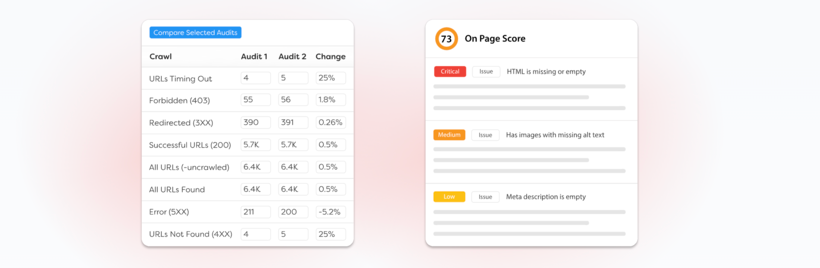
SiteBulb prioritizes issues into 5 levels: Critical, High, Medium, Low, and Insights (informational).
Reports are clear and actionable, with the following tools:
Printable PDF: Export reports, tables, and charts to PDF.
Export Internal URL Data: Data in CSV or Google Sheets.
Graphic Backup: Save as PNG, JPEG, or PDF.
Explanations: Each report includes a description (in English) and a "Learn more" link to a tutorial detailing the problem and its solution.
Translated Tutorials: Use the Chrome extension to automatically translate guides into your language.
Key Reports:
Duplicate Content: Identifies similar pages harming SEO.
Content Analysis: SiteBulb thoroughly explores and analyzes site content to detect duplication or relevance issues.
Internal/External Links: Detects broken or poorly optimized links during crawling.
Core Web Vitals: Analyzes LCP, CLS, and INP.
HTML Tags: Checks for missing meta-tags, titles, and descriptions.
Indexation: Flags non-indexed pages or those blocked by robots.txt.
The information provided by these reports facilitates decision-making and SEO strategy development.
Conclusion
In 2026, SiteBulb stands out as an essential tool for SEO audits thanks to its ease of use, actionable insights, and scalability.
Its priority Hints, interactive visualizations, and customizable PDF reports enable SEO consultants, agencies, and webmasters to diagnose and correct technical issues effectively.
Compared to Screaming Frog (more technical), SEMRush (more generalist), or Lumar (more expensive), SiteBulb offers exceptional value for money, suitable for freelancers and large teams alike.
With a 14-day free trial and 10% discount on annual plans until June 30, 2026, now's the perfect time to test SiteBulb and boost your SEO performance. Visit www.sitebulb.com to get started!
FAQ
What is SiteBulb?
SiteBulb is an SEO crawler that audits websites to detect technical issues, SEO errors, and provide actionable recommendations.
Who is SiteBulb for?
For SEO consultants, digital agencies, webmasters, and marketers optimizing sites of all sizes.
What are its main features?
Unlimited crawling, SEO Hints (300+ checks), interactive visualizations, scheduled audits, and customizable PDF reports.
What are the advantages of SiteBulb?
Intelligent prioritization, intuitive interface, visibility, scalability, regular updates, and visual reports for clients/developers.
How does SiteBulb compare to Screaming Frog?
SiteBulb is more visual and accessible, with priority Hints. Screaming Frog is more technical but less intuitive.
How much does SiteBulb cost?
From $18/month (Lite) to $195/month (Cloud Small), with a 14-day free trial. Annual plans at -10% until June 30, 2026.
What do users think of SiteBulb?
Rated 4.8/5 on Capterra, appreciated for its simplicity and reports, but criticized for frequent updates.
TRANSPARENCY ON PARTNERSHIPS We carefully choose the software, platforms, and services we recommend based on their quality and reliability. Our team tests and approves them, regardless of any business agreements.If you make a purchase or sign up through our partner links, we may earn a commission. This doesn’t cost you extra and helps keep our content free.
PhantomBuster: launch your first LinkedIn campaign without the busywork
Build a targeted prospect list, enrich profiles, and organize follow-ups in one workflow. Spend less time moving data and more time personalizing your message.
14 days free. No credit card or automatic charge. Includes 2 execution hours and 5 automation slots.
Set your targeting and daily limits, run one Phantom, and export a prospect list ready to work.
.svg)