.svg)
YouTube at work: Balancing productivity and education. Discuss fairness of institutional blocking. Examine educational benefits versus distractions.

There are several ways to unblock YouTube at school and work, including using:
While all of these apps allow you to access YouTube, they work differently and some are better suited to certain situations. We'll show you how to use each tool, starting with a virtual private network (VPN).
Using a VPN to bypass YouTube restrictions is as easy as these next three steps. For this example, we used our favorite YouTube VPN, ExpressVPN.


Open YouTube on your browser and find the video you want to watch. A VPN encrypts your web traffic and changes your IP address, making your location seem different from the real world. This allows you to access websites that are blocked at the local network (like school and work) and Internet Service Provider (ISP) levels.

We've narrowed the options down to three VPNs for YouTube, so it should be easy for you to choose one with the VPN features you need.

NordVPN is a VPN that offers strong security and privacy, and it has an extended network of over 5,200 servers.
It also passes school or office firewalls without a hitch and should allow you to access YouTube without a problem.
While not as consistent as ExpressVPN, it's one of the best VPNs for streaming, which means it offers great performance on YouTube.

ExpressVPN is the fastest VPN out there, so YouTube videos will load faster and stream without buffering.
It's also secure and allows you to easily bypass the school firewall. Plus, with over 3,000 servers in 94 countries, you have a pool of IP addresses to stream most YouTube videos. The only downside is the price, but it comes with a 30-day money-back guarantee. Read our ExpressVPN reviews to find out more.

Windscribe is the best free VPN for a good reason. While it's far from being the fastest VPN, it's fast enough to support unbuffered streaming on YouTube. Its excellent free plan lets you use 10 server locations and 10GB of data per month, which is enough to stream a casual YouTube video. Read our Windscribe reviews for more information.
Sometimes IT administrators limit permissions to install software on a school or company computer, making it difficult to use a VPN to unblock YouTube. This is where Google Translate comes in handy. Google Translate is a useful tool in schools and offices that administrators will almost never block within the network, and you don't need to install anything to use it.
By entering a link into Google Translate, you will get a clickable URL whose domain is Google and not YouTube. By doing so, the network firewall thinks you are accessing Translate, allowing you to watch YouTube videos in the Translate window. Here's how to do it.
Open Google Translate in your browser, making sure the input language is set to “detect language” and the output language is set to “English.” Then simply paste “www.youtube.com” into the input field and click on the translated link. You will then be able to watch YouTube videos in a new window.

A proxy server works the same way as a VPN, but it's less secure; it changes your IP address but doesn't encrypt your traffic or make it anonymous. While the absence of encryption allows for better connection speed, your personal data and information are easy to find. We don't recommend using a proxy server in most cases, but if you're still not discouraged, here's how to use it to access YouTube.
You can also use a browser extension to unblock YouTube. These extensions work in tandem with a proxy server to bypass content firewalls. In other words, Google Chrome extensions like YouTube Unblocker route your traffic through a proxy server. As a result, they have the same pitfalls as a proxy, not to mention that some browser extensions may contain malicious software.
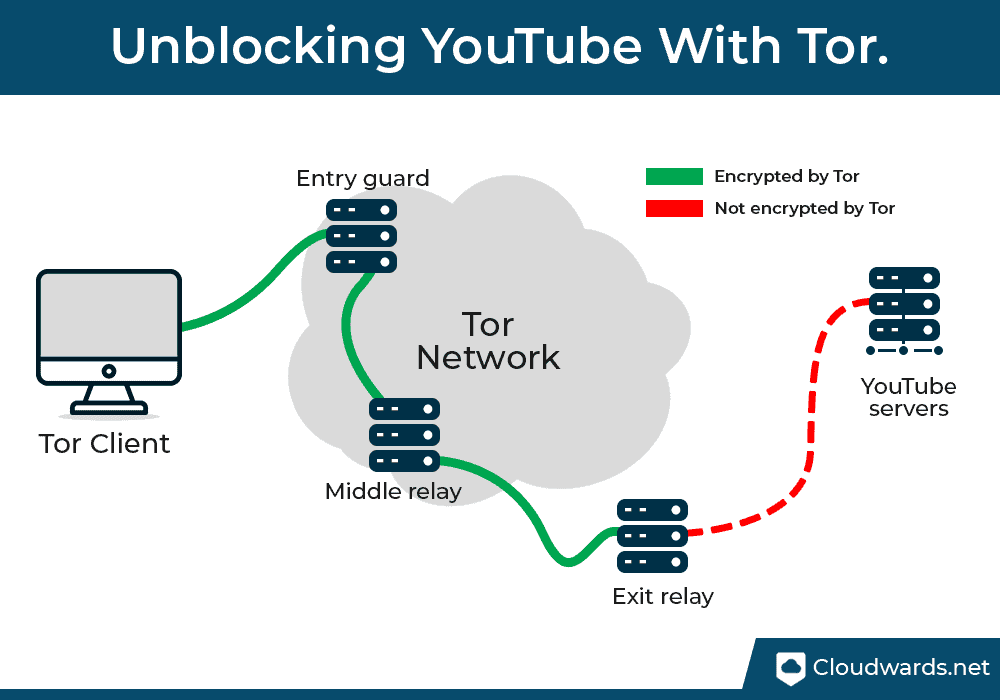
The onion router (Tor, for short) bypasses firewalls by hiding your IP address. It sends your web traffic through multiple relay nodes (servers), ensuring that the YouTube server only sees the IP address of the exit node. It works like a regular browser. So all you have to do is use it to access YouTube instead of your regular browser (if your company or school allows you to install it).
The problem with Tor is that sending web traffic across multiple servers can increase latency and decrease connection speed. YouTube videos can take a bit longer to load, and buffering can ruin the experience, especially at high resolution. The nodes are also run by anonymous volunteers, who may not have the best intentions in the world, which ultimately makes this method insecure.
There are multiple reasons why your favorite country, business, school, or artist might be blocking YouTube videos, including:
Your workplace doesn't really have a say in what's legal and what's not. However, he may have a policy that prohibits watching YouTube at work. Breaking this policy could land you in trouble with your bosses. In the worst case scenario, you could get suspended or fired, especially if watching YouTube hurts your productivity.
There are several practical ways to unblock YouTube video content. Our preferred method for unblocking YouTube is using a VPN, as it offers full performance in any situation.
For example, ExpressVPN not only allows you to access YouTube but also allows you to bypass the geoblocks of other streaming services. You can try ExpressVPN risk-free thanks to its 30-day money-back guarantee.
If not, check out our List of the best VPNs if you want to know more about your options. We also have a comprehensive guide on how to get YouTube Premium on the cheap to unlock additional benefits that you never get with YouTube's standard plan.
Have you ever unblocked YouTube at work or school? What method did you use? We'd love to hear it in the comments section below. As always, thank you for reading.