Data Extraction Software: three words that are revolutionizing how businesses collect, analyze, and utilize information.
By 2026, over 60% of companies have adopted no-code scraping tools or AI-based solutions.
This comprehensive guide walks you through each step: definition, types of extractors, top tools on the market, selection criteria, and a practical tutorial to get you started immediately.
What is a Data Extractor?
A data extractor is a technological tool designed to automatically collect information from various sources: websites, PDF documents, databases, emails, or scanned images. Its main goal?
To transform raw data into structured and actionable information.
💡 Imagine Marie, an e-commerce manager. Every week, she spent 8 hours manually copying competitors' prices. With data extraction software, this task now takes 15 minutes. Process automation has revolutionized her daily routine.
How Does a Data Extractor Work?
The extraction process generally follows four key steps:
Source Identification: the tool analyzes the structure of the document or web page
Data Recognition: using AI or predefined rules, it identifies relevant elements
Extraction and Structuring: data is extracted and organized into a usable format
Export and Integration: results are sent to Excel, a CRM, or a database
Types of Data Extractors and Uses
The market offers several categories of tools tailored to specific needs. Understanding these differences will help you choose the optimal solution for your data collection.
The Different Types of Data Extractors and Their Uses
📋 Type of Extractor
🎯 Main Use
👥 Target Audience
🌐 Web Scraper
Data extraction from websites (prices, reviews, leads)
Marketers, e-commerce, analysts
📄 OCR / PDF
Text extraction from images and scanned documents
Accountants, lawyers, HR
🔄 ETL
Data transformation – ETL between heterogeneous systems
IT managers, data engineers
🤖 AI / ML
Intelligent extraction with machine learning
Startups, data-driven teams
🔌 API
Direct connection to sources via API for extraction
Developers, integrators
Web Scraping: The Star of Extraction
Effective web scraping is currently the most popular method. These tools automatically browse web pages to extract structured information: contact details, prices, product descriptions, customer reviews...
Modern solutions incorporate advanced features: IP rotation to avoid blocks, CAPTCHA management, and real-time data extraction on complex JavaScript sites.
OCR Text Extraction
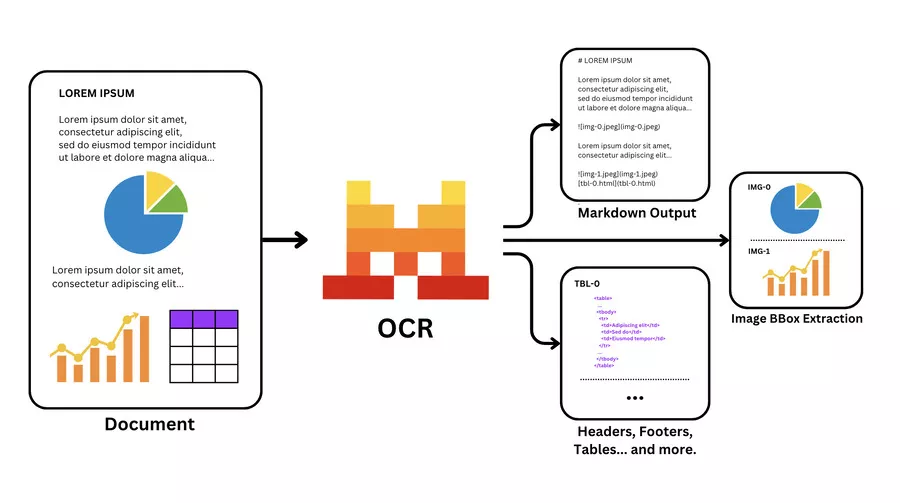
OCR (Optical Character Recognition) text extraction transforms images and scanned documents into editable text. Recent algorithms achieve 99.5% accuracy thanks to AI-driven data extraction, even on handwritten documents.
Best Data Extraction Tools
The market for AI tools for extraction is booming. Here is our selection of the most efficient solutions, tested and compared based on objective criteria.
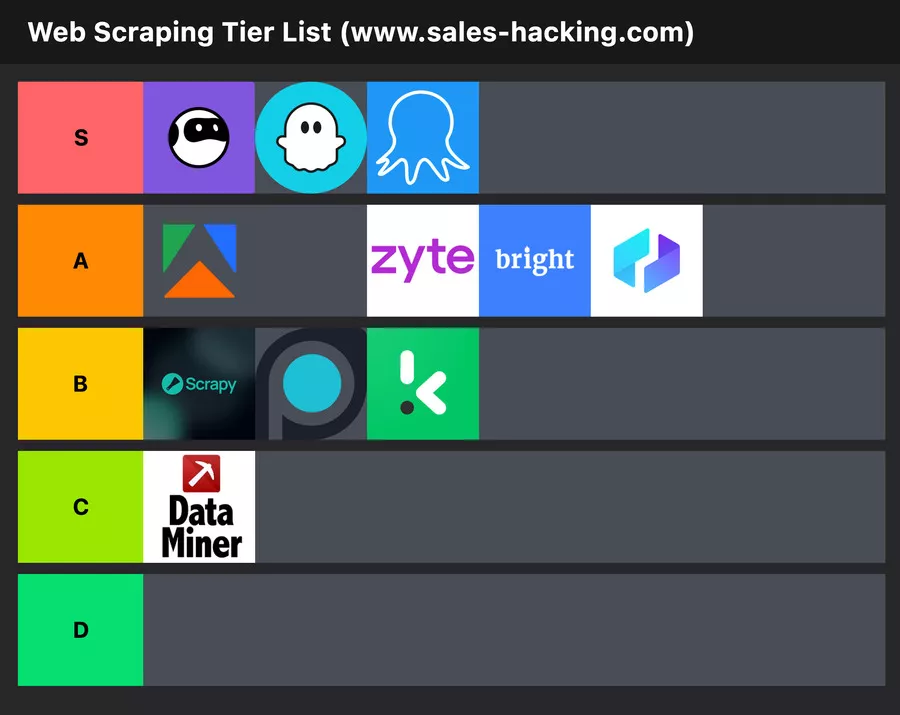
🏆 Top 5 No-Code Web Scraping Tools
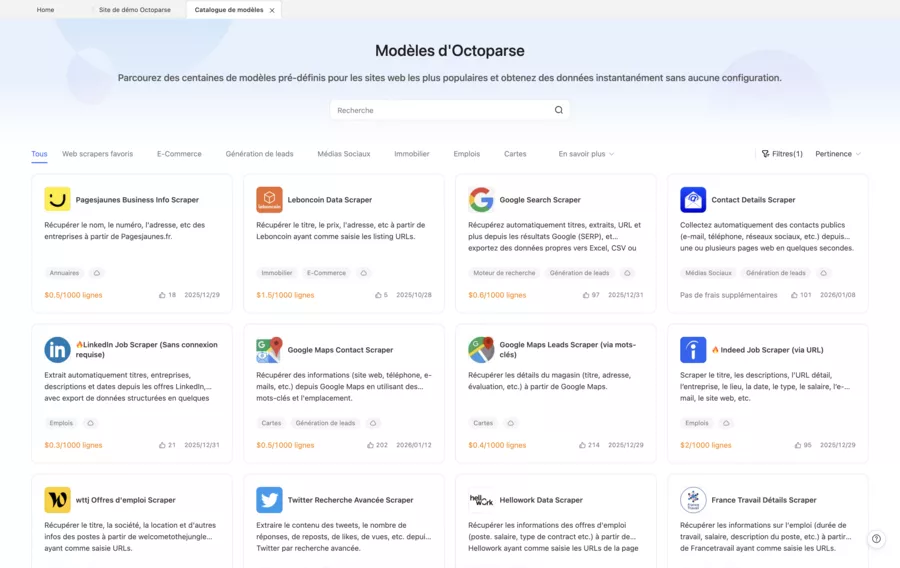
Octoparse: intuitive visual interface, AI auto-detection, 24/7 cloud – ideal for beginners
Apify: marketplace of ready-to-use "Actors," powerful for LinkedIn and social networks
Browse AI: records actions like a robot, real-time change monitoring
ParseHub: free to start, handles AJAX and JavaScript sites perfectly
Thunderbit: conversational AI to describe what you want to extract in natural language
Scale + anti-blocking (industrial data pipelining)
Intermediate → Enterprise
✅ Yes
Diffbot ⭐️⭐️⭐️☆☆
Plans (based on usage)
AI extraction via API (web → structured data)
Intermediate
✅ Yes
Scrapy ⭐️⭐️⭐️☆☆
Open source
Total control (performance, customization, Python ecosystem)
Developer
❌ No
How to Choose the Right Data Extractor?
Selecting the right tool for your needs requires evaluating several criteria. Here are the data extraction methods to prioritize based on your context.
✅ Essential Selection Criteria
Ease of Use: no-code interface if you're not a developer
Example: Amazon results page (lots of prices in one place), type Amazon.fr → search “SSD 1TB”.
Here are some prerequisites before starting:
An Amazon results page (not a single product page).
The list of fields to extract: Name, Price, URL (optional: rating ⭐, number of reviews).
1: Registration
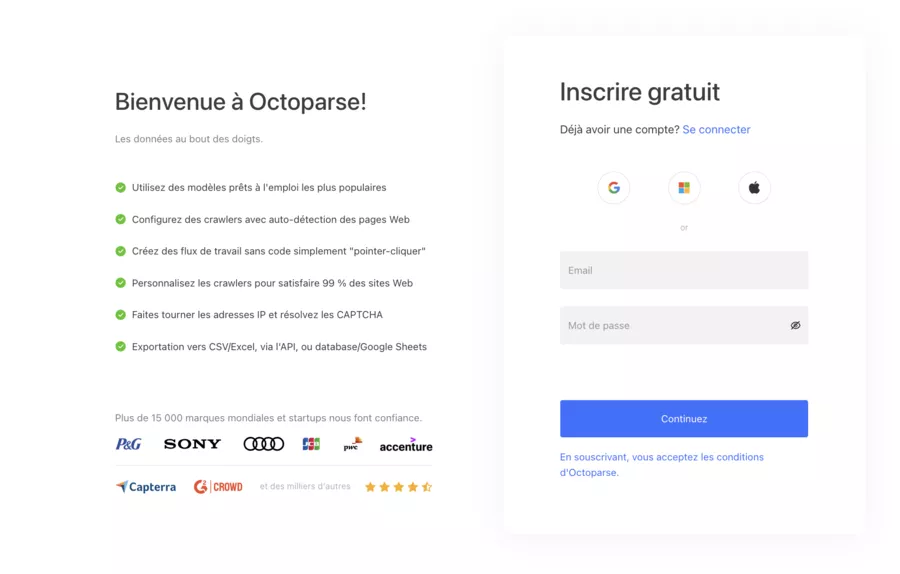
Go to the Octoparse website and click Sign Up
Create an account (email + password or Google, depending on the option shown)
Verify the email if requested
Download and install Octoparse Desktop
Open the app → Log In
2: Create a Task and Open the Amazon Page
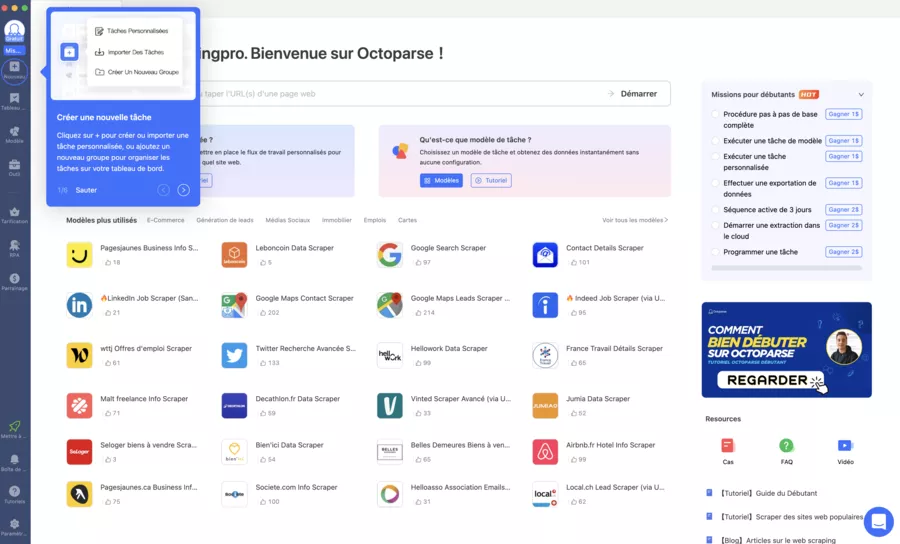
In Octoparse, click New Task
Select Advanced Mode (more reliable)
Paste the Amazon page URL (search results)
Click Start
If a cookie banner appears, click Accept (directly in the integrated browser)
Pro tip: wait 2–3 seconds for the page to fully load before selecting anything.
3: Auto-Detection
Click Auto-detect Web Page Data
Octoparse suggests a “list” extraction → click Create workflow
Open Data Preview to check if you can already see:
product titles
a price (at least on some lines)
If the preview mixes elements (ads, sponsored blocks), don't worry: we'll clean it up in the next step.
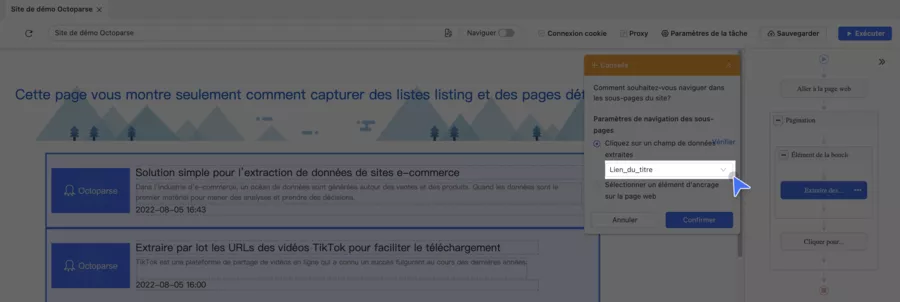
4: Correctly Extract Name, Price, URL
On Amazon, the price is often displayed in two parts (euros + cents). The goal: to get a usable price.
Here's how to do it:
On the page, click on a product title
Select Select all similar (select all similar titles)
Then Extract text → column product_name
For the product URL:
Re-click the title → Extract link URL → column product_url
For the price:
Click on the “€” part of the price (or the price area)
Select all similar → Extract text → column price_raw
If price_raw comes out wrong (e.g., “19” without “,99”):
Select euros → extract price_euros
Select cents → extract price_cents
Then, after export, recombine in Excel (=A2&","&B2) or in your pipeline (simpler, more stable).
Here's a checklist of fields
🛒 Amazon → Octoparse: What to Click and What to Extract
Field 🎯
Where to Click on Amazon 🖱️
Octoparse Action ⚙️
Name 🏷️
Product title
Select all similar → Extract text
URL 🔗
Product title/link
Extract link URL
Price 💶
Price area
Select all similar → Extract text
Rating ⭐ (optional)
Stars
Extract text
Reviews 🧾 (optional)
“xxx reviews”
Extract text
5: Pagination
On the Amazon page, locate the Next button (at the bottom)
Click Next once
In Octoparse, choose Loop click next page / Pagination
Check in the workflow that the order looks like:
Loop (Next page) → Extract data
Tip: run a test on 2 pages to confirm that the lines are indeed increasing.
6: Make the Extraction Stable
In the workflow options (or each step):
Add a Wait (1 to 3 seconds) before extraction
Enable Scroll page if results load on scroll
Enable Retry if some lines come out empty
Avoid too-fast extractions: it increases errors
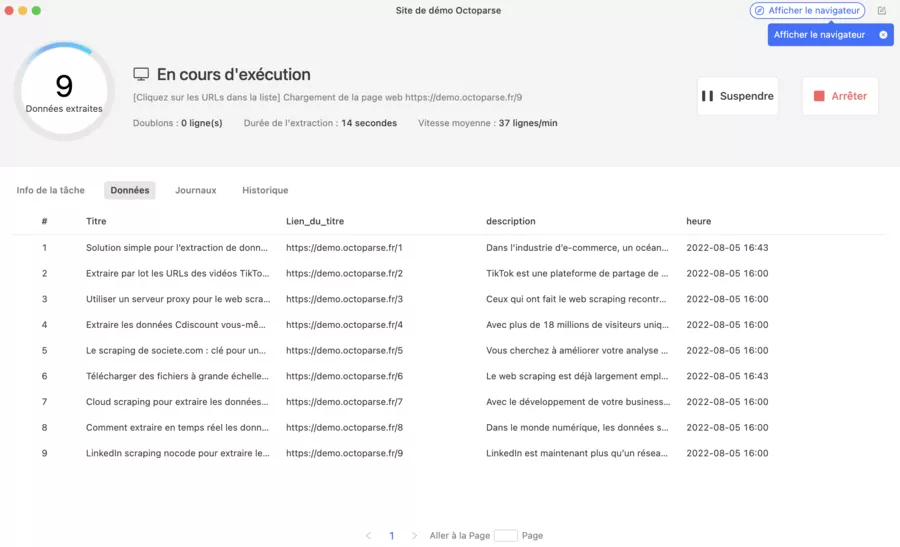
7: Start the Extraction
Click Run
Choose Local Run for an initial test
Run a short test (1–2 pages) then check the data
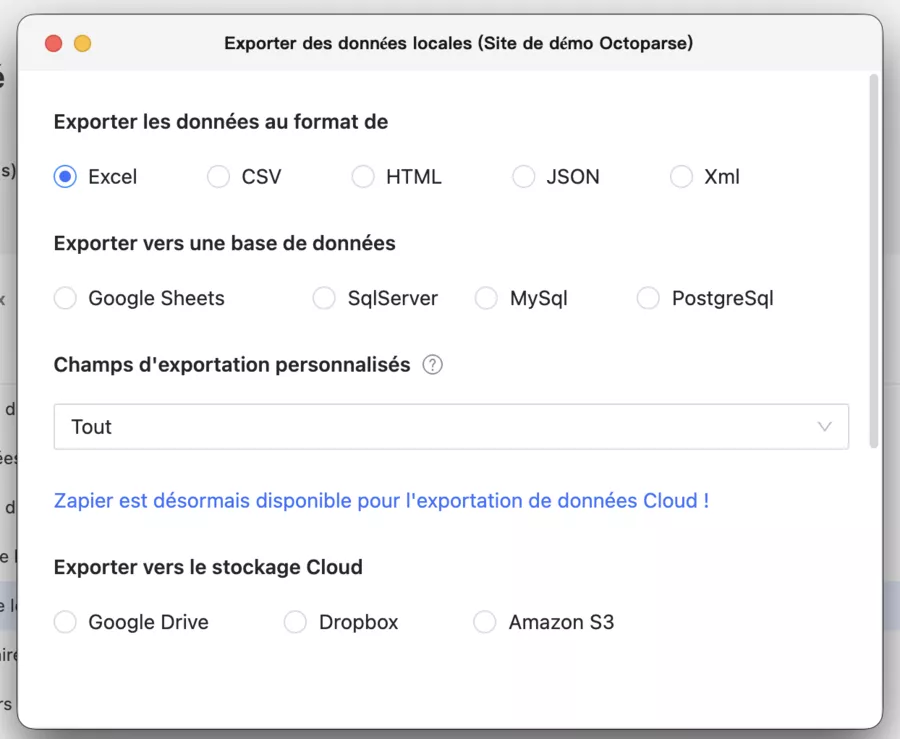
8: Export (CSV / Excel)
Open the Data tab
Click Export
Choose CSV (the most universal) or Excel
Tip: always keep product_url in the export. It's your “ID” for deduplication and tracking changes.
⭐️ Bonus: Only Retrieve New Items
The simplest way:
Rerun the task regularly
Deduplicate on product_url in your file/tool (Sheets/Excel/BI)
Add a date_extraction column for history
Amazon often changes its display, and some pages impose access limits. If you have an official alternative (e.g., partner API), it's often more stable for long-term use.
AI Data Extraction: Trends
AI data extraction is radically transforming the sector. Machine learning algorithms now enable the collection of unstructured data with unmatched precision.
Conversational AI: describe in natural language what you want to extract
Auto-Adaptation: tools automatically adjust to changes in site structure
Dynamic Report Creation: automatic generation of analyses from extracted data
Improved Operational Efficiency: 40% reduction in collection time thanks to machine learning
Advantages and Disadvantages
⚖️ Advantages and Disadvantages of Data Extractors
✅ Advantages
❌ Disadvantages
⏱️ Significant time savings (up to 90%)
💰 Cost of premium solutions
📊 Reduction in manual entry errors
📚 Learning curve for advanced tools
🔄 24/7 automation without intervention
🔒 Legal risks if misused (GDPR)
📈 Real-time data for quick decisions
🛡️ Possible blocks by certain sites
🔗 Easy integration with CRM and business tools
⚙️ Maintenance required when sites change
Data Security During Extraction
Data security is a major concern during any extraction operation. A high-performance data extraction software must not only be efficient but also ensure the protection of your information against viruses, unauthorized access, or accidental loss. For this, it is essential to adopt best practices and choose tools equipped with advanced security features.
Conclusion
Data extractors are no longer reserved for developers or large enterprises. With the emergence of no-code scraping tools and artificial intelligence, any entrepreneur or professional can automate their information collection.
User feedback is unanimous: after a few weeks of use, the return on investment is evident. The time saved on repetitive tasks can be reinvested in strategic analysis and decision-making.
🚀 Our recommendation: Start by testing a free solution like Octoparse or ParseHub on a simple project. Measure the tangible gains before investing in a premium license. Integrating data into your business processes will sustainably transform your productivity.
Try one of the recommended tools now and see for yourself the commercial performance that automation can generate.
🎁 TRY AI REVOLUTION FOR FREE
Notion AI: read less and decide faster
Ask one question across your pages, meeting notes, and databases. Notion AI surfaces the decisions, blockers, and next steps worth your attention.
Everyone gets complimentary AI responses. Upgrade to Business only after you use them up.
Open the meeting notes you have been avoiding and ask Notion AI for a one-minute decision brief.
Large-scale data extraction has applications across virtually every industry.
It enables the extraction of information from social media accounts, point of sale systems, or other databases, thereby facilitating analysis and reporting. Content extraction, for instance, in HR systems or online learning platforms, is crucial for providing digital resources tailored to talent management and training.
Data retrieval through automated techniques, such as web scraping, APIs, or OCR, stands out for its speed and accuracy, optimizing overall data management efficiency.
Here are the most common use cases that generate significant time savings.
🛒 E-commerce and Market Analysis
Web scraping for e-commerce allows real-time competition monitoring. Pierre, the founder of an online store, increased his margins by 12% by adjusting his prices daily thanks to automatically collected data.
Automated price monitoring on marketplaces
Analysis of competitor customer reviews
Detection of new products and trends
Enrichment of product catalogs
Extraction of verified phone numbers of professionals or businesses to optimize prospecting and marketing campaigns
📈 Lead Generation and Prospecting
Sales teams use CRM integration to automatically feed their pipeline. Extracting contact details from LinkedIn, professional directories, or company websites significantly speeds up prospecting.
Moreover, the extracted data can be securely stored using cloud-to-cloud backup solutions, ensuring their protection and quick restoration if needed.
📑 Document Processing and Compliance
Automated document processing is revolutionizing accounting and legal services. Invoices, contracts, purchase orders: everything is extracted and sorted automatically, reducing manual entry errors by over 95%. Automated extraction also captures essential document details, such as order numbers or amounts, optimizing file management and tracking.
Data Sources to Leverage for Extraction
Data extraction is no longer limited to just websites: today, the wealth of available data sources allows you to go far beyond simple web page scraping.
🗂️ Data Sources to Leverage for Extraction (Beyond Web Scraping)
Depending on your goals, you can extract data from PDF documents, emails, databases, text files, images, videos, or social networks. Each source offers unique opportunities to enrich your analyses and refine your marketing or business strategy.
Frequently Asked Questions
What is a data extractor?
A data extractor is a data extraction software that collects information from a source (website, file, database, API) and converts it into usable data (CSV, table, JSON) to automate collection, reduce errors, and speed up analysis.
What is the purpose of a data extractor in business?
It is used to industrialize the reading and consolidation of a set of dispersed data: competitive intelligence, price monitoring, reporting, CRM enrichment, quality control, compliance, or feeding an ETL pipeline.
What types of data can be extracted in concrete terms?
Common examples: product names, keywords, prices, availability, availability, public company contact information, reviews, technical attributes, PDF tables, form fields, history, and metadata.
What are the most common use cases in 2026?
Market analysis and monitoring (prices, catalogs, trends)
Web scraping for e-commerce (product monitoring)
CRM enrichment and cleaning (standardization, deduplication)
Extraction of documents (invoices, purchase orders, contracts)
Process automation (recurring workflows + export)
OCR extraction for better document management
Web scraping: why does it sometimes break from one day to the next?
Because sites change their structure, load content via scripts, or add protections. A reliable extractor must manage dynamic loading (scroll, delays), and you must provide quality control (empty field rate, errors, duplicates).
How do you know if a no-code tool is enough, or if a more “technical” solution is needed?
No-code is enough if you have a moderate volume, stable pages, and a “list + export” need. A more technical solution becomes preferable if you aim for: large volume, frequent extraction, high variability of pages, or direct integration into a pipeline (ETL/warehouse).
What key features should you check before buying a tool?
Key features that make the difference:
Pagination and scroll management (dynamic content)
Error detection and management (retry, logs, alerts)
Deduplication, standardization, cleaning rules
Session/cookie management if necessary
How to avoid polluting a CRM with extracted data?
Define a unique key (e.g. URL), standardize the formats (phone, country, currency), do a “staging” (buffer table), then apply rules: deduplication, validation, and historization. Without it, you will “load” the CRM with duplicates and inconsistent data.
Can data be extracted from Google Maps?
Yes, for prospecting or local analysis, some tools can extract business information visible on Google Maps. Do it carefully: focus on strictly necessary data, avoid personal data, and maintain a compliance logic.
Where to store the extracted data: on disks or in the cloud?
On your disks (CSV/Excel) if it is punctual and light. In the cloud if it is recurrent, collaborative, or large. The important thing: governance (who accesses), traceability (date of extraction), and quality control.
What are the signs that your extraction is not reliable?
Too many empty or inconsistent fields
“Impossible” price/value variations from one run to another
Massive duplicates in the same export
“Pub/sponsored” lines mixed with the real dataset
Error rate that increases as you increase volume
What are the 3 classic pitfalls to avoid when starting out?
Extract too many fields “just in case” (cost, noise, maintenance).
Launch on a large scale without testing on a few pages.
Forget the “cleaning + validation” phase before integrating into the final tool.


.svg)


.avif)