.svg)
HostPapa is not the latest web host, but it's not as popular as Hostinger or GoDaddy.
The fact remains that it is in competition with these giants.

After reading more recent reviews on HostPapa, I understood that the provider had actually improved their performance and overall hosting experience. Of course, I had to test it myself. So I bought a plan and went on an adventure.
One thing I found to be true while preparing for this HostPapa review is that it is definitely easy to use as it uses the original control panel for hosting management.
This tool allows you to easily manage every aspect of your website - from adding a domain and email address to installing WordPress and configuring security settings.
If you're looking for proof, it took me less than 3 minutes to add a domain and install WordPress after buying a plan.
But cPanel isn't the first interface you'll encounter. HostPapa welcomes you with the native account management dashboard, which I think is... in poor taste.
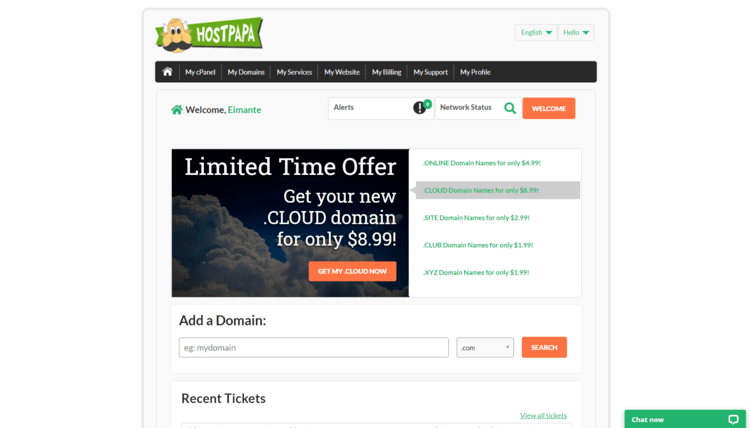
Right in the middle, there is a huge advertisement that encourages you to buy a domain name, while the important things are hidden in the menu bar at the top. All I can say is that I am not a fan.
Luckily, cPanel is just one click away - just click on the “My cPanel” button to access it. This interface also allows you to contact the support service (note the green “Chat Now” bar at the bottom of the screen), manage the services, and check if the HostPapa server network is working properly.
All HostPapa hosting management is based on cPanel, and it uses the standard version.
This one is immediately intuitive for new users and still familiar for those who have had more than one rodeo with web hosting services.
Here's what HostPapa's 100% standard cPanel interface looks like:
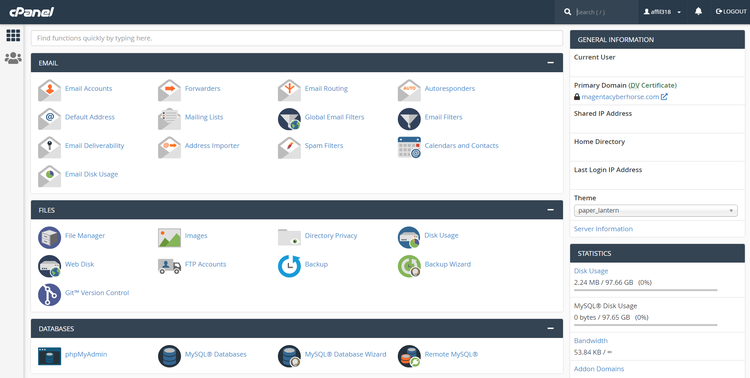
You'll use cPanel for a lot of different things, like installing WordPress, backing up, adding a domain name, email account, etc.
When I buy web hosting services, I always do this:
Based on this, I can tell you how easy and functional a provider is.

While it only takes a few minutes to complete all the tasks, I know that everything works well and that it's easy to navigate.
If I put in more than 5 minutes, something is wrong.
So HostPapa was successful, and I don't think it took a full 3 minutes to complete all the tasks.
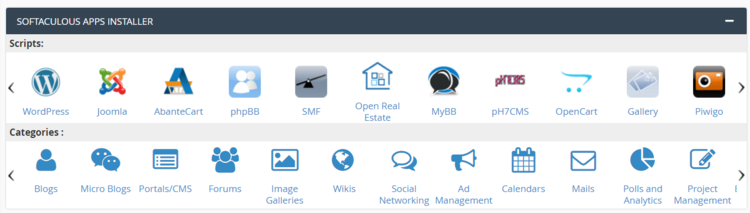
Installing WordPress at HostPapa is very easy. You just need to find the section Softaculous App Installer at the bottom of the cPanel and click on the “WordPress” icon.
This will automatically take you to the Softaculous installation page. Here is the screen that is displayed. Just click “Install.”
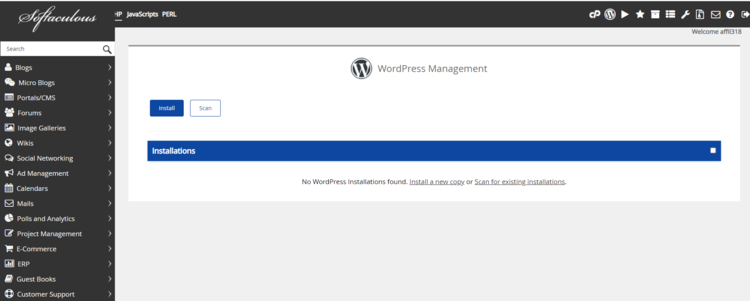
And now, fill in all the information fields so that your website is completely ready. I find it more accurate if I do it manually, rather than choosing the “Quick Install” option, which fills in the fields for you.
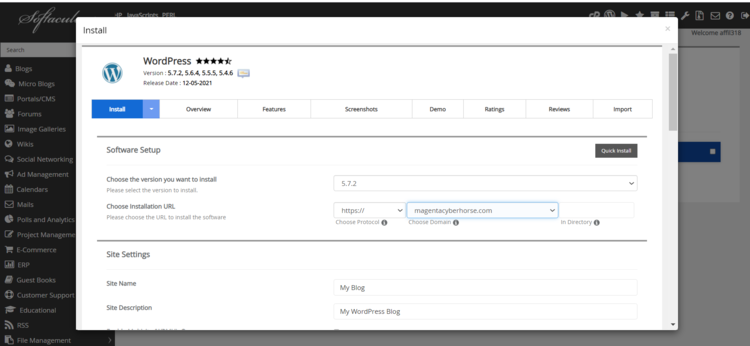
And that's all! Took a minute, right? Now, your website is live and ready to be customized to your heart's content.
Ease of use is definitely HostPapa's strong suit. Just like installing WordPress, creating an email account will only take you a minute. In the cPanel, you will find the section Email. There, simply choose “Email Accounts” and click to add a new email account.
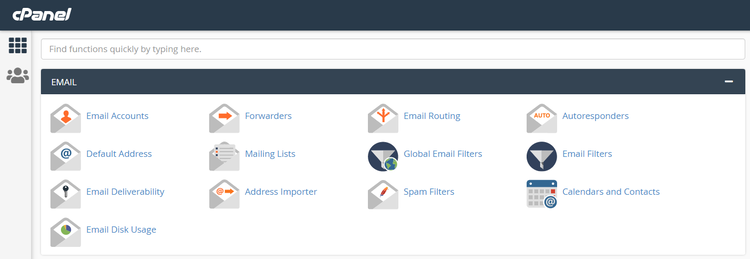
Here's what you'll see once you've done all that.
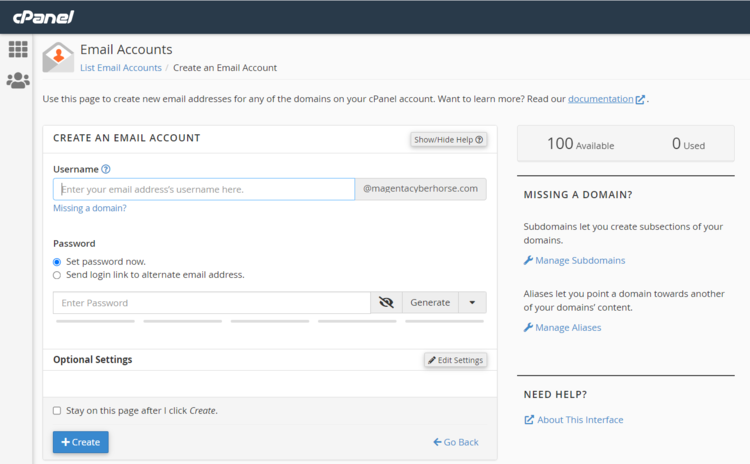
Yes, a bit more field filling, but one, two, and you're done here too! And you have a professional email account. Remember that these email accounts are stored on your server and are not suitable for massive marketing campaigns or frequent mailings.
At the end of the day, HostPapa is very easy and intuitive to use. Everything works perfectly and you will have no problem navigating the control panel. All the necessary tools, such as managing domains, emails, databases, and more, are there.
For this HostPapa review, I put the provider through three reliability and speed tests. While the vendor maintained a perfect score of 100% during the two weeks of the review, their response time was not the best. However, the provider presented a very good speed.
Let's take a closer look at the reliability, speed, and stability test results from this provider.
The first thing I tested at HostPapa was the reliability of the host. For this, I monitored the provider for about 2 weeks.
During this time, it maintained an impressive record of zero outages. The result is 100% perfect uptime. Simply put, this is an amazing result. Especially when HostPapa officially offers you a 99.9% uptime guarantee.
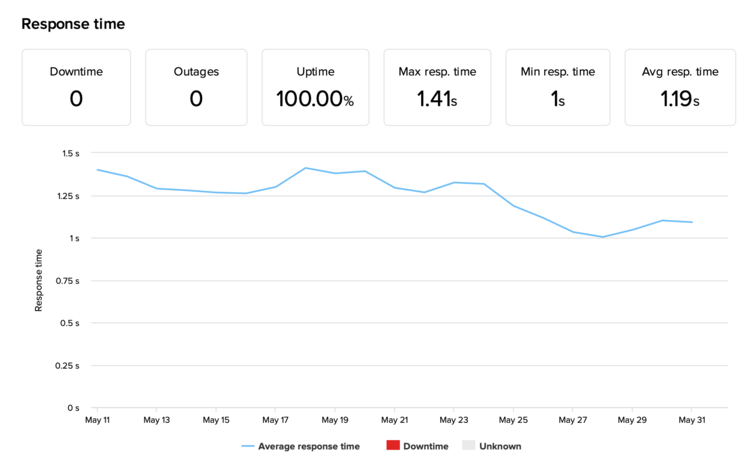
Its response time, however, is a slightly different story. The average response time is 1.19s. And while it's not the worst, it could be a lot better. For example, the average response time on the market is around 600ms.
So while your visitors won't complain about this figure, it's almost double the market average.
Overall, HostPapa has shown impressive reliability by maintaining 100% uptime. As for response time, it's not great, but there's nothing to worry about right now.
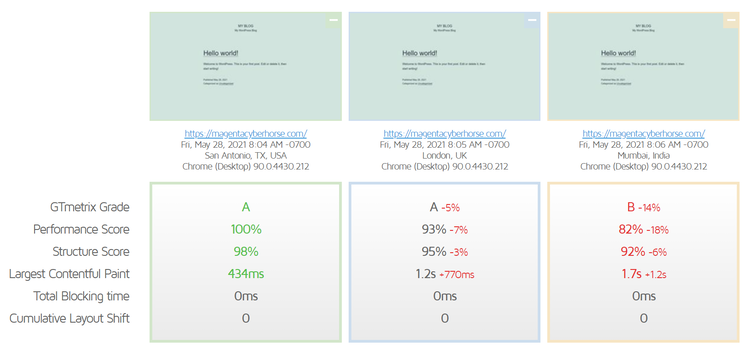
The second test concerns the speed of the website and what your visitors can expect. I first tested the loading speed of a blank site in the US, UK, and India.
Since my website is hosted in the United States, the best results were also obtained in the United States - the Largest Contentful Paint (LCP) was at 434 ms.
Although the United Kingdom and India showed significantly higher LCPs, they can still be considered good results.
But wait, why is LCP important?
LCP is one of the many measures taken by Google to rank websites on its results page. As long as this measurement does not exceed 2.5s, the site is more likely to be ranked higher. Or to rank up at all.
When purchasing your hosting plan from HostPapa, you can choose where you want your server to be located. HostPapa offers three possible locations: the United States, Canada, and Europe.
So, knowing that, you can say that HostPapa is doing very well so far. However, it is a lot of fun to look at an empty site. But what would it look like if we tested a fully built site ?
To do this, I installed an Astra theme with a Startup template and its content and I did the test again. This time his LCP was 1.2s.
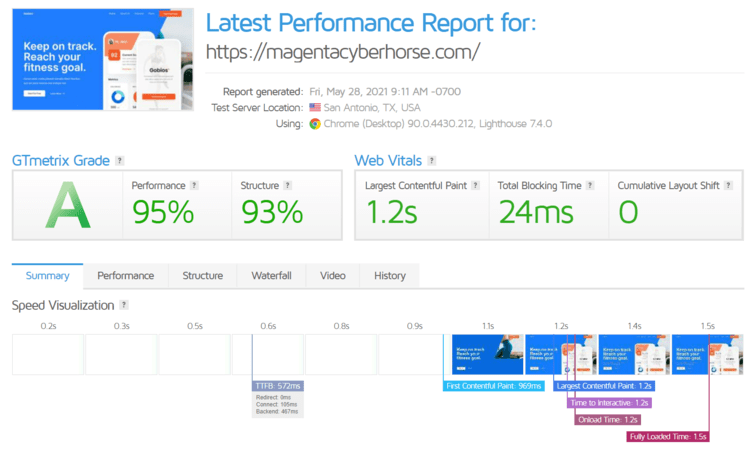
An increase in LCP is highly expected, as the more The site is heavier, the longer it will take to load. However, it fits within the recommended 2.5s, without any problem.
However, this is no longer the only measure you need to focus on. Your visitors are also concerned about how long the site takes to load and when they can start interacting with it. To do this, we look at the full load time, which is only 1.5 seconds. For a better visitor experience, this time should not exceed 3s, and HostPapa did, no questions asked.
Overall, HostPapa was very quick. The site was fast and loaded smoothly. However, I'm curious to see if the provider can handle increased traffic without slowing down.
HostPapa offers all the essentials like an SSL certificate, server-level firewall, and DDoS protection for free in the cheaper plans, while more advanced features come at a charge, or you have to buy the most expensive plan.

To be a bit more specific, here's what you get by default:
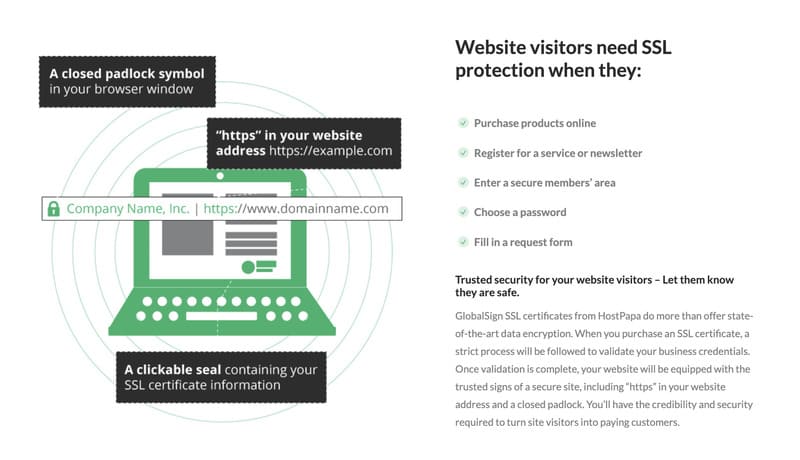
More advanced features are available with the Business Pro plan or at an additional cost:

Overall, HostPapa offers more than some providers in terms of security measures, but some important features like automatic backups come at a charge. However, whether you have a personal blog or a small business, the security features included should serve you well against the most common threats.
HostPapa calls their PapaSquad help desk, and it's available in English, Spanish, and French, which is impressive.
If you need help, you can contact HostPapa customer service through a live chat option, phone support, opening a ticket, or sending a fax. All of these options are available 24 hours a day, 7 days a week, and 365 days a year. Additionally, the vendor's knowledge base contains over 2,600 articles and guides.
It seems that the company is taking its support seriously. So I decided to check it out as part of this HostPapa review and turned to my preferred option, live chat.
I asked how to change my primary domain, and there was absolutely no waiting time. The agent was very polite and knowledgeable. He quickly explained to me what the procedure was and what I should expect. He also created a ticket to proceed with my request.
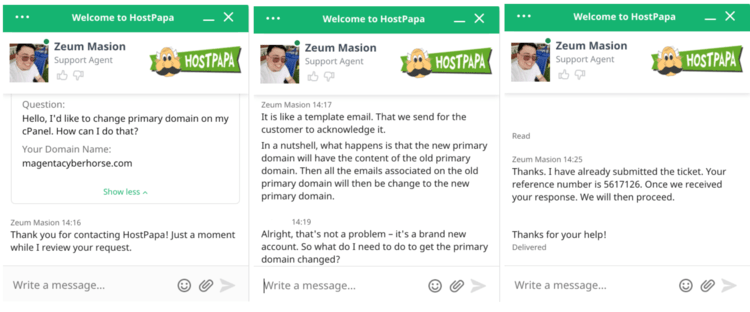
What pleasantly surprised me was that I received the ticket while continuing to chat with the agent. That's what I call great speed.
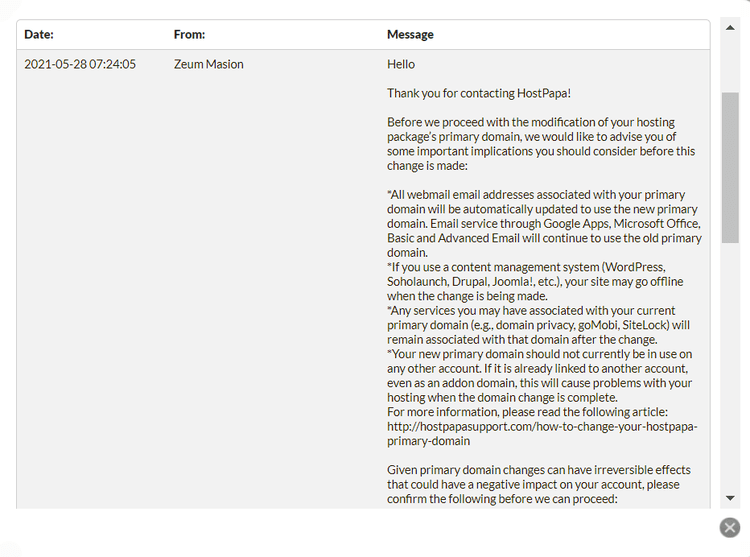
All I needed to do was confirm that I accepted the risks of changing my primary domain. Once I did, all the requested changes were completed in under 30 minutes.
So overall it was a great experience. I have seen that the live chat and ticket support work perfectly.
Remember that when you talk to a person, there is a human factor at play. That's why the customer support ratings of many other providers and HostPapa are so contradictory. Some people are connected to amazing experts, while others get trainee-level support. It's not something to disagree with, but it's good to be aware of it.
In addition to a live chat, telephone, and ticketing system, HostPapa offers an extensive knowledge base. There are over 2,600 articles, step-by-step guides, and tutorials. They are designed to help you learn everything you need about accommodation-related topics. It is also available in several languages.
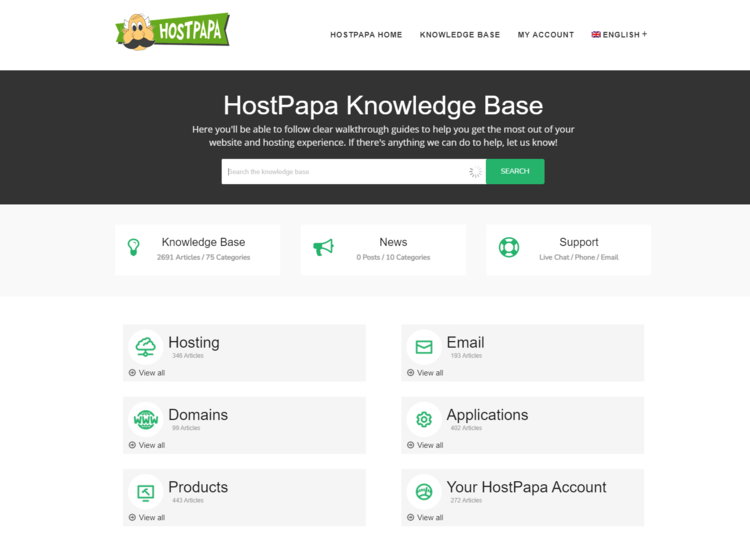
Everything is well classified, you will have no trouble finding the subject that interests you.
I even think that customer support and knowledge base, in particular, were one of Hostpapa's main selling points a few years ago. It's a bold statement, but it's one of the best knowledge bases I've seen.
Overall, HostPapa support is knowledgeable and fast. You have several options for getting help by contacting a real person or by looking at the knowledge base. While some agents may be more useful than others, it's just the human factor.
Individual training
If you are a beginner, HostPapa offers you a one-on-one training session with a professional. You should schedule a 30-minute session where you can ask an expert anything you need to know. Additionally, you can request guides and tutorials on topics that interest you.

Since I found this role to be unique in the accommodation industry, I decided to give it a try and see how things work out. And things went well. I turned into an absolute beginner and asked the expert to tell me how to install WordPress and make my website look a bit professional.
I was told the steps to follow, from installing WordPress to customizing my theme. The agent was thorough and I was given all the resources I needed to do exactly what I wanted to do. To say I was impressed would be an understatement.
Of course, if you are a veteran and need more advanced information, the expert will give it to you. But I think this feature is like a golden key, and I personally can't believe it's free.
HostPapa has an offering that focuses on small businesses.
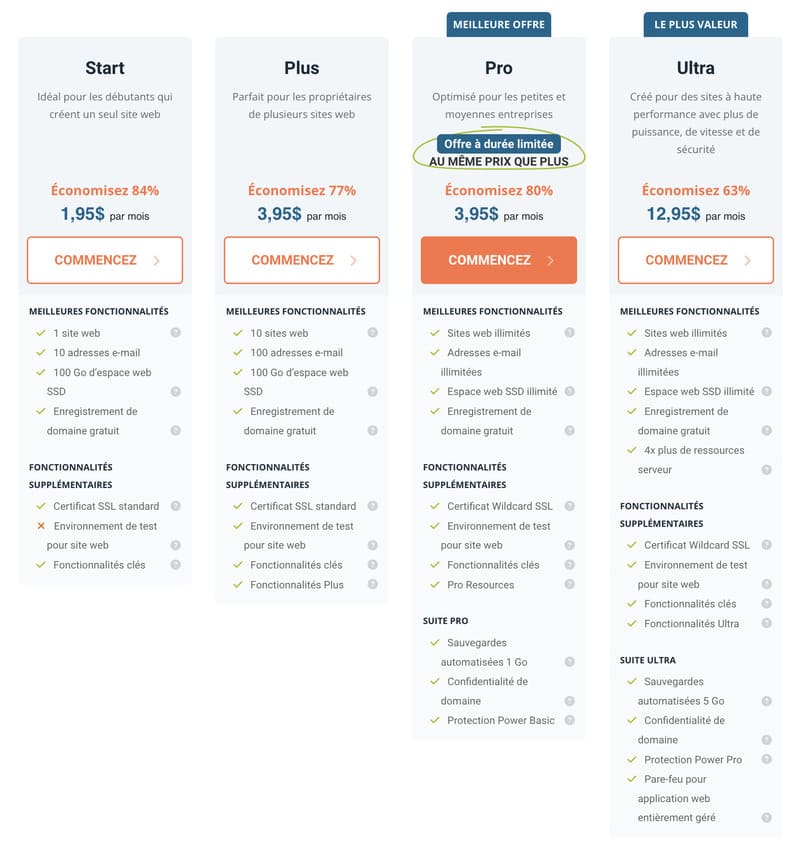
Shared hosting gets you started with an affordable option, while VPS is for those with popular sites or online stores. As for reseller hosting plans, which are relatively affordable, they can allow you to launch your own web hosting brand or design and develop websites for your customers.
But shared hosting is where the majority of people start, so that's my main focus.
When it comes to shared hosting plans, HostPapa makes a good impression. All three HostPapa plans come with free domain registration, unlimited bandwidth, a Cloudflare CDN, SSL certificates, one-on-one training sessions, and free email accounts.
Needless to say, the plans are packed with features and resources. The prices are not the lowest on the market, but they are average and you get what you pay for. Let's just say there aren't a lot of hosts that allow more than one website on their entry plans.
For this HostPapa review, I chose to go with the Starter version. Two websites are more than enough for many small businesses. Why not Business if the price is the same? Well, the main difference is in renewal prices. The renewal rate on the Starter plan is much lower, and I won't need more than 2 websites anyway.
Now, before you think about making a purchase, let's see how you can get the best deal with HostPapa.
HostPapa is a good hosting provider, but while it may not be what you expected for your website, there are numerous alternatives.
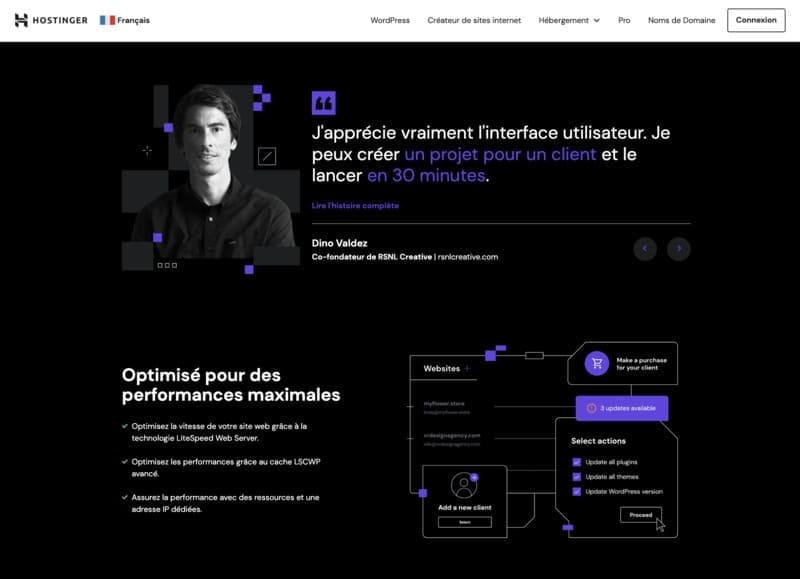
Hostinger is renowned for its approach focused on performance and accessibility in the field of web hosting. It offers a variety of hosting solutions, ranging from shared to VPS, and stands out for its competitive pricing and intuitive user interface, ideal for beginners and small businesses.

Hostinger is presented as an economical alternative to HostPapa, with excellent value for money. It is an ideal choice for those who are new to creating websites or who have basic web hosting needs.
FIND OUT MORE: Try Hostinger Now

SiteGround is a web host renowned for its stability, performance, and top-notch customer support. It offers web hosting solutions for WordPress, WooCommerce, and cloud services, suitable for both beginners and advanced users.
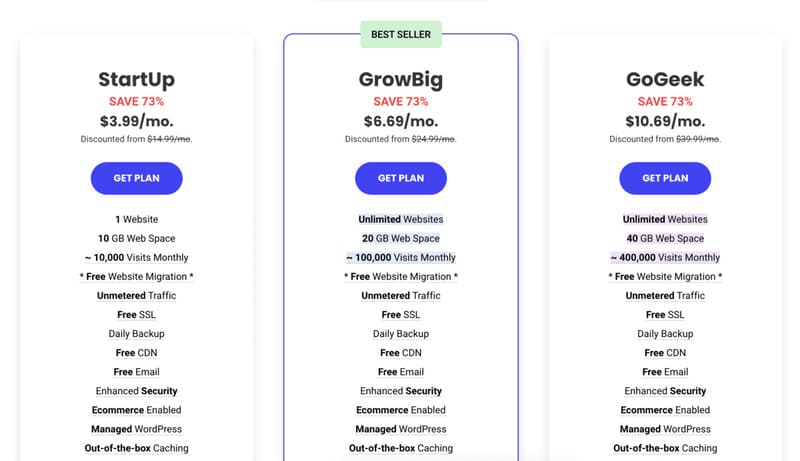
SiteGround stands out for its advanced technologies and customer service. Its rates are slightly higher than HostPapa, but it offers better performance and more robust features, especially for WordPress websites.
FIND OUT MORE: Try SiteGround Now

A2 Hosting is known for its fast and reliable web hosting solutions. Offering a wide range of services, including shared, VPS, and dedicated hosting, A2 Hosting is appreciated for its flexibility and speed technologies.
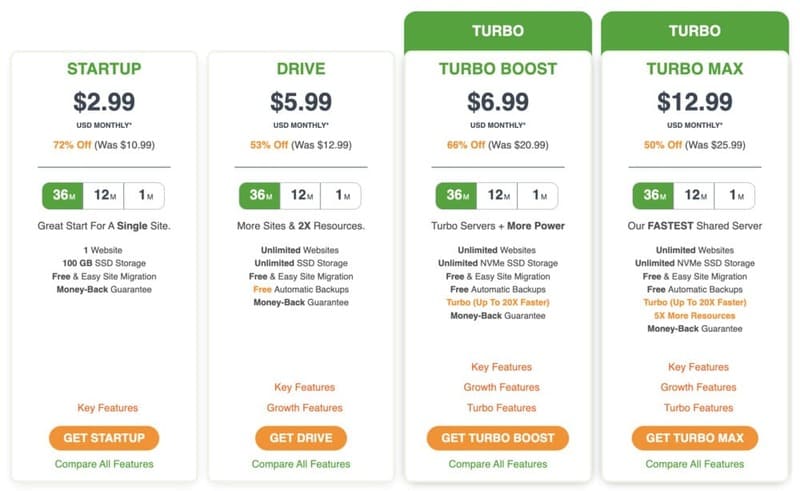
A2 Hosting is a great alternative for those looking for high performance and flexibility.
Its prices are competitive and it offers unique features like Turbo hosting, making it ideal for high traffic websites.
Yes, HostPapa supports WordPress, which you can set up using a 1-click installation on any of its plans. HostPapa also offers “WordPress hosting” plans, but they are the same as standard shared hosting.
HostPapa has servers in the United States, Canada, and Europe. When you buy a plan, you can choose the data center that is closest to your target audience.
This HostPapa review showed me that providers can change. A few years ago, I had a disastrous experience with HostPapa due to the poor performance of their server.
This time, Papa redeemed himself by showing reliable performance results. All in all, the plans offer good value for money, the servers are reliable and the use is very easy.
So if we take each aspect piece by piece, what is the final verdict?
HostPapa is achieving its goal, and I recommend that small business owners use it. All of HostPapa's features are meant to help you manage and grow your business website with few or no restrictions. Additionally, choosing the server location can be very useful if you have a specific target audience in mind. This can speed up the site considerably.