Group Attention : A significant optimization in the processing of requests.
Innovations integrated into Llama 2 are promising milestones for more efficient AI applications that are adapted to modern requirements.
Llama 2 Features: Meta's AI Prowess
Discover Llama 2, the flagship innovation of Meta, which broadens the horizon of language models with enriched characteristics.
1. Massive Adoption
Downloads : Over 30 million via Hugging Face, proof of the enthusiasm for Llama 2.
Cloud Engagement : AWS, Google Cloud, and Microsoft Azure adopted Llama, with AWS being the first partner for Llama 2.
Mass adoption reflects the trust and usefulness given to Llama 2 in industry.
2. Innovations and Startups
Use : Many startups, like DoorDash, base their innovations in AI generative on Llama 2.
Community Optimization : More than 7,000 derivatives have been created, improving benchmark performance by nearly 10%.
Llama 2 is a reliable foundation for innovators and startups embracingAI generative.
3. Performance and Reliability
Robust architecture : Performance and reliability to meet modern application requirements.
Token training : Training on a rich corpus of data, allowing the generation of text.
Performance and reliability are at the heart of the architecture of Llama 2.
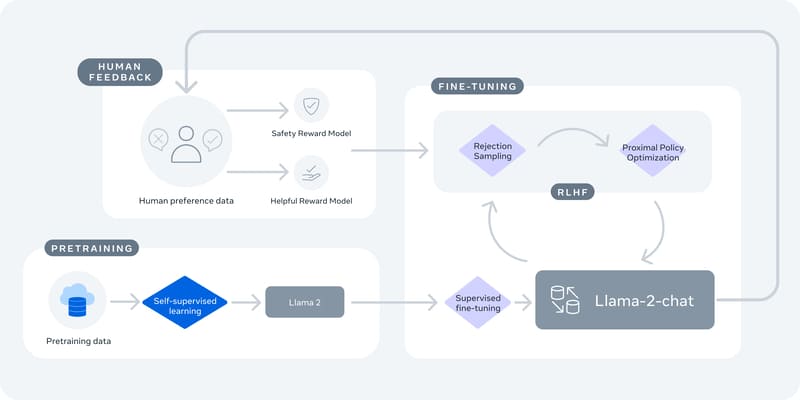
4. Optimization by RLHF
Human Feedback : Human intervention is crucial to refine the performance of Llama 2.
Reinforcing Learning : Advanced techniques for greater precision and relevance.
Optimization by RLHF is a pillar for improving the functionality of Llama 2.
5. Customization and Accessibility
Adaptability : Llama 2 offers the possibility of customizing the model according to specific requirements.
Meta-Microsoft partnership : Facilitated access on various platforms, broadening the horizon of possibilities.
Llama 2 paves the way for advanced exploration and customization, based on your needs.
Llama 2 rates
Llama 2 is offered free of charge for research and commercial use, a move that underscores Meta's commitment to promoting an open approach to AI. This free access allows companies, startups, and researchers to access tools developed at a scale that would be difficult to build by themselves.
resources
To fully exploit Llama 2, various resources are available:
Download the template and interaction with Llama 2.
Sessions Connect including workshops on construction with Llama models.
Technical documents : Provides details about the inner workings of Llama 2.
Research paper : Explore the science behind Llama 2.
Responsible Use Guide : Offers best practices for responsible use and security assessments.
Acceptable Use Policy : Establishes rules to ensure fair and responsible use of Llama 2.
These resources are crucial for understanding, evaluating, and using Llama 2 ethically and effectively.
Comparison of Llama 2 with other technologies on the market
Llama 2 stands out in the language model landscape in large part due to its availability in open source. Here's a quick comparison with some of the more notable models:
Performance : The 70B versions of Llama 2 are generally as good as GPT-3.5 and PalM on most benchmarks, although GPT-4 and PalM 2 outperform them.
Accessibility : Unlike OpenAI's GPT-3 and GPT-4, Llama 2 is open and accessible, allowing for deeper exploration and modification of the model.
Partnerships : Llama 2 benefits from a privileged partnership with Microsoft, facilitating its use on Azure, which can offer an advantage for developers already integrated into the Microsoft ecosystem.
This comparison highlights the unique advantages of Llama 2, particularly its openness and accessibility, which can accelerate innovation in the field of AI.
How to get started with Llama 2
1. Access to the Model
Access to the Llama 2 model is the critical first step.
Look for Llama 2 in the search bar and click the download button, Meta will ask you for some information before sending you a confirmation email
Once the model is downloaded, proceed to read the documentation to better understand how it works.
2. Documentation
The documentation is your guide to exploring the features of Llama 2.
Browse through the user guide sections and available tutorials.
Take note of sample code and best practice recommendations.
With a basic understanding of documentation, you are ready to join the Llama 2 community.
3. Join the community
Joining the community will allow you to connect with other developers and get help if needed.
Look for forums and discussion groups around Llama 2.
Ask questions, share experiences, and learn from others.
Now that you're connected with the community, it's time to move on to installing and configuring Llama 2.
4. Installation and Setup
Installing and configuring Llama 2 is an essential step that will determine how easy it is for you to work on your future projects. It may seem complex, but don't worry, we'll guide you step by step.
Platform choice
On your machine : Make sure you have a Python environment installed. If not, download and install Python from official site.
On the cloud : Platforms like AWS, Azure or Google Cloud provide ready-to-use environments for deploying Llama 2.
Search for Llama 2 in the search bar and click the download button.
Installation
Open your terminal or command prompt.
Type the following command and then press Enter: Pip install llama2
Setup
Consult the documenting to understand the configurations required.
Adapt the configurations according to your project and your environment.
Checking
In your terminal or command prompt, type the following command and then press Enter: Python -c “import llama2”
If there are no errors, the installation and configuration are successful.
Congratulations! You have successfully installed and configured Llama 2. Now you're ready to explore the features of Llama 2 and begin your journey into the world of generative AI.
5. Experimentation
It's time to get your hands on the code and see Llama 2 in action.
Start with simple code examples.
Try to create basic scripts to familiarize yourself with the features of Llama 2.
After this experimental phase, think of a practical project to apply what you have learned.
6. Practical Project
A practical project will give you hands-on experience working with Llama 2.
Choose a project that you are passionate about and that can be improved or automated with Llama 2.
Develop your project, test, adjust, and learn as you go.
Once your project is complete, share it with the community to get feedback and keep learning.
7. Share Your Work
Sharing your work allows you to get valuable feedback and help others.
Share your code and project results on platforms like GitHub or Llama 2 forums.
Join discussions, give and receive tips to improve your work.
Keep learning, exploring, and contributing to the Llama 2 community. You are now well on your way to mastering Llama 2!
What is Code Llama?
Llama Code Discovery: The fusion between Code and Language for intuitive programming.
Llama 2 expansion : Transcends the boundaries between code and natural language.
Code generation : Easily create code from natural instructions.
Language comprehension : Promotes better communication with systems.
Llama code - Python : Specialized for the Python language.
Code Llama - Instruct : Understands natural language instructions.
Model Sizes : Models of various sizes to balance performance and speed.
Reduced Latency : Improved responsiveness, ideal for code completion.
Code Llama, an essential tool for developers, makes programming accessible and interactive, paving the way for innovative AI applications.
Summary
Open innovation has always been at the heart of Meta's initiatives, and Llama 2 is just one example among many. The community is invited to join this technological adventure, to explore the potential of Llama 2, and to contribute to the future of generative AI.
🎁 TRY AI REVOLUTION FOR FREE
Notion AI: read less and decide faster
Ask one question across your pages, meeting notes, and databases. Notion AI surfaces the decisions, blockers, and next steps worth your attention.
Everyone gets complimentary AI responses. Upgrade to Business only after you use them up.
Open the meeting notes you have been avoiding and ask Notion AI for a one-minute decision brief.
.svg)