.svg)
Compare Podbean, Libsyn, and Buzzsprout podcast hosting platforms. Discover their pros, cons, and which is best for your podcasting needs.

Let's start with a step-by-step comparison between Podbean, Libsyn, and Buzzsprout:
Creating a podcast site is essential if you don't have your own website. Podbean, Libsyn, and Buzzsprout all offer this feature in their offerings.
Podbean allows you to create a website fairly quickly thanks to various pre-designed, paid, or free website themes.

You can choose a theme that best fits the niche and goals of your podcast. There are also options for customizing things like the header image, fonts, background colors, background image, style, subdomain, and more.
Paid plans also offer advanced customization options and a custom domain. You can quickly preview your site before publishing to get an idea of how the final product will look.
Libsyn comes with podcast page “mini-sites” that work as a place where you can send your visitors to access your podcasts. The page will include your podcast episodes, a quick summary of the episode, text messages, an HTML5 media player, social media widgets, and more.
This is what your final podcast site would look like:
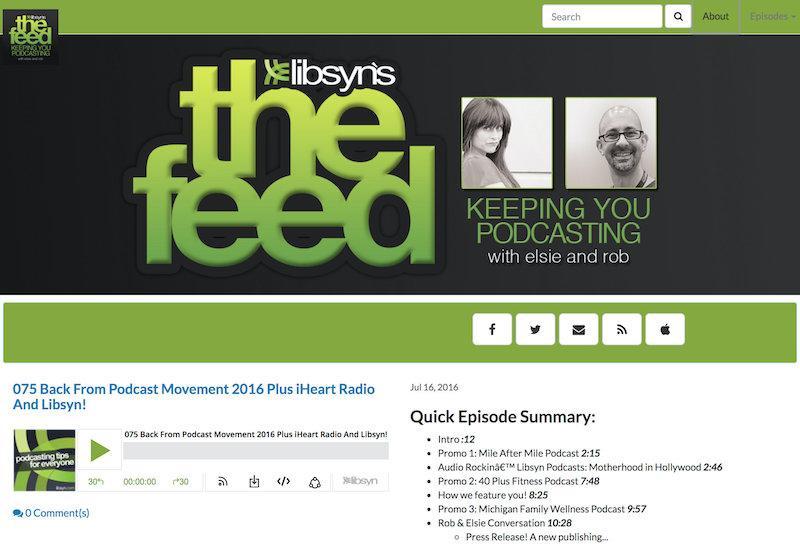
You can customize it to suit your podcast's branding by changing things like the header, theme colors, title font color, and more.
Buzzsprout also allows you to create a simple site to host your podcast, with a custom domain and social sharing options. There are also preview options for desktop and mobile sites.

You can change the site's background color and image to personalize your brand image. While there aren't a lot of customization options or even website templates, you have default pages that are easy to navigate.
Winner: Podbean.
Podbean is the clear winner for podcast creators who want a personalized site, thanks to its numerous website themes, custom domain, and versatile customization options.
If you already have a podcast site, you can simply embed the podcast player on your site. The embeddable player is also handy for sharing your content on podcast directories and applications.
Podbean's embeddable player is simple, no-frills, and highlights the header image and title of your podcast.

You can embed it on your website or blog page using a widget code. There are several customization options to suit your brand theme, including player color, height, font, and more.
Libsyn has a personalized and user-friendly HTML5 media player that allows you to view all episodes or just one episode. Besides audio, it can also distribute PDFs and videos through your RSS feed.

There are numerous customization options, including custom sizes, thumbnail settings, custom start time, reading direction, and custom colors.
Buzzsprout also has a built-in player builder for embedding podcasts on your website. You can customize colors and have complete control over listening.
The podcasting platform allows you to choose between two player options:

Simply paste the code provided at the far right onto the side of your site to embed and use the player.
Winner: Libsyn.
Libsyn is the winner here because of its more customization options and the ability to embed videos and PDFs.
Statistics and analytics help you determine how your podcasts are performing and whether or not your efforts are paying off.
Podbean provides comprehensive statistics and an overview of the performance of your podcasts, including downloads, trends, geographic distribution of listeners, and more.
You can also get a comprehensive overview of your podcast and user interaction based on the number of your followers, comments, and likes.
Here are all the stats you can track with Podbean:

You can even add user engagement information to understand why your episodes are working or not. However, you need to have one of the paid plans to access advanced statistics and user engagement information.
Libsyn provides statistics and audience information for IAB v2.0 certified podcasts. The IAB standards include the following filters and measurement practices for improved clarity.
The platform allows you to measure user agent statistics, overall popularity, audience concentration, destination statistics, social media statistics, total downloads, etc.

Here's everything you can measure with Libsyn:
It is also possible to export these trends and analyses using downloadable statistical reports. However, you need to buy Libsyn Advanced 400+ plans or higher to access Libsyn's advanced analysis and reporting features.
The Buzzsprout dashboard also provides access to metrics such as total downloads over time, listener statistics, the most popular podcast directories, and more.
The layout of the dashboard is user-friendly, making it easy for even a beginner to analyze the data.
Here's everything you can measure with Buzzsprout:

You'll also find a podcast predictor on your dashboard that predicts how many downloads to expect for your next episode.

Winner: Buzzsprout.
While they all provide similar information, Buzzsprout wins here because it offers advanced statistics with all of its plans. I also liked how Podbean presented all the statistics and data on their dashboard. It's very visual, making everything easy to analyze.
Podbean's monetization and advertising methods include:

You can track your revenue and ad impressions in the dashboard. All of these monetization options are also integrated into your dashboard. However, you need to buy advanced plans to use all of these monetization options.
Additionally, you can stream your events live and earn money by selling virtual tickets for your live events. Auditors can even send you virtual gifts that can be converted to US dollars, allowing you to get the money back.
Libsyn allows you to sell advertising space if your show gets at least 5,000 downloads in the United States within 30 days of its release. You will also need to fill out the W-9 form for tax purposes.
Libsyn offers two monetization and advertising options:
Revenue sharing is a 50/50 split on the payment of the advertising campaign.
Libsyn also has advertising assembly tools that allow you to include ads in your files by specifically targeting specific geographic locations. You can also sell subscriptions to your content to monetize audio and video content, PDFs, and bonus episodes.
Buzzsprout offers podcasters access to an affiliate marketplace to monetize their podcast. It helps you find and collaborate with affiliate programs like Allswell, Buzzsprout, Instacart, and more.
The tool will automatically add the affiliate link to your podcast episode notes once you become an affiliate. With the Buzzsprout affiliate program, you get 15% of total purchases, and your listeners get a 20% discount on the first order and free shipping for orders over $50.
Buzzsprout also partners with Podcorn to help you find appropriate brand sponsorships for your podcast.

You'll also be able to manage an unlimited number of podcasts under a single account and give an unlimited number of team members access to the account.
Winner: Podbean.
Podbean offers more varied monetization options, followed by Libsyn and Buzzsprout.
Podbean allows you to submit your podcast to the most well known podcast directories, including Apple Podcasts, Google Podcasts, Spotify, Amazon Music, etc. Other options include Pandora, TuneIn+ Alexa, iHeartRadio, PlayerFM, Listen Notes, Stitcher, Podcast Addict, and Deezer.

Simply copy and paste the URL of your RSS feed to submit your files to these applications.
Additionally, submitting your podcast episodes to Apple Podcasts automatically makes them available on directories like Overcast, Pocket Cast, Castro, and Castbox.
There's also an “Alexa Skill” feature that automatically makes all new podcast episodes available on Alexa devices. Your podcasts are also available instantly in the Podbean apps for iOS and Android.
Podbean also offers an automatic social media sharing feature that allows you to automatically share your new podcast shows on connected social media channels. It allows you to share your content on Facebook, Twitter, LinkedIn, YouTube, Tumblr, and WordPress.
In addition, its advertising management solution allows you to focus on producing your podcast by automatically inserting your ads.
Libsyn allows you to distribute and host not only audios but also PDFs and videos. You can submit your podcasts to directories like Spotify, Apple Podcasts, Google Podcasts, Deezer, Soundcloud, TuneIn, and more.
Social media sharing options include Facebook, LinkedIn, Twitter, YouTube, and more.
You can use the built-in bulk editing tools to add or remove content from any destination.
Other characteristics of the distribution are as follows:
Buzzsprout allows you to submit your podcasts to the following directories:
Once listed in Apple Podcasts, your podcasts will automatically appear on podcasting apps like Overcast, Castro, Catbox, Podfried. You can also share your podcasts on social channels like Facebook, Instagram, Twitter, and LinkedIn to find new listeners.
Additionally, Buzzsprout offers several other advanced promotion and marketing tools to reach a wider audience. For example, its “Visual Soundbites” feature allows you to create a video trailer from a short portion of your podcast audio.
Other advanced features include
Winner: Buzzsprout.
Buzzsprout offers far more advanced promotion and distribution features than Podbean and Libsyn. However, many podcasters may also find Libsyn's bulk editing tool very useful.
Podbean allows for free and paid integrations. For example, you can automatically send emails to your subscribers Mailchimp when you release new episodes, free of charge.
THEintegration with Mailchimp also allows you to collect email addresses.
It also integrates with free tools like Dropbox, Vokal Studio, Google Analytics, SEO Meta Tags, Article Amplifier, and more.

Libsyn allows direct integration with WordPress thanks to its Libsyn Publisher Hub WordPress plugin. This plugin allows you to publish podcasts directly from WordPress and ensures that the files and the RSS feed are hosted off your web browser's server.
Additionally, Libsyn's built-in onPublish publishing feature allows publishing to over 20 podcast platforms from a single dashboard. Libsyn's RSS feed and OnPublish also connect you to your audience on platforms and applications like Spotify, Pandora, Apple Podcasts, and more.
Buzzsprout offers a paid built-in audio transcription feature, starting at $0.25 per minute. It's ideal for SEO, converting audio episodes into blog posts, or reaching new audiences.
You will also get a free podcast WordPress plugin that you can integrate into your podcast player or your site.
The platform also integrates with podcast tools like Chartable, Alitu, Podtrac, and Hindenburg Journalist.

You can connect directly to theBuzzsprout API for more advanced integration options.
Winner: Podbean.
The big winner is Podbean, with its native plugin options.
Podbean offers an application for iOS and Android devices that allows you to broadcast your podcasts live orrecord and edit your podcasts, and then to publish them. The Podbean Podcast app has over 1 million active users and several built-in tools to improve your podcasting experience.
The Podbean mobile application allows you to:
The mobile app also helps you stream your bonus episodes and content reserved for sponsors to premium users. It also offers free storage space, promotional opportunities, and social sharing tools.
Listeners also benefit from features like automatic updates, notifications of new episodes, personalized playlists, and recommendations.
Libsyn has its own custom iOS and Android apps, which are available on the Google Play and Amazon marketplaces.

It allows users to create lists of their favorite episodes. You can also use custom colors and graphics to suit your brand theme.
The other characteristics are as follows:
For Buzzsprout, the site works like a mobile application on the side of your listeners. They can access it through the Add to Home Screen feature on iOS and Android devices.

Winner: Podbean.
Podbean wins in the app category because Podbean's Podcast app offers more advanced features for users and podcast hosts.
Podbean provides podcasters with customer support through an email ticket and a live chat option. There is no phone call option.
It also offers extensive support via its knowledge base. The knowledge base contains video tutorials, getting started guides, ad support, a live streaming guide, an application guide, free webinars, a developer guide, plugin support, and other resources for podcasters.
Libsyn has a support blog, a community blog, video tutorials, and a knowledge base. You will also find several guides, in particular on the How to launch and plan your podcast.
Their email support staff is available to help you Monday through Friday, 9:00 a.m. to 5:00 p.m. The Libsyn System Status also allows you to report system failures, the free monthly podcasting quickstart web seminar, and legal help.
Buzzsprout support includes detailed guides on how to start a podcast, a blog, platform statistics, the WordPress plugin guide, the Buzzsprout API guide, and more.
The help desk also includes questions and FAQs on topics like integration, WordPress plugins, directories, and other podcasting features. You can also take advantage of the search option to browse anything you want.

There's also a press kit where you'll find valuable resources, including Buzzsprout logos, colors, screenshots of the app, etc. They also have a YouTube channel and a private community on Facebook.
For direct support, you can get in touch with their team via email. There is no phone call or live chat option.
Winner: Podbean.
Podbean is the winner in this area, as it offers a live chat option, email support, and self-help guides.
The other two podcasting platforms only allow you to contact them by email.
Initially, you get a freemium plan that offers five hours of total storage, 100GB of bandwidth, and a few limited services and features. Then there are three paid plans.
Podbean's paid plans include:

All of these plans offer unlimited storage space, unmetered bandwidth, advanced statistics, Pro themes, RSS feeds, etc. There are a few variations in their customization options and features. For example, you'll get the Patron account feature only with the unlimited Plus and Business plan.
Libsyn does not offer a free plan. You have six payment plans, starting at $5 per month.
Paid plans include:
You can opt for advanced plans for more storage:

You can try LibSynPro for more features, storage space, and personalized pricing. Its features include dynamic ad insertion tools, SSO private podcasting, statistics that comply with the IAB v2.0 standard, and more.
Buzzsprout offers a freemium plan for up to 90 days and three paid plans.
Paid plans cost:
The free plan lets you download two hours of audio per month, making it a great choice for beginners or those creating short, infrequent episodes.
The first paid plan allows three hours of audio, the second six hours of audio, and the third 12 hours of monthly downloads. You can also download more content by paying an additional amount per hour for each plan.
All paid plans offer full access to statistics, built-in players, podcast directories, and a podcast site.
Winner: Podbean.
Podbean is the winner here because it offers an unlimited free plan that allows five hours of audio download per month. However, you will need to make the final decision based on your needs and business goals.
Podbean, Libsyn, and Buzzsprout all offer comprehensive features for creating, distributing, and monetizing podcasts. Nevertheless, they all have specific advantages and disadvantages.
Here's a quick look at the pros and cons of all of these podcast tools.
Benefits
Disadvantages
Benefits
Disadvantages
Benefits
Disadvantages
Podbean, Buzzsprout, and Libsyn are some of the best podcast hosting platforms. Prices and features vary slightly, but all three platforms allow you to manage all aspects of your podcast and create a podcast hosting site.
Try Podbean if you want unlimited storage and hosting services at an affordable price Their $9 per month unlimited Audio plan is a great option if you only have one podcast. You can opt for the Unlimited Plus and Business plans if you want to monetize your podcasts.
Buzzsprout is the most suitable for beginners thanks to its automatic episode optimization function and its advanced podcast promotion functions. Its free plan is great, and Buzzsprout's publishing interface is easy to use.
Finally, Libsyn's advanced professional features are better suited if you have existing podcasts and if you know how much storage is needed. It is the ideal solution for professionals and businesses. Libsyn's basic offerings are also attractive.