.svg)








Complete guide to getting started with WP Engine
WP Engine revolutionizes WordPress hosting in 2026. Gone are the complex cPanel interfaces and unexpected outages.
This managed platform propels your WordPress site to new performance heights, with military-grade security and astounding simplicity.

Overview and accessing the User Portal
WP Engine replaces cPanel chaos with a clean, modern interface. Head to my.wpengine.com to access your command center and set up your resources:
On your first login, an intelligent onboarding process guides you:
- Define your profile (developer, marketer, owner)
- Select your WordPress level
- Customize the interface to your needs
- Enable relevant ecosystem notifications
The User Portal is organized around logical sections in the sidebar: Dashboard for overview, Sites to manage your projects, Users for permissions, Products for premium tools, and Developer Tools for advanced features.
Creating your first WordPress site

From the Sites section, click the green "Add Site" button in the top right. WP Engine offers two philosophies:
Personal site: Counts toward your quota, ideal for permanent projects Transferable site: Doesn't consume your quota, perfect for agencies
Five configuration methods are available:
| 🔍 Method | ⏱️ Estimated time | ⚡ Difficulty | 👥 Recommended for |
|---|---|---|---|
| Build new (Genesis) | ≈ 5 min | ⭐ Easy | Beginners wanting a quick site with Genesis framework |
| Build new (Guided) | ≈ 10 min | ⭐⭐ Very easy | Novices benefiting from step-by-step assistant |
| Automatic migration | ≈ 20 min | ⭐⭐⭐ Medium | Existing sites with integrated migration plugin |
| Manual migration | 1–2 h | ⭐⭐⭐⭐ Complex | Critical sites requiring full control (FTP, databases) |
| Clone existing | ≈ 3 min | ⭐ Easy | Quick duplications (staging → prod, site copy) |
Configuring essential details
The form requests three critical pieces of information:
Site name: Modifiable descriptive name (e.g., "Marketing Blog 2026") Environment name: Permanent technical identifier (e.g., blogmkt-prod) Environment type: Production to start
Enable Smart Plugin Manager for secure automatic updates. The Site grouping option organizes your projects by client or team. Additionally, WP Engine includes free Let's Encrypt SSL certificates in all plans, ensuring secure connections for your sites.
Click "Add Site". Creation takes 5-15 minutes.
During this time, WP Engine provisions servers, installs the latest WordPress version, applies proprietary optimizations, generates temporary SSL certificate, and configures automatic backups.
Accessing WordPress and post-creation setup
Once created, click on your site to access the Overview page.
The blue "WP Admin" button instantly connects you to WordPress through Seamless Login (no password required).
To add your custom domain:
- Domains section → "
Add Domain" - Enter your domain
- Retrieve the provided IP and CNAME
- Configure at your registrar
- Enable free SSL in the SSL section
Managing multiple environments
WP Engine offers three environments per site:
- Production: Live site with maximum performance
- Staging: Clone for risk-free testing
- Development: Sandbox for experimentation
To create staging: "Add environment" → "Copy existing" → Name → "Create". The clone is ready in 3-5 minutes.
The "Push to" and "Pull from" buttons synchronize your environments. Recommended workflow: Dev → Staging → Production for deployments.
Essential tools and advanced features
Backup system (Backup section):
- Automatic daily backups (30-day history)
- Manual creation before major changes
- 2-click restore with preview
- Automatic backups retained up to 60 days, providing additional data security.
SFTP access (Users and SFTP):
- Host:
xxx.sftp.wpengine.com - Port:
2222 - Automatically generated credentials
Included premium extensions:
- Smart Plugin Manager (automatic updates)
- Global Edge Security (CDN + WAF at $15/month)
- Advanced Custom Fields Pro (license included)
- 24/7 Site Monitoring
Developer Tools for pros:
- Local by WP Engine (local development)
- SSH Gateway with WP-CLI
- CI/CD integrations (GitHub Actions, Bitbucket)
Support and optimizations
24/7 support is accessible via chat icon or "Support" button. Response times by plan: 2 hours (Startup), 30 minutes (Growth), 15 minutes (Scale).
Recommended performance optimizations:
- Enable Object Cache (Redis) for +40% speed
- Configure custom CDN rules
- Always use the latest stable PHP version
- Enable Smart Plugin Manager for auto updates
Security checklist:
- Password protection on staging/dev
- Mandatory 2FA for all users
- Security notifications enabled
- Monthly backup restore testing
The Automattic vs WP Engine conflict: a battle dividing the WordPress ecosystem
The conflict that has pitted Automattic (Matt Mullenweg's company) against WP Engine since September 2024 represents one of the most significant crises the WordPress ecosystem has ever known. This conflict led to the banning of WP Engine teams from WordPress.org infrastructure, marking a significant escalation in tensions between the two entities.
This battle, rooted in questions of financial contributions and governance, quickly degenerated into open warfare with major repercussions for the entire community.
The origin: a question of big money and contributions
At the heart of the conflict lies an essentially financial dispute disguised as a philosophical debate about open source.
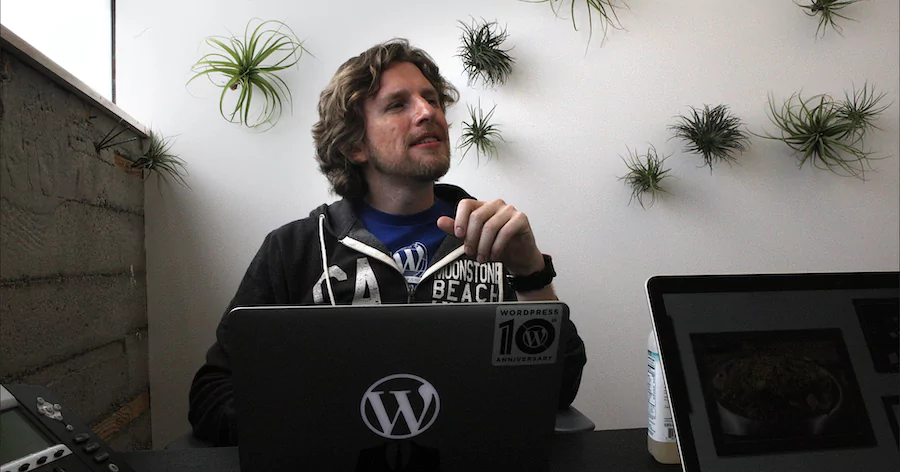
Matt Mullenweg, WordPress co-founder and Automattic CEO, criticizes WP Engine for generating an estimated revenue of $400 million in 2024 thanks to WordPress, without contributing proportionally to its profits.
According to Mullenweg, WP Engine dedicates only 40 hours per week to WordPress development, compared to 3,900 hours for Automattic.
Tension reached its peak when Automattic demanded that WP Engine pay 8% of its revenue in royalties for using the "WordPress" and "WooCommerce" trademarks, potentially tens of millions of dollars annually.
The explosive keynote at WordCamp US 2024
On September 20, 2024, at WordCamp US in Portland, Matt Mullenweg transformed his closing presentation into a veritable indictment against WP Engine.
In what he himself called the "spiciest Word Camp presentation," he publicly called WP Engine a "cancer for WordPress," accusing the company of misleading its customers into believing it was officially affiliated with WordPress.
Mullenweg also targeted Silver Lake, the investment fund that owns WP Engine (valued at $102 billion), accusing it of only caring about return on investment without regard for open source values. The conflict between Automattic and WP Engine is currently in the hands of U.S. courts.
He even announced that "this might be the last WordCamp where WP Engine will have a booth."
Technical and legal escalation
The consequences of this public attack were immediate and dramatic:
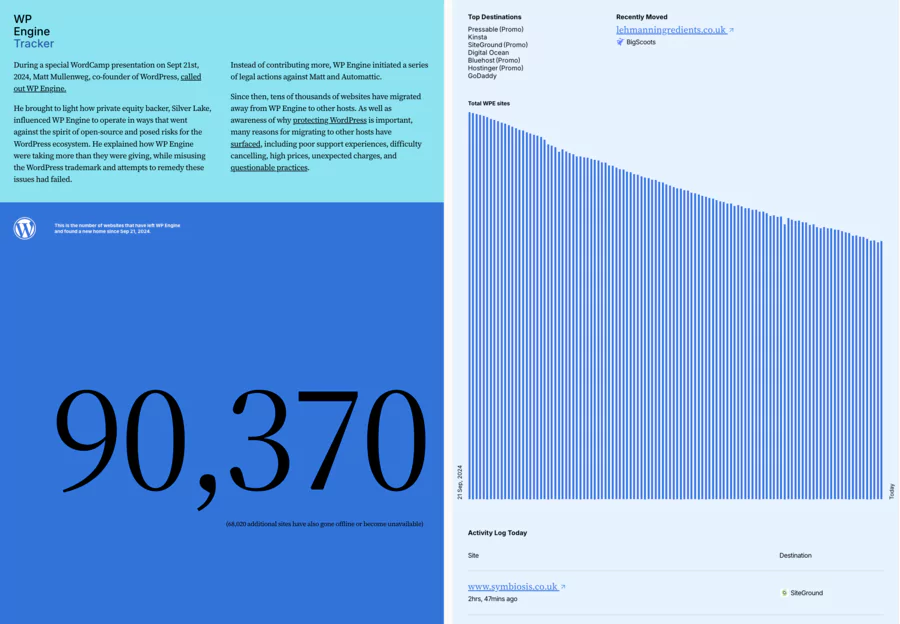
Automattic's actions:
- Blocking WP Engine's access to WordPress.org resources as of September 24, 2024
- Taking control of the Advanced Custom Fields (ACF) plugin, renamed "Secure Custom Fields"
- Launching the "WP Engine Tracker" in June 2024, a controversial tool monitoring domains leaving WP Engine
- Aggressive recruitment of WP Engine employees
WP Engine's legal response:
- Cease-and-desist letter sent on September 23
- Lawsuit filed on October 3, 2024 for extortion, defamation, and unfair competition
- Revised complaint in November 2024 invoking Sherman Act and Lanham Act antitrust laws
Mixed community reaction
Contrary to Matt Mullenweg's expectations, the WordPress ecosystem globally did not appreciate this aggressive public approach.
The community proved divided and concerned:
- Method criticism: Many developers and users denounced Mullenweg's approach as "reckless and unkind"
- Governance concerns: The centralization of power in Automattic's hands raises fears for the future of open source
- Loss of trust: Unilateral actions (blocking access, taking control of plugins) have shaken the community's confidence in WordPress.org's neutrality
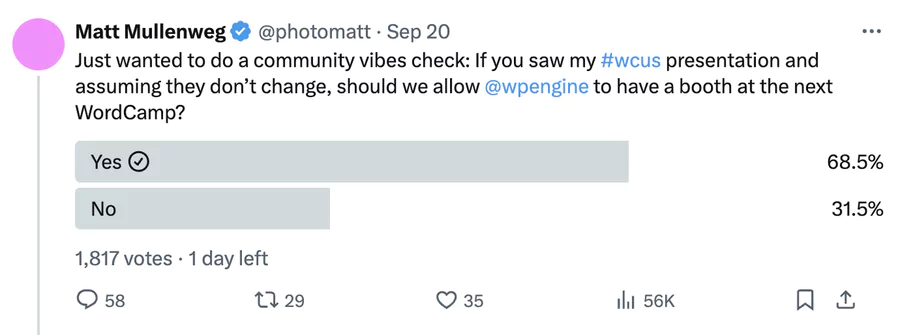
A Twitter poll launched by Mullenweg himself to determine whether WP Engine should be banned from WordCamps resulted in a majority favoring WP Engine's retention, illustrating the gap between his expectations and the reality of community opinion.
Recent judicial decisions
On December 10, 2024, a California court issued an important decision in favor of WP Engine, granting a preliminary injunction that restores the status quo.
Automattic was forced to:
- Cease all interference with WP Engine's access to wordpress.org
- Restore login credentials and resources
- Remove the discriminatory mention on the login page
This judicial decision marks a significant turning point and underscores the growing tensions within the WordPress ecosystem.
The WordPress project has demonstrated its resilience, maintaining approximately 43% of the web market share.
Consequences for the ecosystem

This conflict reveals major structural issues that go beyond a simple commercial dispute:
- Governance question: Who really controls WordPress and its community resources?
- Business model: How to reconcile commercial interests with open source values?
- Community trust: Automattic's unilateral actions call into question the supposed neutrality of WordPress.org
Paradoxically, this battle has highlighted the economic power of the WordPress ecosystem: with a global economy estimated at $596.7 billion in 2020, WordPress represents a considerable financial stake that explains the intensity of the conflict.
The community now watches with attention the evolution of this crisis, fearing that this war between giants will ultimately harm the entire WordPress ecosystem and its millions of users worldwide.
Conclusion
WP Engine radically transforms the WordPress hosting experience in 2026. The platform eliminates traditional technical complexities while offering enterprise-grade performance and security accessible to all. Managed hosting platforms provide world-class performance adapted to business scalability. WP Engine ensures excellent 100% uptime during performance testing.
The numbers speak for themselves: loading times under 500ms, 26 billion attacks blocked annually, expert support available 24/7, and three environments included in each plan. This robust infrastructure amply justifies the higher initial investment compared to standard shared hosting.
For web professionals, agencies, and serious businesses, WP Engine is no longer an option but a necessity. The productivity gained through integrated tools (automatic staging, Git deployments, global CDN) quickly offsets the monthly cost. Developers save configuration hours, marketers sleep peacefully knowing their site is secure, and owners focus on their business rather than technical maintenance.
The WP Engine ecosystem continues to evolve with constant innovations: AI to optimize performance, native integrations with modern development tools, and support that truly understands WordPress. In 2026, choosing WP Engine means investing in peace of mind and sustainable growth of your online presence. Additionally, WP Engine complies with SOC-2 and ISO 27001-2013 security standards, ensuring advanced protection for your data.
WP Engine FAQ
Is WP Engine suitable for web hosting beginners?
Yes. The User Portal dashboard is more intuitive than cPanel, with website creation in 10 minutes. 24/7 support (English, French during business hours in France) and automatic backups simplify content management. The learning curve is gentle for a CMS like WordPress.
What's the difference between WP Engine and standard €5/month web hosting?
Standard hosting lacks WordPress optimization. WP Engine offers optimized servers, caching via EverCache, global CDN, free SSL, testing environments, and expert support.
Example: a site on WP Engine gains 73% in loading time, boosting conversion rate (src: WP Engine, 2026).
Can I host multiple websites on a single WP Engine plan?
Yes, depending on the plan (src: WP Engine, 2026):
- Startup ($20/month): 1 site
- Professional ($50/month): 3 sites
- Growth ($95/month): 10 sites
- Scale ($241/month): 30 sites
- Enterprise: Unlimited sites Testing environments (staging/dev) don't count toward the quota.
Which WordPress plugins are prohibited on WP Engine?
WP Engine blocks ~70 plugins (out of 60,000+) to avoid conflicts with its caching, security (Secure Custom Fields), or automatic backups.
Examples: caching plugins (unnecessary with EverCache), some backups, or incompatible security plugins. Alternatives are provided (src: WP Engine Docs, 2026).
How does website migration to WP Engine work?
Three options:
- Automatic plugin: WP Engine Automated Migration, ~20 min.
- Manual: Via phpMyAdmin/FTP for database.
- Assisted: Free, managed by experts for e-commerce or multi-sites. Average time: 20 min (simple site) to 8h (complex) (src: WP Engine, 2026).
Does WP Engine handle emails?
No, WP Engine focuses on WordPress web hosting. Use providers like Google Workspace ($6/month), Microsoft 365 ($4/month), or SendGrid for emails, configured via WP Mail SMTP.
Will my sites be faster with WP Engine?
Yes. 2026 statistics:
- Loading time: -73% vs shared hosting.
- PageSpeed: 90+ without optimization.
- TTFB: <200ms thanks to Cloudflare CDN.
- Uptime: 99.95% guaranteed. Global datacenters ensure high availability (src: WP Engine).
What happens if my site goes viral?
Scalable architecture absorbs traffic spikes via auto-scaling. A notification offers an upgrade if limits are exceeded, without downtime (unlike other hosts).
How does WP Engine protect against hacks?
In case of hacking (rare):
- Immediate 24/7 support.
- Restore via automatic backups.
- Expert cleanup and detailed report.
- DDoS protection, WAF, and SSL included. GDPR/SOC 2 compliance (src: WP Engine, 2026).
Are WordPress updates automatic?
- Minor updates: Automatic (security).
- Major updates: Manual with alert.
- Plugins/themes: Smart Plugin Manager tests before applying to avoid errors. This protects the WordPress ecosystem. WP Engine automatically updates WordPress and PHP to secure sites. WP Engine also offers an access log monitoring feature to maintain visibility on users.
Are there hidden fees?
No, everything is transparent: CDN, SSL, backups, and support included. Paid options: Global Edge Security ($15/month), GeoTarget ($25/month), bandwidth overages ($40/100GB).
Can I test WP Engine before committing?
Yes:
- 60-day money-back guarantee.
- Demo on request (wpengine.com).
- Free dev environment.
- Free migration on annual plans.
Is the price worth it for a small site?
A €5/month host + plugins/CDN/SSL/support costs ~€55/month separately. WP Engine ($20/month) integrates everything, optimized for WordPress, ideal for a professional online presence.
What's the connection between WP Engine and Matt Mullenweg?
Matt Mullenweg, Automattic founder (WordPress.com), criticized WP Engine in a controversial 2024 article, accusing lack of contribution to the WordPress ecosystem (src: X posts, 2024). WP Engine responded by highlighting its strategic partnerships and support for WordPress conferences.
Does support speak French?
Main support in English 24/7, but France support available in French during business hours. WP Engine offers 24/7 customer support, but primarily in English and with a tiered system. Active French documentation and community for mutual assistance.