.svg)
Discover the best product management software tools. Compare features, pricing, and use cases to choose the right solution for managing your projects.

Here are my picks of the best product management tools.
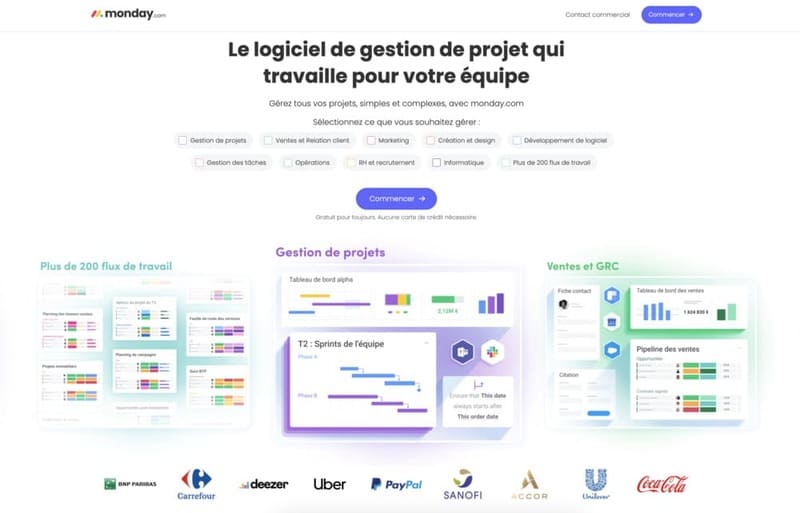
Monday.com is widely used as a project management tool, but its functionalities can be easily adapted to product management. It is a software that is completely cloud-based and allows for transparent monitoring, management, and product development.
The best part about Monday.com is that it can adapt to any team size; therefore, it can develop agile and flexible workflows. Monday.com also functions as a agile project management tool, making it the most versatile tool on this list.
Plus, it's highly customizable, which means you can manage different types of products using this tool, from software development projects to electronic products.
Another reason for the popularity of this tool is that it allows you to automate product development tasks and reduce human error. You can also integrate it with other applications like Slack and GitHub to create your own custom product management system; it even comes with a dedicated API.
In addition to planning, tracking, and managing daily product development tasks, Monday.com helps create product roadmaps. It even allows teams to clearly define ownership and better collaborate in agile product development.
Here are some of the features on Monday.com that can help with product design and development:

When it comes to pricing plans, monday.com gives you lots of options and flexibility. The minimum team size you can choose for paid plans is three seats, and prices increase with the number of seats and the level of the plan you opt for.
Take a look at the price levels that monday.com offers:
SEE MORE : Start 100% free with monday.com

ClickUp is another project management tool that also acts as product management software. It's a versatile tool that increases productivity and ensures seamless communication between product team members.
It includes all the usual elements of project management, such as lists, calendars, and tables. There are even features like Scrum Points, which help businesses using this methodology for product development. You can also automate the entire task management system using custom algorithms.
This tool is ideal for product teams that work remotely, as it facilitates better collaboration through document management and goal tracking. Regardless of the type of product you're building, ClickUp can enable your team to develop product strategies and execute them quickly.
In terms of the number of functionalities, ClickUp It's not made in lace. Its broad range of features can be customized to manage multi-purpose product development. From agile board views to workflow automation, you won't miss a thing using this application.
Here's a list of what ClickUp has to offer product managers and teams:

When it comes to pricing, ClickUp offers very simple plans. There are only two plans: the free plan, which is free forever, and the unlimited plan, which has no restrictions. Below is a brief overview of each option to help you make your decision.
1. Forever Free Plan
2. $5/member/month unlimited plan
SEE MORE : Start with ClickUp for free

Wrike is best known as a workflow management tool, but it's also a great software for managing products and prioritizing workflows. It is a versatile tool that takes care of all levels of product management, from business to individual.
This tool allows you to customize your projects the way you want using Gantt charts and Kanban boards. Wrike also has an AI feature called Work Intelligence, which allows you to automate tasks and predict the risk factor associated with product development.
Like the previous two tools on our list, Wrike also integrates seamlessly with Jira, Gmail, and Dropbox using the Wrike API. Such a large number of integrations makes it the ideal tool for agile teams focused on collaborative software development.
If you're looking for product management software that helps you maximize the productivity of any team, Wrike is your best bet. Its wide range of features allows you to significantly improve the product development process and improve the customer experience.
Let's take a look at some of the key features Wrike has to offer:

Wrike's pricing plans are divided into four tiers, with each higher tier offering better features and capabilities. The plans are segmented according to the size of the organization, allowing you to choose the one that best fits your business.
Let's take a quick look at the pricing plans that Wrike has in place:
SEE MORE : Start with Wrike for free

Celoxis is one of the best product management tools that are best suited for medium to large businesses looking to plan and manage complex products. This tool is one of the best products for development teams looking to collaborate in a cloud-based environment.
The Celoxis suite includes comprehensive modules to address resource management, budgeting, expense management, time tracking, and even advanced reporting. With it, you can plan and manage a variety of real world product portfolios.
In addition to its product management functions, Celoxis is also a powerful project management software, with fully customizable solutions for all business sectors. Like other project management tools, it has a robust API for integration with third-party applications.
One of the unique features of Celoxis is that it allows deployment both in the cloud and on premises, allowing you to choose what works best for your business. Additionally, it has advanced programming functions that model real world conditions.
If you think Celoxis is the ideal product for your business, here is a list of features you should know:

Celoxis pricing plans are divided into two levels, depending on whether you choose to deploy in the cloud or on-premises. Cloud plans are billed monthly, annually, semi-annually, or triennially, with increasing discounts for each tier. The onsite plan is billed all at once.
Here is an overview of the pricing plans offered by Celoxis:
Remember that when you opt for any of these plans, you need to take out a subscription for a minimum of five users. Also, the company does not offer refunds, so be sure to make a smart choice.
Start with Celoxis

ProductPlan is a product planning tool and can be used as the base software for any product management system. It is a simple and effective software for planning, visualizing, and communicating product strategies across departments and teams.
The software offers over 25 customizable product planning templates that are suitable for a wide range of industries and product types. There are separate templates for product launch plans, OKRs, executive portfolios, and more.
Another commendable aspect of this tool is its strong security features, such as flexible permissions for different roles. It can also be integrated with other applications like Jira, Slack, and Trello thanks to the dedicated API.
The live roadmapping feature of ProductPlan simplifies project creation and collaboration. The unlimited number of product roadmaps keeps teams on the same page. And the drag-and-drop user interface makes using the tool as easy as possible.
Here are some of the key features of ProductPlan that you need to know:

ProductPlan's three-tier pricing is simple and intuitive and works according to the size and needs of your business. Billing can be done monthly or annually; I recommend the annual subscription because it allows you to make significant savings.
Here is a breakdown of ProductPlan prices:

With Productboard, you know you're in a competent company because corporate giants like Zendesk and Microsoft use it for product development. This product management solution focuses on finding customers to understand and prioritize user needs.
A focus on customer feedback helps you create product features that meet customer requirements. Productboard provides you with a plethora of tools that allow you to categorize feedback and convert it into actionable information for product feature planning.
However, the only thing I have to complain about is the low number of third-party integrations, at least compared to the other tools on this list. While you can integrate directly with tools like Trello, Slack, and Jira, custom integrations should be done through the API.
Productboard offers all the tools you need to gather user feedback and incorporate it into your product design. Additionally, the data-based prioritization feature allows you to decide what features you should incorporate into the next iteration of the product.
Here is a brief overview of the features offered by Productboard:

Productboard's pricing plans are divided into four levels, each of which is separated according to the size and requirements of your business. The prices are based on the number of platform users who receive the nickname “makers.”
Take a look at Productboard's pricing plans and decide which one is best for you:

Aha is one of those rare product management tools that doesn't offer a lot of surface bells and whistles but has all the features you need for superior product management. It's a tool that's better suited for organizations that prefer an old-fashioned style of product management.
With this tool, product managers will be able to convert ideas into actionable product roadmaps that they can share with their product teams. With Aha, it will be easy for you to shape your product vision and unite your team members around the same idea.
Aha allows you to create product strategies, make decisions about new products, and even gather ideas from the public. You can then import all of this feedback into a custom template and create visual roadmaps for product use cases.
You can also use this information to share details about upcoming releases of your product. Aha even supports multiple product development paradigms. Therefore, you can quickly adapt the tool according to the development methodology used in your organization.
One of the things I like about Aha is that it gives you an overview of the entire product line in your portfolio. With just a few clicks, you can analyze product development, prepare detailed reports, and create visual materials such as dynamic cross tables and graphs.
Here is a quick overview of the features that Aha offers you:

The pricing plans for the Aha product management suite are divided into four levels, depending on the size of your business. You can opt for monthly or annual plans, but I suggest that you go for the latter as they will allow you to save up to 20% on the subscription.
Let's take a look at the pricing plans offered by Aha:
Product management software refers to a set of organizational software tools that allow businesses to imagine, plan, and create complex products with the lowest possible overhead costs. With these software tools, your business can quickly turn ideas into finished products.
Product management software has a lot in common with project management tools. But the main difference between the two is that the sole purpose of product management tools is to allow you to create complex products from a diverse set of ideas and feedback.
Choosing the best product management software for your business can be a challenge, as there are multiple aspects to consider in the process. To help you, here is my list of important factors to consider when choosing a product management tool.
First, your application should have a clean user interface, allowing new users to quickly adapt to the tool. Additionally, the application should be available on all devices, and it's best if the product is cloud-based so that even distributed teams have ubiquitous access.
Any good product management tool should be able to capture, gather, and learn from user feedback. This allows your product to continue to occupy a leading position on the market for as long as possible.
For effective and successful product development, prototyping is an essential aspect. Ensure that the product management tool you are using has iterative prototyping and product development capabilities.
Product roadmaps are essential to ensure that everyone on the team stays on the same page about the product.
Any product development and management tool you choose should have pre-defined, customizable roadmapping templates that are also easily shareable.
Real-time task management will allow you to ensure that your product development is progressing optimally.
Since most project management tools offer this functionality, they can act as product management tools, as long as they meet the other requirements listed above.
Major products cannot be developed in isolation, which is true for tangible and intangible products.
That's why, to ensure your entire team is on the same page, the product management tool of your choice should have sufficient data sharing capabilities.
Product planning and development can be complex, but you can be sure to stay ahead of the curve with the right tools. Just be sure to choose the one that best fits your organization's needs and goals.
If you are looking for a suitable product management software, choose from these pages:
With the list above at your disposal, I am confident that you will be able to get your hands on the best product management software in no time.
Looking for more product management articles?







%252520(1).avif)

.avif)