.svg)
We've done the research for you, here's the ultimate guide to Squarespace SEO. Learn how to identify SEO issues you may encounter on the platform and how to fix them.

If you're new to SEO and chose SquareSpace to build your website, you've made a great choice.
Not only is SquareSpace user-friendly, it also offers a range of built-in SEO tools that make it easy to optimize your site.
SquareSpace is therefore an ideal platform for those who are new to SEO but still want a site optimized for search engines.
Google Search Console is a free Google tool that allows you to get an overview of your presence in Google search results. You'll be able to see things like the keywords you're ranking for, the number of clicks, the number of impressions, and more.

Squarespace offers you the option to integrate with your Google Search Console and view these metrics through the “Search Keyword Panel.” You can access it from Home > Analytics > Search Keywords.

To set up Google Search Console, click on the “Connect” option in the “Search Keywords Panel.” Then sign in using the Google account that you want to connect to your site.
After granting permissions and completing the process, you should wait 48 hours before the data appears in your “Search Keywords” panel.

For Google to rank your website, you need to get your Squarespace site indexed. You can do this by submitting an XML sitemap to your Google Search Console.
It's a one-time process; you don't need to do it every time you publish a new web page. Once you submit an XML sitemap for the first time, Google will frequently check for new pages on your website and index those pages.
Luckily, you don't need to write XML for that. Squarespace automatically generates an XML sitemap for your website.
You can access it by adding "/sitemap.xml" to the end of your domain name. Like “www.yourdomain.com/sitemap.xml.”

Now copy this XML sitemap code and paste it into the “Add a new sitemap” option in your Google Search Console.

After waiting 48 hours, you can use theURL inspection tool from Google to check if Google has indexed your site.
Your domain needs to be verified before it can be indexed. This check is done after you set up the Google Search Console using the steps in the previous section.
Google Analytics is a free analytics tool that will help you get detailed information about visitors to your website. You can get details like the number of visitors, length of visits, demographics, pages viewed, and other similar information.
Thanks to Google Analytics, you will get a lot of information about traffic channels and the SEO of your website.
To set up Google Analytics for your Squarespace site, sign up for your free Google Analytics account using your email address.
In your Google Analytics dashboard, go to Admin > Property > Tracking Info > Tracking Code.


Copy this tracking code. Then, on your Squarespace dashboard, click Home > Settings > Advanced > External API Keys. In the “Google Analytics Account Number” section, paste the tracking code that you copied.


After 24 hours, your Squarespace site analysis will be populated, and you can track it after signing in to your Google Analytics account.
You can also enable advanced e-commerce tracking for your Squarespace site using Google Analytics. To do this, in your Google Analytics dashboard, go to Admin > Ecommerce Settings.

Here, you can enable the Enable E-commerce and Enable Enhanced E-commerce Reporting options. You can now see improved e-commerce reports in the Conversions section of your Google Analytics dashboard.

If you want to explore other e-commerce store options, you can check out our comprehensive guides on SEO Shopify, the SEO Magento, the SEO BigCommerce And the WooCommerce SEO.
Bing Webmaster works the same way as Google Search Console. It allows you to manage your website's presence in Bing search results. Bing is the second most used search engine. So you should consider setting up Bing Webmaster for your website.
Connect to Bing Webmaster and enter your domain in the “Add a site” option. Then add additional information like your website URL and site map (which you generated in the “Submit your site map to Google Search Console” section) and click Save.

The next step is to check your site.
For this step, you must first copy the piece of code that Bing Webmaster provides you in the “Copy and paste a tag into your default web page” section.
Then, come to your Squarespace dashboard and navigate to Home > Settings > Advanced > Code Injection. Paste the copied code here and click save (only works on a premium Squarespace plan).
Then, click on verify in your Bing Webmaster tool.


The favicon is the small icon that appears in the browser tab near the title of your page when your website is open.

If you don't have a favicon, you can easily design one using a free tool called Canva. Click on “Create a design” and select the “Custom dimensions” option. Give dimensions that vary between (100x*100x) and (300x*300x).

You will have the choice between different models. Using these, create your custom favicon and download it in.png format. Make sure the file size is under 100KB.
Then, on your Squarespace dashboard, navigate to Home > Design > Browser Icon. Upload your image here and click save.


Just like the Favicon, you also need to add your custom logo to your website. You can have logos designed by a designer. You can also create your own logo using Canva.

To add the site title and logo to your Squarespace site, click the “Edit” button in the “Preview” section of your site.
Then click “Edit Site Header,” then navigate to “Site Title and Logo.” Upload your custom logo and enter the site title here.


SSL certificates are nothing more than security measures for your organization's online data. When an SSL certificate is activated for a website, the URL starts with “https://” instead of “http://”.
SSL certificates are essential for SEO. Google won't rank you if you don't activate an SSL certificate for your site.
All domains added to your Squarespace site automatically have SSL certificates, whether they're Squarespace domains or custom domains. You can change your SSL certificate settings in the Squarespace dashboard.
Navigate to Home > Settings > Advanced > SSL. Squarespace recommends the Secure HSTS Secure option. You can learn more about these Squarespace SSL settings by looking at their directives.

The first essential step in SEO is keyword research. By using keyword research and optimizing your website for specific keywords, you will be able to start positioning yourself on search engines.
Keyword research is the process of finding a set of words or phrases that people use to search different search engines.
You need to find your target keywords and optimize your Squarespace site for those keywords. So when people search for these keywords on search engines, your site will appear in the results.
For example, if I search for “How to make money online” in a Google search, I get the following results:

The first web result that pops up contains the keywords “make money online,” which is their target keyword.
Keyword research has an impact on almost every SEO task you do. Keywords give you the direction of your SEO campaign. And keywords also help you track metrics and determine if you're on the right track.

Keyword research is the process of finding a set of words or phrases that people use to search different search engines.
Now you know that search engines work based on keywords. So you need to find a set of keywords for your website. But how do you find these keywords?
The first step is to create a list of topics for your website. For example, if your website is about economical vegan recipes, your list of topics could include the following:
And so on.
Now you have a large list of topics related to your website. The next step is to create a list of keywords. You need to find:
For example, if your website is about health and fitness, your keyword list for a website might be “weight loss for men.” And the keywords in your blog posts might be “breakfast recipes to lose weight” or “cardio to lose weight.”
After you've done keyword research for your Squarespace site, it's time to start on-page SEO.
On-page SEO is basically optimizing the content and structure of your web page for search engines. This may include optimizing your URL, the meta description, the title tags, or the content itself.
On-page SEO is where you use your keyword list. This is important because when a user searches for specific keywords on Google, the user explores your website.
During the exploration, if Google finds that the keywords in the search term have been found in your title tag, your URL, your titles, etc. it determines the relevance of the page. That's how Google gets its set of search results.
But of course, optimizing your web content for keywords alone won't work. Other factors also come into play. But On-Page SEO plays an important role and is the logical first step in SEO.
In the previous section, you learned how to determine your target keywords for your web pages and blog posts. Now it's time to include these keywords in your website for SEO.
Google searches your website content for keywords, starting with the H1 or Heading 1 tag, which is typically a mini-title tag. It is therefore important to include your main target keywords.
You should also try to include your keywords in other subtitles such as H2, H3, and H4.
Google gives more weight to the keywords that appear in the initial part of your content, that is, in the first 100 to 150 words. So include your keywords and their long-tail variants in the first 100 words.
Then, of course, you should also include keywords in the main body of your web page content. You should try to include:
Keyword frequency is also important. Including keywords only once or twice won't be as effective.
So try to include your keywords between 10 and 15 times. But remember to include them naturally. Don't fill in keywords abnormally and don't overdo it.
URLs are another important part of on-page SEO. So here's how you should optimize your website URLs for search engines:
The title is one of the most crucial elements of your on-page SEO. When the search results are displayed, the user will first browse through all the titles. Thanks to this, the user will decide whether or not to click on the link.
Here are a few ways to optimize your title tag:
The SEO or meta description is the part that appears under the search results.
Squarespace gives you the option to add your meta description.
Your meta description should be between 50 and 300 characters long and ideally contain your main keywords.
Likewise, your meta description should tell the user what the page is about and at the same time be appealing to the user. The user should be curious and want to know more. Only then will it click on the link on your website and land on your site.
Content marketing is one of the best and most effective options for bringing organic, consistent traffic to your Squarespace website. Let's take a look at how you can use Squarespace SEO content marketing:
Keeping a blog and updating it regularly with relevant content is the best way to attract organic traffic to your website.
Here's how you can create a blog for your website:
Did you know that 40% of people respond better to visual content than to text?
Infographics are one of the best ways to represent complex concepts in a visual format. That's why infographics are so popular and tend to go viral more than just text formats. So infographics are a great way to improve Squarespace's SEO.
Conducting your research, studies, or surveys is another great way to improve the SEO of your Squarespace site.
Statistics are a way of proving and conceptualizing theories. That's why statistics are loved by everyone - your users, other industry professionals, and the media. Here's what you can do:
Content or theme groups are content on your website that consists of the main page, which contains content from the main theme. It is also surrounded by several theme groups that group the sub-themes around the content of the main pillar.
Creating content clusters contributes to the SEO of your Squarespace site because it allows you to organize your content in a way that Google can best understand and explore it. Additionally, it also establishes the topical authority of your website and provides a better user experience.
To create content clusters:
How many times have you left a web page because you found it boring or hard to read?
Regardless of the quality of your content, users will turn away from your site if they don't find it appealing.
Here's how you can make your content more engaging:
User experience signals, such as bounce rate and visit time, are also important factors that Google takes into account to rank your website.
Google uses all of these UX signals to rank your website in the SERPs (Search Engine Results Page). So you need to optimize these UX signals:
Images are an integral part of all good web content. But simply adding images thinking it will increase your engagement and SEO doesn't work.
Internal links are when you add links in your content to other pages on your website. This helps Google understand the context and relevance of the overall content on your website.
In addition, internal links allow the user to stay in contact with the content of your website for a long time.
An amazing SEO tip is to add links to your lower-ranking pages from your higher-ranking pages. This will give a boost to the SEO of your lowest ranking pages.

When a user types a keyword into the Google search bar, there is an intent associated with the search. google wants you to optimize your content and plan it with user intent in mind.
For example, if a user searched for “quick vegan breakfast recipes,” that means they're looking for “quick” recipes. Your content should therefore focus on recipes that can be made in a few minutes.
A decade ago, most articles that ranked on Google were around 500 words long. But that is no longer the case today.
With over million websites today, Google wants to rank the most in-depth and comprehensive content at the top. The reason is simple: by browsing a single result, the reader should be able to get all the answers.
Today, most of the pages that rank at the top of the SERPs are around 1500 words long. So always try to keep your content as long as possible. But don't add unnecessary elements to your content to make it longer.
Squarespace gives you options for categorizing your content into Categories and Tags. Thanks to these, you can segment your content into different categories.
Going back to our vegan recipe example, you can have categories like “Vegan Breakfast Recipes,” “Vegan Dinner Recipes,” etc. And you can have labels like “Vegan Nutrition,” “Cheap Vegan Recipes,” etc.
You should also include your target keywords in the names of your categories and tags. It also helps with SEO because Google has an easier time understanding the context of your content using categories and tags.
So your blog post about “vegan French toast” is very likely to appear in search results when a user searches for “vegan breakfast recipes.”
Today, approximately 60% of Google searches are performed on mobile devices. Due to the increasing number of mobile searches, Google has turned to mobile-first indexing in recent years.
Indexing first means that Google indexes or crawls the mobile version of your website to rank it, regardless of whether the search was done from a mobile device or a desktop computer. As a result, mobile SEO is no longer an option. It has become a necessity.
Today 20% of all mobile searches are voice searches. Voice searches are growing rapidly and will soon dominate search engines, so voice search optimization is another critical part of Squarespace's SEO.
Voice searches are different because voice search keywords tend to be longer and more conversational. For example, “vegan French toast recipe” becomes “how to make vegan French toast at home.”
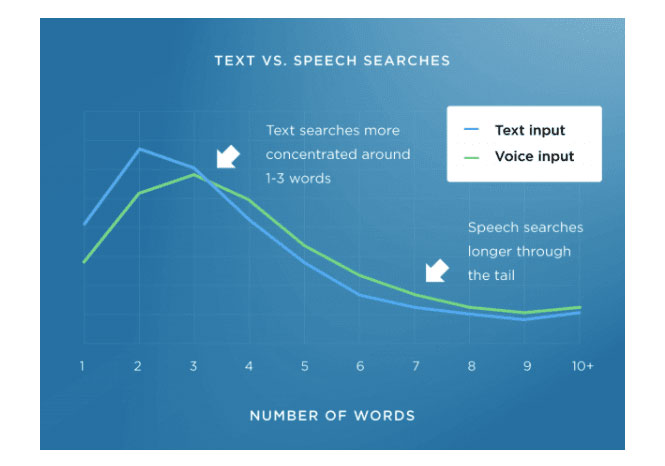
Here are some tips for optimizing your content for voice search:
Featured snippets are the selected search results that Google displays at the top of the SERPs. Optimizing for featured snippets can allow you to significantly increase traffic and increase brand awareness.
There are different types of featured snippets: paragraphs, articles, and tables. Paragraph featured snippets are the most common.
Here's how you can optimize content on your Squarespace website for featured snippets:
Rich snippets or Google results are the additional result formats that are displayed by Google for certain types of search queries. These could be reviews, videos, images, recipes, music, events, or similar items.
Regular Google search results only show titles, meta descriptions, and the URL of the results. But rich results allow for other types of content to be displayed, improving your organic click-through rate and, in turn, Squarespace website traffic.
To optimize your content for Google's rich results, start by choosing rich result types. Then, implement structured data using Sechema.org markup on your Squarespace site (more on this in the technical SEO section).
You can use Google's structured data testing tool to check if the structured data on your website is properly defined.
EAT (Expertise Authoritativeness and Trustworthiness) is one of the essential elements of Google's algorithm today. It just means that Google is looking for content that is authoritative and trustworthy.
Here's what you can do to optimize your Squarespace site for Google's EAT algorithm:
Some pages on your Squarespace site may not be getting traffic, either because they're not relevant to your site or because the content on those pages isn't up to par.
These types of pages don't increase your website traffic. On the contrary, they can even degrade the authority and SEO of your site. So here's what you need to do:
By doing this, you will see a considerable difference in your website traffic.
As daunting as it may seem, basic technical SEO isn't that hard to learn. Technical SEO ensures that your Squarespace site meets the technical requirements of search engines like Google.
The aim of technical SEO is once again to improve your organic rankings, bring more traffic to your site, and improve your domain authority.
One of Squarespace's common SEO issues is the crawl error. These occur when Google tries to reach your website but has problems. You need to ensure that every link on your website leads to a valid page.
Google classifies crawl errors into two categories:
You can first audit your website and look for these crawl errors using Google Search Console.

If one of your URLs isn't indexed, you can submit it for indexing by pasting the URL into the top search bar in Google Search Console that says “Inspect any URL.”
For site crawling errors, such as DNS or server errors, contact a technical developer to fix the problem.
Search engines like Google crawl your website from top to bottom. So the best way to organize your content is to make all the links accessible in a few clicks.
By doing this, you ensure that all pages on your site will be explored without any obstacles.
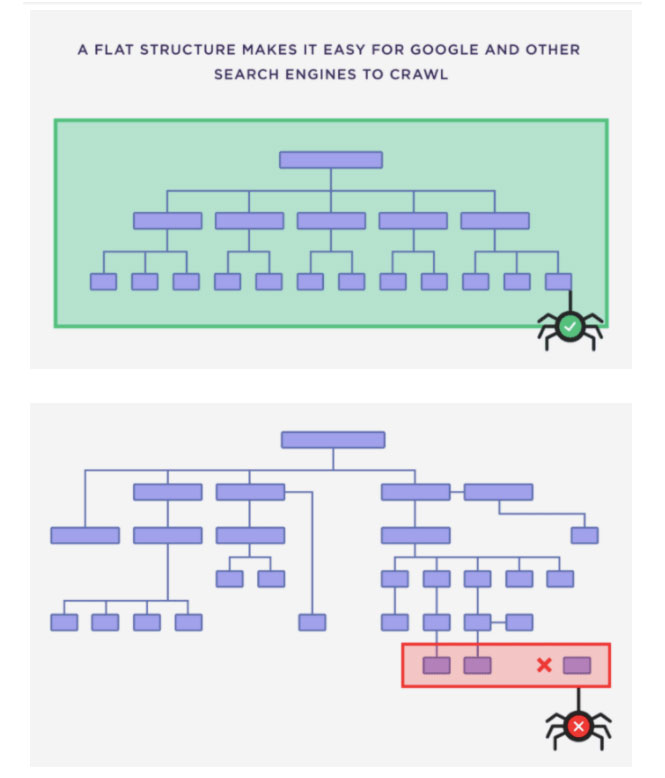
Mobile usability, as we've seen in previous sections, is another critical component of technical SEO.
Use Google's free Mobile-Friendly Test to test the mobile-friendliness of your website.
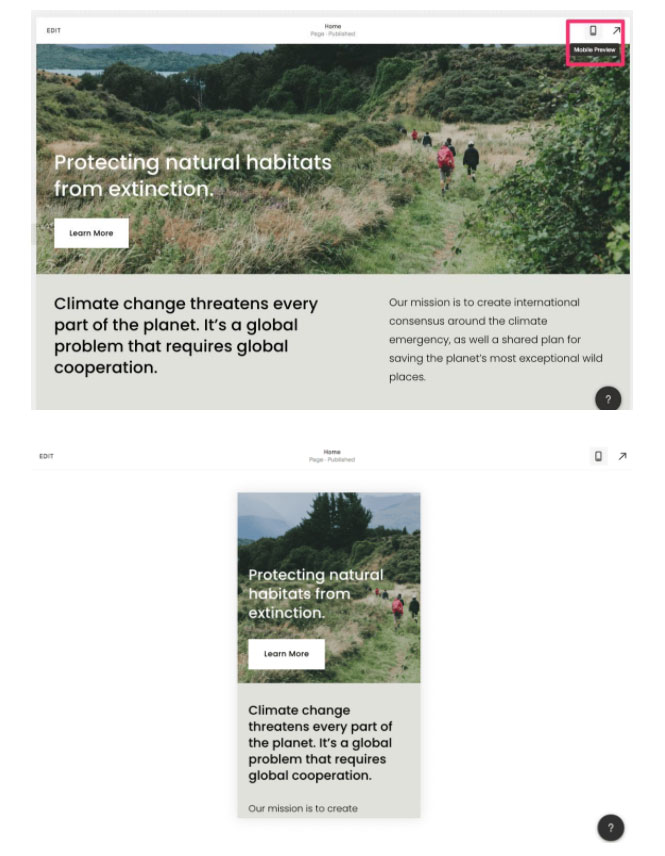
Here are some best practices you should follow to avoid such mistakes:
In general, Squarespace supports mobile-friendly and responsive designs. Even then, it's good to follow the above practices.
Broken or dead links can again make it difficult for Google to crawl your site. It is therefore necessary to identify and repair them.
Use the site audit features that are available in most keyword research tools like Ahrefs, SEMrush, or Ubersuggest.
These audits will list broken links on your site. You can simply remove these broken links from your site.
You can also use Chrome extensions like Check My Links and Link Miner to find broken outgoing links. Again, remove these links from your site or replace them with other internal or outgoing links that work.
Speeding up your site and Squarespace pages can have a significant impact on your site's rankings. Google wants to provide the best possible experience for its users. That's why fast loading is always ranked higher in the SERPs.
The tools Google Speed Insights page are very useful for checking the loading speed of your pages. Simply enter the URL you want to test to get a detailed report on the overall speed score and what's slowing speed.
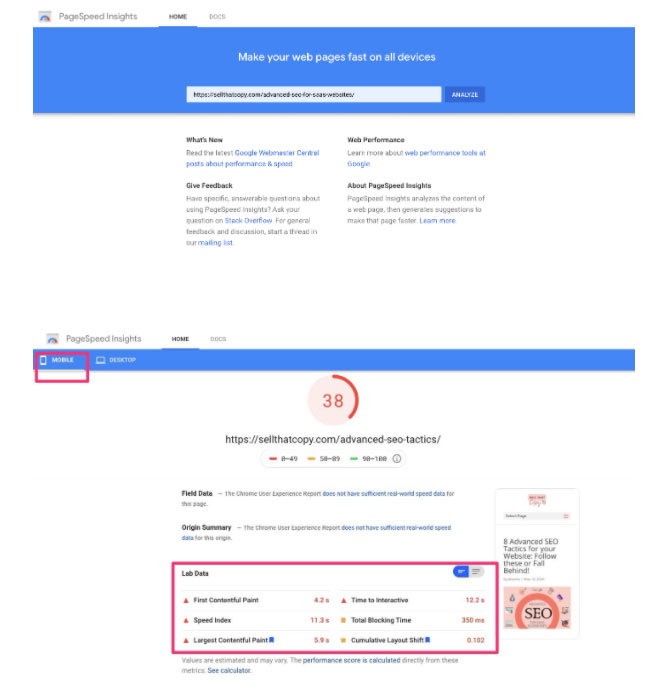
You get a comprehensive report on how you can improve page speed for mobile and desktop devices separately. Use this information to improve the speed of your Squarespace site.
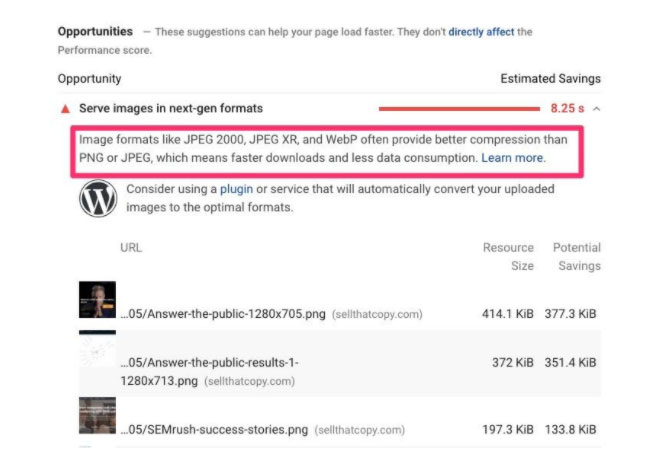
Squarespace provides you with a list of practices you should follow to speed up your page. Here are a few quick tips:
Duplicate content on your site can hurt your organic rankings.
Duplicate content can occur either because you put in place repetitive content on the pages of your site. Or even because of some technical issues.
So use the site audit function of the Raven tool or the Ahrefs content quality section to determine if your Squarespace site contains duplicate content. And take steps to remove any type of duplicate content from your site.
Accelerated Mobile Pages (AMP) pages are used to create lightweight mobile versions of your blog posts. Google gives priority to AMP pages for mobile searches.
En enabling AMP for your Squarespace website, you can offer a good mobile experience to your visitors with simplified design and readability.
If you enable AMP pages for your blog posts, some blocks and fonts may be restricted.
You can enable AMP by going to Home > Settings > Blogs > Accelerated Mobile Pages > Use AMP > Save.
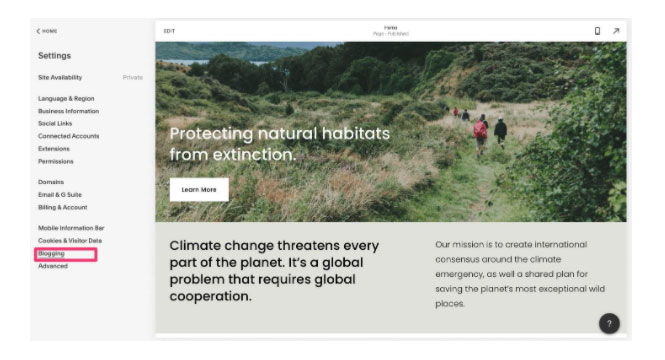
To preview AMP versions of your site, add “? format=amp” at the end of your blog post URL.
404 server errors are triggered when a user enters incorrect URLs with your website's domain name or if one of your URLs doesn't work.
In that case, it's good to design your custom 404 error page using the Squarespace editor.
By default, 404 pages on your Squarespace site will look like this:
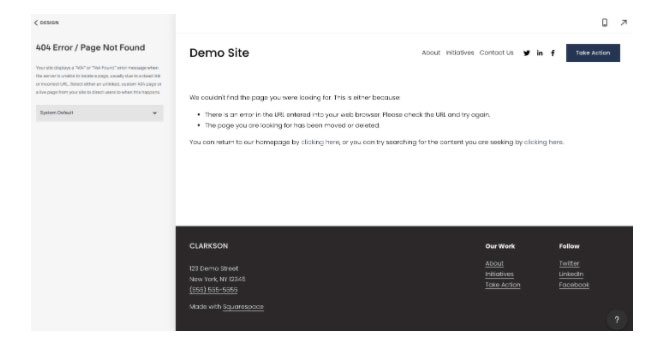
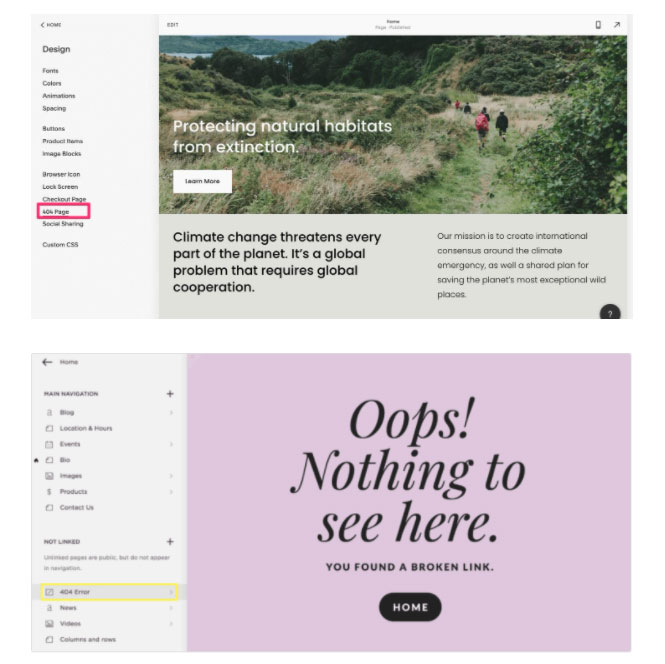
You can create a custom page by creating a new page and placing it in the “Unlinked” section.
Then go to Home > Design > Error 404.
And select your new custom page here.
Structured data or schema markup is a type of code that makes it easier for Google to understand the content on your website and to explore it accordingly.
Adding schematic markup makes a lot of things easier, like rich Google results, featured snippets, and voice search. There are different types of schema markup for different types of content, like blogs, events, products, FAQs, and more.
While Squarespace structured the data for a few schemas, you may need schemas for other types of content.
You can use schematic generation tools suchlike Merkle to generate schemas for other types of content.
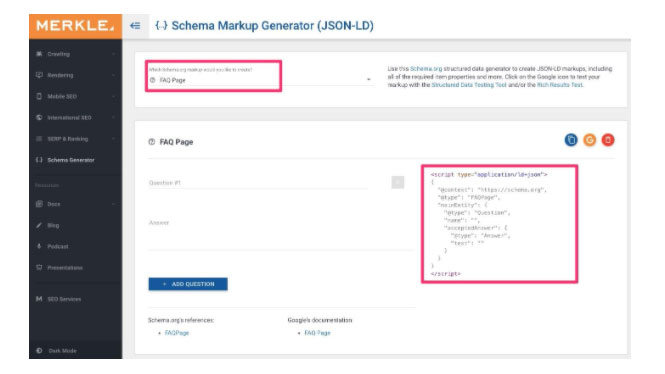
Copy the code from this tool and you can paste it onto your Squarespace web pages using the “Advanced” option under “Page Settings.”
If you have an international website, chances are you have different versions of the same page for other languages.
By using Hreflang, Google will be able to show the appropriate versions to your users.
It is simply a way to let Google know the different multilingual versions that you have.
Google provides you with guidelines on how to add Hreflang to your website.
Backlinks are crucial for SEO, especially on Squarespace. They are among the top three ranking factors according to Google. Here's how you can optimize your backlink strategy.
Importance of Backlinks: Backlinks help Google assess the quality of your content. The more quality backlinks you have, the better Google ranks your site.
Quality vs Quantity: One high quality backlink is better than several low quality ones. Evaluate quality based on domain authority, relevance, and position of the link on the page.
Link Building Strategies
Advanced Tactics
Best practices: Avoid black-hat techniques and focus on relevant, high-quality backlinks to improve your SEO on Squarespace.
This section summarizes best practices and strategies for creating high-quality, effective backlinks for your Squarespace site.
Local SEO is essential for businesses with a physical presence, as 46% of all Google searches are local. Here's how to optimize your local SEO on Squarespace to increase traffic and visibility.
Local SEO Ranking Factors : Local SEO differs from general SEO by focusing on factors such as keywords in Google My Business, search location, online reviews, and social media shares.
Google My Business
Squarespace Card Blocks: Use map blocks to add your address and customize the appearance of the map.
Contact page and footer: Make sure your contact information is consistent everywhere, including your Google My Business listing.
Other Local SEO Strategies
By following these guidelines, you can effectively optimize your local SEO on Squarespace, which can lead to increased traffic and awareness for your local business.
If you've already taken the previous steps to optimize your Squarespace site for SEO, you're on the right track. But why stop there? Here are a few more tips for maximizing traffic and visibility for your site.
By applying these additional tips, you'll be able to maximize the SEO potential of your Squarespace site. You won't just follow the pack, you'll lead it.
Yes, Squarespace offers a lot of built-in SEO tools that make it easy to optimize your site.
No, SquareSpace is very user-friendly and does not require advanced technical skills.
Yes, Squarespace offers built-in analytics tools that allow you to track traffic, referral sources, and more.
Squarespace SEO optimization isn't something that can be done in a day or even a month. It's an ongoing process that takes time to show results. SEO is like a small seed that you can plant today. Over time, you'll start to see increased traffic and increased popularity from your Squarespace site.
Now you know how to do SEO on Squarespace. So don't waste any more time. Get started today! Implement these SEO strategies on your Squarespace site and watch your business grow!
If you want to explore other website creation tools, you can check out our comprehensive guide on Webflow SEO.