.svg)
We've done the research for you, here's the ultimate Prestashop SEO guide. Learn how to identify SEO issues you may encounter on the platform and how to fix them.

PrestaShop is a free, open-source software solution that helps you create e-commerce sites from scratch. It's a self-hosted solution, so you'll need a separate hosting provider for your PrestaShop site.
According to W3Techs, 0.5% of all websites on the web use PrestaShop. Below is a graph that shows PrestaShop's market position in terms of popularity and traffic, compared to other leading CMS solutions:

If you look closely at the graph, you'll notice that PrestaShop is used by fewer sites than other leading CMS solutions. However, PrestaShop is used by high traffic sites compared to CMS such as Wix, Squarespace, and Joomla.
PrestaShop is mainly popular with medium and large businesses that are looking for a highly customizable solution for their e-commerce store.
Small store owners don't seem to prefer PrestaShop because the learning curve is steep, and you may need technical help setting up your e-commerce store.

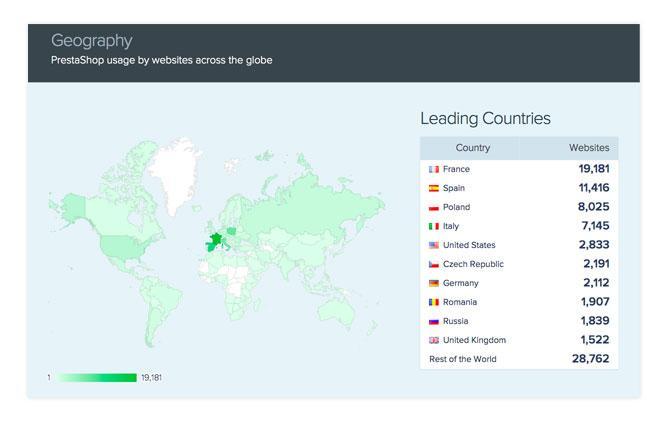
PrestaShop is more widely used in the lifestyle, e-commerce, and computer electronics verticals. Geographically, PrestaShop is more popular in countries such as France, Spain, Poland, and Italy.
According to BuiltWith, over 300,000 websites use PrestaShop today. In addition, PrestaShop works:
This means that PrestaShop has a fair share among the best e-commerce businesses in the world.

Here is a list of the main websites that are powered by the PrestaShop CMS:


If you are looking for a feature-rich e-commerce solution that is customizable to your business needs, then PrestaShop is a great choice that you should consider.
You should consider choosing PrestaShop if you have a medium or large e-commerce business. If you are the owner of a small e-commerce business, you should choose other platforms such as Shopify and WooCommerce rather than PrestaShop.
PrestaShop comes with good built-in SEO features.
However, you may need to take the help of free or paid PrestaShop SEO plugins to execute basic SEO strategies. On the other hand, other leading eCommerce CMS such as woocommerce, Shopify, Magento, etc., are equipped with these SEO capabilities right from the start.
Before you start implementing SEO, you need to have a few basic PrestaShop SEO settings ready. In this section, we are going to take a look at the basic PrestaShop SEO setup.
Security is taken very seriously by search engines like Google. Insecure websites are vulnerable to cybersecurity attacks, resulting in a poor user experience. Security is therefore one of the main search engine ranking factors, especially for websites that involve financial transactions, such as e-commerce sites.
SSL certificates ensure that all data transferred between users' browsers and your website is encrypted. Enabling SSL certificates changes your website address from HTTP to HTTPS.
To activate the SSL certificate on your PrestaShop site, you can go to the “General” settings and use the “Activate SSL on all pages” option.

Did you know that more than half of the world's Internet traffic comes from mobile devices? That's why Google algorithms have adopted mobile-first indexing in recent years. This means that Google will crawl the mobile version of your website for search rankings regardless of what device the search came from.
This means that having a mobile-friendly PrestaShop site is essential if you want to get a good ranking in search engines.
Unfortunately, many businesses make the mistake of ignoring the mobile version of their website.
Therefore, if you opt for PrestaShop themes and modules, make sure they are mobile-friendly. Your website should be responsive for all device sizes. And, text and features should be easily readable and user-friendly, even on the mobile versions of your website.
Google Search Console (GSC) is a free Google tool that allows you to track the performance of your website in search engines. With GSC, you can track the keywords you're ranking for, the number of clicks, the number of impressions, and more.
Here's how you can set up Google Search Console for your PrestaShop site:
Connect to Google Search Console using the URL Prefix option and enter your domain name here. Click Continue and copy the meta tag code.

To verify ownership of your website, you can download the HTML file and add it to your site using the FTP manager. You can ask for help from a developer for this.


Then, go back to your Google Search Console window and click Verify. Your site review has been completed.
To create a sitemap in PrestaShop, you need to install a free add-on called Google Sitemap Module. After installing this module, you can generate the XML sitemap file for your website by clicking on the “Generate Sitemap” button. This will generate a sitemap URL specific to your website.

To submit your site to Google, go to your Google Search Console dashboard and open Sitemaps in the sidebar.
Add sitemap.xml to the URL and click Submit. Google will start indexing your website after a while.

Like GSC, Google Analytics is another free Google tool that helps you analyze your website data. This includes data on user demographics, user behavior, acquisition sources, the main pages on your website, and more.
Google Analytics can be a great tool for SEO because it will help you track key metrics of performance (KPIs) such as marketing metrics and to improve search engine rankings.
You can connect your PrestaShop site to Google Analytics using a tracking code. Start by signing up or signing in to your Google Analytics account. In your Google Analytics dashboard, navigate to Admin > Property > Tracking Info > Tracking Code. You can copy the code that is displayed there.

To connect your Google Analytics account with the PrestaShop site using the tracking code, you can install a free PrestaShop add-on called PrestaShop Metrics Module. In this way, you can synchronize your website with Google Analytics by installing the Google Analytics tag.

Before you start setting up your PrestaShop eCommerce store and implementing SEO, you need to start with an optimized site structure. Site structure is how information, pages, and content are organized on your website.
For example, for an e-commerce site, the base is generally your home page. This is followed by category pages and subcategory pages. Finally, you will have the product pages.

Search engine crawlers depend on site structure to index websites and ultimately rank them.
Having a clear hierarchical structure for your PrestaShop site will not only help Google but also users with better usability and ease of search.
A good user experience is always a priority for search engines like Google.
Ultimately, search engines want their users to land on websites that offer good navigation, searchability, usability, readability, etc. Therefore, providing a good user experience will automatically help you rank higher on Google.
When a user arrives at your website, navigation is where they look for links to categories, subcategories, or other pages. If you don't have a clear navigation structure, your visitors will bounce back and head to your competitors' websites.
Likewise, ease of search is crucial for any website, especially for e-commerce stores. E-commerce shoppers rely heavily on a website's search option to find products or categories. Therefore, make sure that you offer good searchability for a better user experience and better PrestaShop SEO.
PrestaShop is one of the main open-source e-commerce platforms that comes with basic features. However, PrestaShop's SEO capabilities can be extended by using the wide variety of add-ons available to PrestaShop site owners.
You can explore the official PrestaShop add-on marketplace to find the add-ons that are right for your business. You can explore free addons or invest in premium addons for better capabilities.

One of the best SEO add-ons developed by PrestaShop is the SEO Expert module. This module comes with great On-Page SEO capabilities that will help you save a lot of time. However, this addon module comes at a high price.

As we explore this guide to SEO for PrestaShop, we'll continue to plug in links to some of the best PrestaShop SEO modules for corresponding strategies. You can explore these add-ons and decide for yourself if you want to invest in these modules.
Opting for the right web hosting provider is vital if you aim for high performance and good SEO results for your PrestaShop store.
Therefore, make sure you are investing in the right web hosting provider.
PrestaShop has partnered with a few hosting providers as official web hosting partners. You can explore these options and see if they are the right fit for your e-commerce business.
Now that your basic PrestaShop SEO setup is done, let's dive deeper into implementing PrestaShop SEO.
The SEO can be broadly divided into on-page and off-page SEO techniques.
On-site SEO (On-Page SEO) involves optimizing your website pages for certain keywords so that those pages are ranked in search engines for those keywords. Keywords are words or phrases that people type into search engines when they're looking for something.
On the other hand, off-page SEO refers to techniques implemented outside of your websites that can help you improve your rankings in organic search engines.
In general, on-page SEO techniques are easier to implement and you have more control over them because they can be implemented as part of your website page settings. On the other hand, off-page SEO techniques are difficult to implement and you don't have much control over them.
In this section, we're going to take an in-depth look at the various PrestaShop On-Page SEO tactics that you can use to improve your search engine presence.
Keywords form the basis of any on-page SEO strategy, especially for e-commerce sites such as your PrestaShop store. Therefore, your first step toward implementing On-Page SEO should be designing a keyword research strategy.
As mentioned earlier, keywords are phrases that people use when looking for something on search engines. For example, if you need help installing PrestaShop SEO, you'll probably type “PrestaShop SEO” into Google. In this case, “PrestaShop SEO” is the keyword.
Therefore, websites that want to be ranked for this keyword should optimize their web page for that same keyword. That way, your website will start to appear on the first page of Google for the same keyword and other related keywords.
Therefore, your entire SEO strategy will depend on choosing the right keywords. When you choose the right keywords, you can drive relevant traffic to your PrestaShop store. Finally, such highly targeted traffic will bring you high conversion rates and sales.
When researching keywords for your online store, it's important that you target keywords that have different intentions, such as informational intent and commercial intent.
Informational intent keywords are the keywords that people use when looking for information about a topic. For example, let's say you sell camping equipment on your PrestaShop site. In this case, a relevant informational keyword that you can target may be “essential camping gear.”
Likewise, a relevant keyword with commercial intent may be “buy an instant camping tent.” People look for commercial keywords when they're looking to buy something and are ready to make a deal.
Commercial intent keywords can immediately lead to conversions, but competition is generally high. Informational intent keywords, on the other hand, are a great way to attract relevant traffic to your site and drive users down your sales funnel so they end up converting.
Now that you understand the importance of a keyword research strategy, let's see how to find relevant keywords for your e-commerce site.
As discussed earlier, keyword research is the key to a winning SEO strategy for your PrestaShop site. So this step is super important. Here are a few ways you can find relevant keywords (commercial and informational intent) for your website:
Keyword research is a vast subject, and it can be as simple or as complicated as you want it to be. To keep things simple, you can do your keyword research using a Google search results page.
Start by creating a list of topics that best describe your business. For example, let's take the case of an e-commerce store that sells camping equipment. In this case, “camping gear,” “online camping gear,” etc., may be a list of topics that describe your activity.
Then search for these topics on Google. As you type, Google automatically offers a list of similar keywords. These keywords are actually used by users when they search for camping gear on Google. So you can use these keywords to optimize your website.

When you scroll down the same page, you'll find the “People Are Also Asking” and “Related Searches” sections, where you can find more relevant keywords that you should include as part of your PrestaShop SEO strategy.


You can also use a variety of keyword research tools to find keywords that are relevant to your PrestaShop site. You can type the main keywords or topics into these tools and select the location. These tools will generate a keyword list with details such as keyword difficulty (KD) and volume.
Keyword difficulty refers to a score that represents how difficult it is to rank for a keyword. When KD is high, it will be very difficult for you to rank on the first page of Google for that keyword.
Volume refers to the number of searches performed for the keyword in a month. That means high-volume keywords get more traffic every month, which ultimately translates into greater profitability for your business.


Spying on your competitors is another great way to determine the list of target keywords that you should pursue.
You can use any of the keyword research tools mentioned above, such as ALSOask, SpyFu, Ahrefs, etc., to find the keywords that your competitors are ranking for.

By now, you're probably ready with a list of target keywords for your e-commerce site. Then, we can start optimizing your PrestaShop site homepage for relevant keywords.
You can start by creating a list of target keywords based on keyword research and competitor research. Then, you can include these main keyword sets in your home page content - title, headers, subheadings, paragraphs, etc.
Be sure to include these keywords in your homepage's SEO title, meta title, and meta description as well. Optimizing these elements for the right keywords will help your PrestaShop store rank on search engines like Google for the same keywords.
You can add or change these elements when adding or editing your home page in the PrestaShop CMS. To do this, you can open the “SEO & URLs” page and click on “index” to access the page settings and edit the SEO information.

In the same way, you should optimize all static pages on your PrestaShop site for the relevant target keywords. These include pages like “About Us”, “Contact Us”, “FAQ”, etc.
After your website, come the product pages of your PrestaShop stores next. As you already guessed, it's best to optimize your product pages for commercial intent keywords.
Let's go back to the example of a camping equipment store. If your product page is about camping tents, you should probably optimize this page for keywords like “buy a camping tent” or “camping tent with masts online,” based on your keyword research.
To create a product page using the PrestaShop CMS, you can go to the “Catalog” page and click on “New Product”. Here you can add new products or edit existing products. For the SEO settings on the PrestaShop product page, you can go to the SEO tab.

Here you will find all the possible settings that will help you optimize your product pages for the right keywords.

Here, you can change the following PrestaShop SEO settings:
You should optimize all of the above items on product pages for the appropriate target keywords. This will help you rank in commercial keyword searches on Google.
Of Numerous e-commerce businesses make the mistake of optimizing their websites only for commercial intent keywords and only having product pages.
The chances of conversions from product pages and keywords with high purchasing intent are quite high. However, competition in the field of SEO for these keywords is quite high, especially for new websites.
Therefore, you need to find other ways to generate relevant and targeted traffic to your PrestaShop store. And the best way to do that is blogging.
By offering valuable information through blog content, you can draw relevant consumers to the top of your sales funnel through SEO. In the long term, the chances of converting these users into loyal customers will be very high.
You can start by creating a list of blog topics that will be useful to your target audience and optimize for high-volume informational intent keywords. Going back to the previous example, you can create blog posts related to topics like “the top 10 things to pack for camping” or “how to choose the right camping tent.”
To create blog content on your PrestaShop site, you can either build a WordPress blog in a subfolder in the root directory. Your blog URL will look like "https://mydomainname.com/blog.”
Or, an easier way to do this is to get a blog addon module from the official PrestaShop addons marketplace. Here, you can look for a blog module that fits your budget and supports your PrestaShop version.
One of the best PrestaShop blog modules is the Advanced Blog module developed by Webkul. This PrestaShop module comes with great blog and SEO-friendly features.

With the advanced Blog module, you can optimize the meta titles, meta descriptions, and meta keywords of blog posts for the list of targeted informational keywords. You can also include these keywords in the title, subheadings, and content of the blog post.

Just like product pages and blog posts on your website, optimizing your website images for SEO is also crucial. This can lead to a better ranking of your products and your images may also start to rank in the image search.
To optimize images, you need to add the target keywords to the image alt text or to the caption as it is called in the case of the PrestaShop CMS. To add or change image Alt Texts for product pages, you can go to the “Basic Settings” tab and upload your images there.


Have you ever wondered how search engines like Google rank millions of websites in a fraction of a second when you do a search? Search engines deploy algorithms that scan indexed pages on your website and rank pages in search engine results pages based on a variety of ranking factors.
For search engines to be able to crawl your website and understand all of the information, you need to ensure that every page on your website is structured properly.
To do this, the pages on your website need to follow a hierarchical structure. Each page should start with the title, followed by titles and subheadings in the correct order (H1, H2, H3, etc.), paragraphs, bullet points, numbered lists, etc.
As noted earlier, search engines use a set of ranking factors to rank website pages in results pages. One of these important ranking factors is user experience. This is the type of experience that users have when browsing your website and consuming content.
To assess the user experience of a web page, Google uses a set of UX signals. Here's a list of the top UX signals you need to know about:
Here are a few things you can do to improve your website's user experience:
Speed is one of the top three ranking factors for Google. This is because speed plays a critical role in the user experience. Studies show that the probability of a bounce increases by 32% when the load time of a page increases from 1 to 3 seconds...
Here are a few steps you can take to optimize your PrestaShop site for greater speed:
A great solution to improve website speed and performance would be to opt for a PrestaShop SEO module that is specifically designed to improve speed. You can explore the official PrestaShop addons marketplace to look for modules that offer a variety of speed optimization features such as caching, image compression, lazy loading, etc.
Sometimes, with or without knowing it, you can add duplicate content to your website. These could be duplicate product pages or blog content.
Having duplicate content is not good for PrestaShop's SEO, as these pages will essentially be competing with each other for Google search results. Therefore, make a conscious effort to avoid adding such duplicate content to your website.
Internal link building involves creating links to relevant pages on your website from other pages on your website. Deep internal links help provide relevant context to search engines about your content.
It also helps distribute link equity or link juice across your website. This means that page authority can be distributed across pages on your website, improving the rankings of all linked pages.
Here are a few ways you can implement internal links for PrestaShop SEO:
As mentioned in the previous section on on-page SEO, off-page SEO refers to techniques implemented outside of your websites that can help improve your organic search engine rankings.
Off-page SEO techniques are generally not entirely within your control, as they are not as simple as changing the settings of the pages on your website. These techniques require more effort and time. However, the search engine optimization results are totally worth the effort.
Off-page SEO techniques can be divided into two broad categories: backlink building and content marketing. Backlink building is more of an outsourcing strategy in which you turn to other websites to create inbound links to your site.
On the other hand, content marketing is more of a market-entry strategy, where you create top-notch content and linkable assets that generate inbound links for your website without necessarily reaching other websites.
Let's look at each of these techniques in detail.
SEO isn't just about creating content that's optimized for search engines. More than that, it's important to create content that attracts relevant audiences in the sector.
When you create quality content, you automatically increase your chances of generating backlinks and ranking well in search engines. Let's see how.
The first step in creating great content is understanding your target audience. This includes information about their demographics, interests, challenges, goals, aspirations, and more.
So, first and foremost, make sure you understand your target audience. To do this, you can research your competitors, ask questions on forums, send surveys, or understand your current customer base.
When you have a good understanding of your target audience, you know exactly what type of content they're looking for. This, plus On-Page SEO, can provide great results for your PrestaShop SEO efforts.
The Internet is far from what it was 15 or even 10 years ago. Back then, anyone could find keywords, create 500 word content, and get to the top of search results pages in just a few days.
Today, the competition is massive, as is the quality of the content. Therefore, if you really want your PrestaShop store and e-commerce business to be out of the ordinary, you need to go the extra mile - there are no shortcuts for that.
Content marketing is a great way to challenge yourself. As a first step, find the topics that interest your target audience the most. Then, rate the top 10 websites ranked on Google for that topic or keyword.
Then, create content that offers content that is much more comprehensive and valuable than all of those ranking pages. This can be a great start in your PrestaShop content marketing journey.
In addition to creating engaging content, you should aim to create high-quality assets that can be linked to your website. What do you mean by “linkable assets”?
Linked assets refer to any piece of unique, high-quality content that other websites, publishers, users, and journalists would like to share and link to.
Linkable assets can be any unique piece of content that has something valuable to offer. These can be white papers, infographics, videos, e-books, tables, charts, tools, calculators, and more.
Once published, these types of assets that can be linked will continue to generate backlinks for you in automatic pilot mode. Promoting these items through social media and email will increase the number of Backlinks that you will receive. However, even without promotion, these assets to be linked tend to attract attention.


Besides tools, ebooks, white papers, and more, publishing original research is also a great way to generate tons of high-quality backlinks to your website.
It goes without saying that the time and effort you will need to invest in creating such a link resource will be enormous, but the results will be well worth the effort. That's why major players in the industry are using this tactic to boost their content marketing results and get to the top of the search engine results pages.
To do this, you can send surveys, conduct interviews, or collect data in any form. Then, you can calculate numbers from that data and publish your results as case studies, research reports, and statistics.
For example, ahrefs is known for publishing research and studies on topics related to SEO. This is the reason why they are able to generate tons of inbound backlinks through these linkable assets.

Gone are the days when you could post 500 word content and expect it to rank at the top of Google's search results. Of course that can happen. However, the chances of that happening are lower.
According to a Backlinko study of 11.8 million Google results, the average number of words in a Google first page result is 1447 words. This means that you should strive to create content that is at least 1500 words long.

As the graph above suggests, longer-lasting blog posts, which are between 3,000 and 1,000 words in length, tend to generate more backlinks than posts with fewer words.
A pro tip here would be to avoid focusing too much on word count. You don't want to create a light-hearted, repetitive article that has a high word count just for fun. Instead, try to be as comprehensive as your readers want.
Try to offer all possible information in the same article so that the user does not have to look for more information on other websites. This will automatically lead to more backlinks and better search engine rankings.
The content marketing techniques offered in this section are intended to generate backlinks by themselves. However, it is never useless to go all the way to promote your content. Therefore, always try to boost your content marketing efforts through promotions.
Here's what you can do to promote your content and generate even more backlinks:
Next, let's talk about creating backlinks through active outreach tactics. Compared to content marketing, these tactics are more intentional and can take up a lot of your time.
One of the best ways to find easy link opportunities is to spy on your competitors. Here's how you can do it:
La publishing invited articless consists of creating blog posts for other websites, usually for free. Guest posting is a great way to generate backlinks for your site. Why? Because most guest article publishing sites allow you to add backlinks to your website from the content itself or at least from the author's biography section.
So you can use it as a way to reach relevant websites with high domain authority by offering them to publish articles and thus generate tons of high-quality inbound links. You can simply do a Google search with the term “guest post+<votre_niche>” or “write for us +<votre_niche>” to find such guest posting opportunities in your niche.
Broken links are links that worked some time ago but no longer work. Nobody likes to have broken links on their website because they provide a poor user experience and also hurt search engine rankings.
You can use this fact to your advantage and create backlinks for your website. To do this, you can contact the websites affected by these broken links and offer a similar page on your website to replace the broken link. There is a good chance that the website owner will reciprocate, and you will get a few backlinks as a result.
To find such opportunities for creating broken links, go to sites with high domain authority in your niche. Then use Chrome plugins like Check My Links and Link Miner to find broken links on these sites.

Many websites with high added value in your niche have a “Resources” page on their site. This page is generally a collection of links that are useful to their users. These pages are a gold mine for backlinks because they are full of links.
You can contact the site owner and explain to them how a link to a relevant page on your site can add value to their audience. Chances are the person won't mind adding more links to the resource page.
Often, other websites use your images, infographics, statistics, quotes, etc., on their site but don't add a link to your site in return. In this case, you can contact these sites and politely ask them to link to your site.
To find such mentions that are not related to your brand, you can set up Google alerts for your brand name or any other keyword specific to your business. That way, Google will send you email alerts when someone mentions these keywords on their website.
By now, you know a lot about the different On-Page and Off-Page SEO strategies for PrestaShop SEO. If you go a step further and implement advanced PrestaShop SEO strategies, then we've got you covered in this section.
Structured data, also known as schema markup, is a format used to inform search engines like Google about the content on your website. Thanks to structured data, Google crawlers better understand the context of your site.
Structured data can be used to describe product pages, blog posts, videos, FAQs, breadcrumbs, etc. Adding structured data to your PrestaShop site will help your products appear as rich results on Google search engine results pages.
You can add structured data to your PrestaShop site using add-ons. For example, you can use the “SEO Schema Markup Structured Data Rich Snippet” module that will help you easily create structured data on the PrestaShop backend.

Google “featured snippets” are snippets of results displayed at the top of the Google search results page. Google shows “featured snippets” for certain types of search queries.

Getting featured snippets for relevant keywords can be of great benefit as it will increase brand awareness and drive more traffic to your PrestaShop store. Here are a few steps you can take to optimize your content for featured snippets:
Sometimes, a PrestaShop page can have several URLs created by itself. Having multiple URLs for the same page is considered spam and can therefore significantly lower your search engine rankings.
To avoid this, you can implement canonicalization for these pages. Canonical tags represent the URL that is the master copy of the page. This tells search engine algorithms which URLs they should choose for ranking.
You can enable canonicalization on your PrestaShop store by going to the settings on the page and opening the “Configure URLs” option. Here you will find the “Redirect to the canonical URL” option.
You can choose one of three options:

If you own a local business, you should consider implementing local SEO for your website.
Studies show that 4 out of 5 consumers use search engines to find local information.
Local SEO allows you to appear in relevant searches based on business location. These could be searches such as “____ near me.” The first step in implementing local SEO for your PrestaShop store is to sign up for a free Google My Business account.

Google My Business will help you set up business information for your website. That way, your site will appear in local searches and customers can provide ratings and feedback.
To connect your PrestaShop store with your Google My Business (GMB) account, you can use additional modules such as “Google My Business Badge PRO Module”. This module allows you to link the GMB account to your website and display customer reviews and ratings on your website. You can also check out our detailed guide on setting up Google My Business.

If you are looking to expand your business internationally, then you may be considering implementing international SEO for PrestaShop. For international SEO, you need to set up your store in multiple languages.
Once again, PrestaShop SEO modules come to your rescue here. By using a PrestaShop plugin such as the multilingual and multi-store SEO Pro Sitemap module or the translation management system, you can easily set up multilingual sites for your store.
While exploring PrestaShop as a viable solution for your eCommerce store and SEO, you should also be aware of the common SEO issues that PrestaShop owners face. In this section, we're going to explore the same thing.
When we compare PrestaShop to other leading e-commerce solutions like Shopify, WooCommerce, BigCommerce, or Magento, you'll find that PrestaShop comes with limited capabilities, which can be a barrier for many people.
PrestaShop's SEO capabilities can be extended with some feature-rich PrestaShop SEO modules. However, you may end up spending a lot of time and money exploring these add-ons and setting them up for your e-commerce store.
PrestaShop customers often complain about the lack of fast customer support for their SEO issues. Waiting for customer support to fix your SEO issues may not be an ideal situation for busy e-commerce site owners. Therefore, it is something that you should be aware of.
Launching your first PrestaShop store and implementing SEO is not a very easy and intuitive process. You will find yourself exploring various guides and tutorials such as this one to implement SEO strategies for your PrestaShop site.
Compare this to other e-commerce CMS available on the market and you'll find that the learning curve isn't as steep.
“It turned out that some plugins conflict with each other, causing malfunctions on the site” - is another major complaint from many PrestaShop users.
Installing multiple PrestaShop modules can extend the SEO capabilities of your website. However, you should watch out for impending conflicts that can cause your entire website to fail.
PrestaShop, being an open-source solution, offers updates frequent, the latest being the PrestaShop 1.7 series.

While version updates are always useful for expanding capabilities and ensuring security, users often complain about experiencing temporary SEO issues after a version update.
Therefore, after each PrestaShop version upgrade, you may need to perform site-wide testing, including SEO testing, to ensure that everything works as expected.
In this section on SEO for PrestaShop, we're going to look at some bonus PrestaShop SEO tips that will help you really elevate your PrestaShop SEO game.
It's hard to get traffic to your PrestaShop store, but it's even harder to get them to come back to your site again and again. Retaining customers and triggering repeat purchases can be much more profitable for e-commerce businesses.
To increase customer loyalty and reduce cart abandonment, you need to ensure that your store is optimized for better engagement. To do this, you can use various tactics:
According to the World Health Organization, around one billion people, or 15% of the world population, live with some form of disability. It can be a physical, mental, psychological, or even emotional disability.
Website accessibility is about ensuring that your site is accessible to everyone, regardless of what type of disability they have. Unfortunately, very few websites take accessibility seriously.
You should work on the accessibility of your PrestaShop site, as this will help you attract more people to your site and provide a better user experience. This will allow you to improve brand awareness and will also contribute to search engine rankings.
Testing and reporting are great ways to ensure that your PrestaShop SEO efforts are on track. Without testing, you risk directing your valuable resources in the wrong direction, and you won't find any improvement in your search engine rankings.
We recommend that you perform SEO tests on your website to consistently measure your website's performance and to ensure that your SEO implementation is done properly. You can take help from tools such as SEO testing, On-Page SEO Checker by SEMrush, or SEO Analyzer from Ubersuggest to perform SEO tests on your PrestaShop site.
We are living in the age of voice assistants. Therefore, the future of search engines seems to be voice search. To ensure you stay ahead of the voice search game, you need to start thinking about voice search SEO from the start.
Here are some tips that will help you optimize your PrestaShop store for voice search rankings:
Rank tracking is the process of tracking your website's target keywords. You can set up rank tracking for a list of keywords that you want to improve your search engine rankings for. You can do this with the help of most of the keyword research tools listed in the previous sections of this PrestaShop SEO guide.
That way, you can consistently measure how your website pages rank for each of these keywords. This will help you improve your SEO rankings over time.
Visitors to your website may want to share your products on social media platforms or through personal messaging. This can be a great way to acquire new costumes for your PrestaShop store. More social media shares result in improved social signals on your site, and that translates into better search engine rankings.
To add social media sharing buttons to your product pages, you can change the basic settings of your store. You will find the option to add social media sharing buttons in the “Social media sharing buttons” module. You can add social media sharing buttons for Facebook, Pinterest, Twitter, and Google+.
SEO in itself is a super effective inbound marketing strategy, there's no question about that! However, you can boost your PrestaShop SEO efforts by implementing omnichannel marketing for your website.
Omnichannel marketing is the process of integrating various marketing channels to provide a consistent and consistent brand experience for your target audience.
This may include integrating SEO efforts with other marketing channels, such as email marketing, the social media marketing, search engine marketing or PPC, etc.
When we talk about cutting-edge eCommerce solutions, we should, of course, talk about how PrestaShop compares to others. In this section, we give you a brief overview of how PrestaShop compares to other eCommerce solutions on various facets.


You can consult our The ultimate guide to WooCommerce SEO for a complete analysis.

You can consult our The ultimate guide to Shopify SEO for a complete analysis.
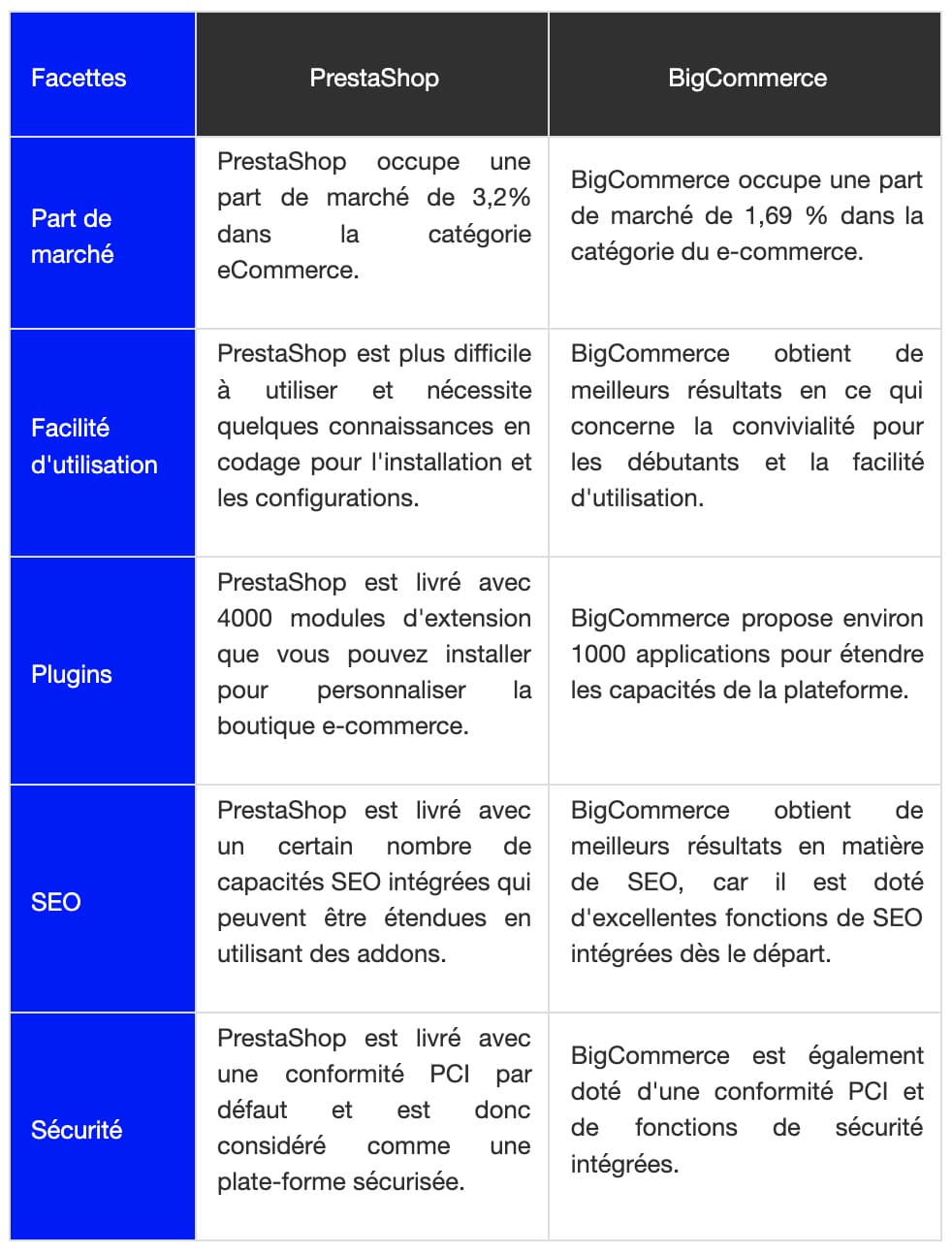
You can consult our The ultimate guide to BigCommerce SEO for a complete analysis.

You can consult our The ultimate Magento SEO guide for a complete analysis.
PrestaShop is an open source e-commerce platform that you can use to create your e-commerce store. It comes with excellent e-commerce features and a wide variety of add-ons to extend its existing features.
Yes, PrestaShop is a free e-commerce solution. However, you will need to invest in hosting providers, add-ons, themes, etc., to set up your e-commerce store.
Both PrestaShop and WordPress are excellent open-source solutions that allow you to create a highly scalable and efficient e-commerce site. However, WordPress and its popular e-commerce plugin, WooCommerce, have a much larger market share than PrestaShop. This is probably due to the fact that WordPress is much more user-friendly, flexible, and versatile than PrestaShop.
PrestaShop is a free and open-source e-commerce solution that offers great features that can help you set up a successful e-commerce site. However, compared to other popular e-commerce solutions, the learning curve in the case of PrestaShop is relatively steeper.
Therefore, PrestaShop is not a very good solution for absolute beginners, as you may find yourself spending an inordinate amount of time learning through guides and tutorials.
After installing PrestaShop, you can start with the basic configuration That includes
Yes, you can integrate PrestaShop with Shopify using the Shopify connector module, which is available as an official PrestaShop addon module. Using this module, you can:
Both PrestaShop and Magento are leading e-commerce solutions. While PrestaShop works great for small and medium-sized e-commerce businesses, Magento is ideal for large e-commerce businesses that experience significant traffic month after month.
Both PrestaShop and Opencart are free and open-source e-commerce solutions and offer great features for setting up your online store. With PrestaShop, the learning curve for setting up your store is steeper compared to Opencart. Therefore, Opencart may be the best solution for you if you are a small business with limited resources.
Yes, compared to other eCommerce CMS solutions, PrestaShop is more difficult to learn and implement. You may need to spend a significant amount of time learning through guides and tutorials before you can fully set up your e-commerce store and put it online. Or, you can hire official PrestaShop partners to set up the store for you.
Although PrestaShop comes with some security features ready to use, the fact that it is an open-source solution makes it vulnerable to cyber attacks from hackers. It is therefore important that you take security measures to ensure the security of your PrestaShop site.
PrestaShop is a leading open-source e-commerce solution that offers great SEO features ready to use. The solution also offers a wide range of add-ons that can extend its SEO capabilities even further.
No matter how easy the platform is to SEO, it is essential for you to take proactive steps towards SEO implementations in order to gain visibility on search engines and improve the profitability of your business. This ultimate PrestaShop SEO guide will be your one-stop solution for all of your PrestaShop SEO needs.
So, take the help of this guide and start implementing PrestaShop SEO strategies right away, and you'll soon notice fantastic results for your e-commerce business.
If you want to explore other e-commerce store options, you can check out our comprehensive guides on Squarespace SEO And of Webflow.